



前言
之前的小程序商城系列已经更新到购物车模块了但是很多读者反映如何能够更接近于实战场景,动态的获取数据并展示出来!那么经过这段时间的准备我们开始来做新的微商城版本,该版本是完全按照工作场景来开发的。
小程序https域名配置
登录注册好的微信小程序官方账号并登录平台——设置——开发设置,如下图所示:
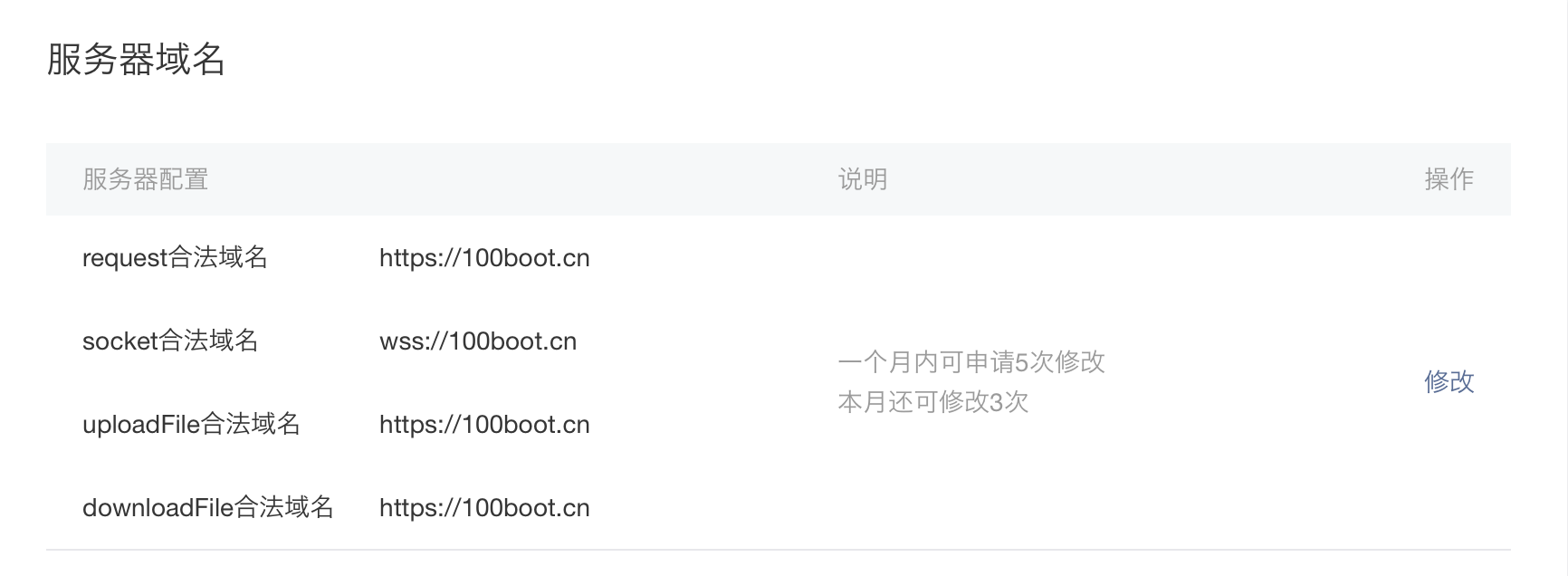
备注:https://100boot.cn 是已经认证过的域名,大家可以放心使用。
创建小程序项目并封装ajax请求
创建小程序项目可以参考文章微信小程序电商实战-入门篇
新建ajax.js
#目录结构-pages--utils---ajax.js 声明api 全局变量调用地址
const api = 'https://100boot.cn/wxShop/';封装request请求
wx.request({
    method: opt.method || 'GET',
    url: api + opt.url,
    header: {
        'content-type': 'application/json' // 默认值    },
    data: opt.data,
    success: function (res) {
        if (res.data.code == 100) {
            if (opt.success) {              opt.success(res.data);            }          } else {
            console.error(res);            wx.showToast({
                title: res.data.message,            })          }        }  })}module.exports.request = request
配置开发者key
打开utils/util.js,增加key
module.exports = {  formatTime: formatTime,  key: '开发者key'
}
微信小程序微商城:开发者key获取
app.json
{
    "pages": [
        "pages/home/home",
        "pages/cart/cart",
        "pages/detail/detail",
        "pages/classify/classify",
        "pages/mine/mine",
        "pages/index/index",
        "pages/logs/logs"  ],
    "window": {
    "backgroundTextStyle": "light",
    "navigationBarBackgroundColor": "#f0145a",
    "navigationBarTitleText": "微商城",
    "backgroundColor": "#f0145a"  },
    "tabBar": {
        "color": "#858585",
        "selectedColor": "#f0145a",
        "backgroundColor": "#ffffff",
        "borderStyle": "#000",
    "list": [      {
        "pagePath": "pages/home/home",
        "iconPath": "images/home.png",
        "selectedIconPath": "images/home_select.png",
        "text": "首页"      },      {
        "pagePath": "pages/classify/classify",
        "iconPath": "images/classify.png",
        "selectedIconPath": "images/classify_select.png",
        "text": "分类"      },      {
        "pagePath": "pages/cart/cart",
        "iconPath": "images/cart.png",
        "selectedIconPath": "images/cart_select.png",
        "text": "购物车"      },      {
        "pagePath": "pages/mine/mine",
        "iconPath": "images/mine.png",
        "selectedIconPath": "images/mine_select.png",
        "text": "我的"      }    ]  }}
app.wxss
.container {
    height: 100%;
    display: flex;
    flex-direction: column;
    align-items: center;
    justify-content: space-between;
    padding: 200rpx 0;
    box-sizing: border-box;}
home.wxml
!--导航条--
view class="navbar"    text wx:for="{{navbars}}" data-idx="{{index}}" class="item {{currentTab==index ? 'active' : ''}}" wx:key="unique" bindtap="navbarTap"{{item.navbarName}}/text
/view
home.wxss
page{    display: flex;    flex-direction: column;    height: 100%;  }  .navbar{    flex: none;    display: flex;    background: #fff;  }  .navbar .item{    position: relative;    flex: auto;    text-align: center;    line-height: 80rpx;    font-size:14px;}
/* 顶部导航字体颜色 */
.navbar .item.active{    color: #f0145a;  }
/* 顶部指示条属性 */
.navbar .item.active:after{    content: "";    display: block;    position: absolute;    bottom: 0;    left: 0;    right: 0;    height: 6rpx;    background: #f0145a;  }
home.js
引用ajax和utils公共js
const ajax = require('../../utils/ajax.js');
const utils = require('../../utils/util.js');
页面初始化导航数据
data: {
    navbars:null,    currentTab: 0,  },
页面初始化加载导航数据函数
/**  * 生命周期函数--监听页面加载  */

onLoad: function (options) {
    var that = this;
    //加载navbar导航条    that.navbarShow();  },
ajax获取导航数据
navbarShow:function(success){
    var that = this;    ajax.request({
        method: 'GET',
        url: 'home/navBar?key=' + utils.key,
        success: data = {        that.setData({
            navbars: data.result        })
        console.log(data.result)      }    })  },
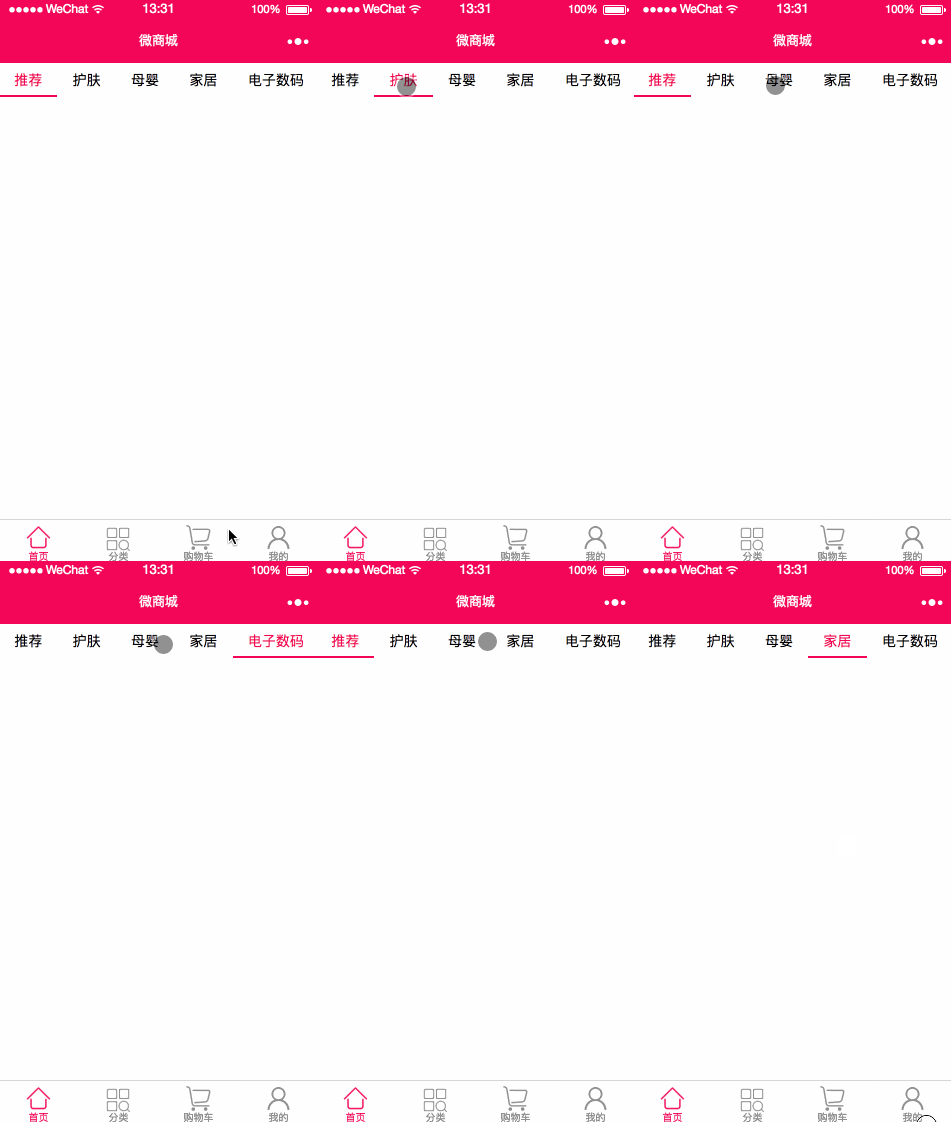
实现效果如下
关注我们
如果需要源码可以关注“IT实战联盟”公*众*号并留言(微商城源码,5个字会收到源码下载地址),也可以加入交流群和作者互撩哦~~~













