最近,经历多个微信小程序支付以及小程序退款实战项目,今天编者经过整理,把小程序申请退款的实战项目案例分享给大家,希望能让大家借鉴,在项目开发中少走弯路。

小程序处理退款前提需安装商户安全证书:
退款请求需要在请求服务器安装微信提供的安全证书,因为微信退款需要携带证书的请求,此证书可在申请微信商户号成功后从微信商户平台自行下载。
具体步骤详见:https://pay.weixin.qq.com/wiki/doc/api/wxa/wxa_api.php?chapter=4_3
下面详细讲解一下微信小程序(支付)退款的具体步骤
一. 用户发起退款请求
用户在前端发起退款请求,后端接收到退款请求,将相应订单标记为申请退款,商户查看后,如果同意退款再进行相应操作,此后才进入真正的退款流程.
二. 商户发起退款请求
商家向微信退款接口发送请求后,得到微信退款接口的响应信息,确定退款是否完成,根据退款是否完成再去进行更新订单状态等相关业务逻辑。
商户同意退款后,商户端即向微信提供的退款 API 发起请求。退款请求需要将需要的参数进行签名后以XML发送到微信的退款API 。详见:https://api.mch.weixin.qq.com/secapi/pay/refund
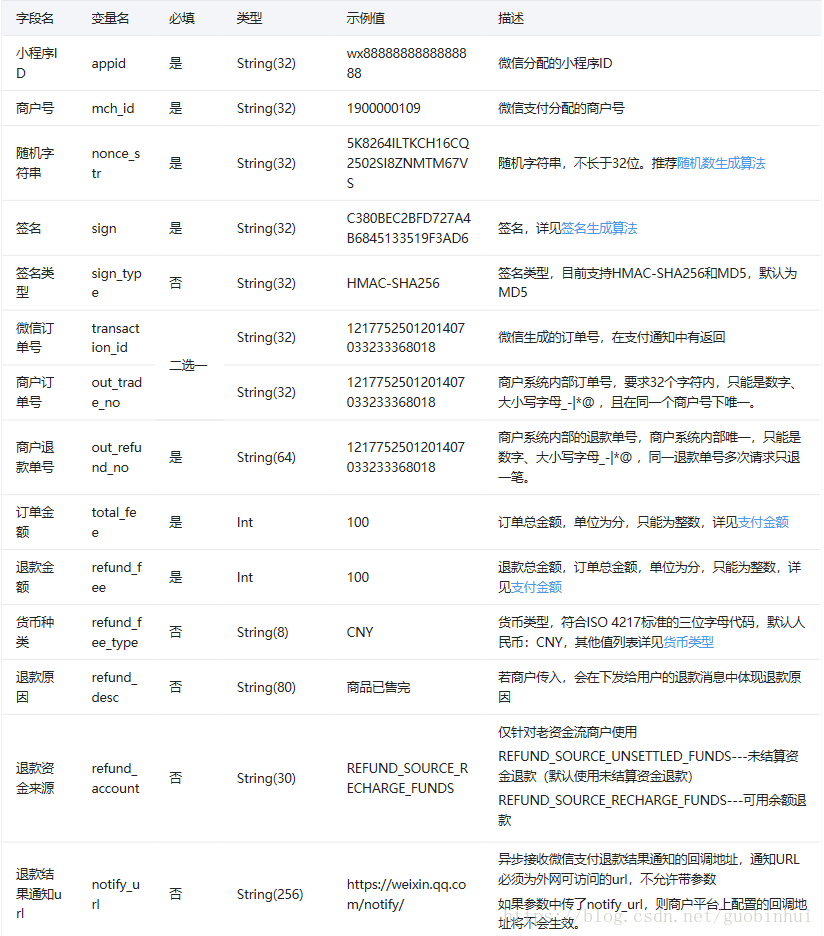
退款请求需要的参数如下:
1.小程序 appid。
2.商户号 mch_id 。申请开通微信支付商户认证成功后微信发给你的邮件里有
3.商户订单号 out_trade_no 。退款订单在支付时生成的订单号
4.退款订单号 out_refund_no 。由后端生成的退款单号,需要保证唯一,因为多个同样的退款单号只会退款一次。
5.总金额 total_fee 。订单总金额,单位为分(切记:必须为整数)
6.退款金额 refund_fee 需要退款的金额,单位同样为分(切记:必须为整数)
7.操作员 op_user_id .与商户号相同即可
8.随机字符串 nonce_str 。同支付请求
9.签名 sign ,使用上面的所有参数进行相应处理加密生成签名。
详见签名算法:https://pay.weixin.qq.com/wiki/doc/api/wxa/wxa_api.php?chapter=4_3
下面通过具体的代码讲解:
1、小程序退款工具类(主要处理微信的退款接口需要的参数)
package com.huaqi.mi.mvc.common.utils;import org.apache.commons.codec.digest.DigestUtils;import org.dom4j.Document;import org.dom4j.Element;import org.dom4j.io.SAXReader;import java.io.*;import java.net.HttpURLConnection;import java.net.URL;import java.security.SignatureException;import java.util.*;public class PayUtil { /** * 签名字符串 * @param text 需要签名的字符串 * @param key 密钥 * @param input_charset 编码格式 * @return 签名结果 */ public static String sign(String text, String key, String input_charset) { text = text + "&key="+key; return DigestUtils.md5Hex(getContentBytes(text, input_charset)); } /** * @param content * @param charset * @return * @throws SignatureException * @throws UnsupportedEncodingException */ public static byte[] getContentBytes(String content, String charset) { if (charset == null || "".equals(charset)) { return content.getBytes(); } try { return content.getBytes(charset); } catch (UnsupportedEncodingException e) { throw new RuntimeException("MD5签名过程中出现错误,指定的编码集不对,您目前指定的编码集是:" + charset); } } /** * 生成6位或10位随机数 param codeLength(多少位) * @return */ public static String createCode(int codeLength) { String code = ""; for (int i = 0; i codeLength; i++) { code += (int) (Math.random() * 9); } return code; } private static boolean isValidChar(char ch) { if ((ch = '0' && ch = '9') || (ch = 'A' && ch = 'Z') || (ch = 'a' && ch = 'z')) return true; if ((ch = 0x4e00 && ch = 0x7fff) || (ch = 0x8000 && ch = 0x952f)) return true;// 简体中文汉字编码 return false; } /** * 除去数组中的空值和签名参数 * @param sArray 签名参数组 * @return 去掉空值与签名参数后的新签名参数组 */ public static Map paraFilter(Map String,String sArray) { Map result = new HashMap(); if (sArray == null || sArray.size() = 0) { return result; } for (String key : sArray.keySet()) { String value = sArray.get(key); if (value == null || value.equals("") || key.equalsIgnoreCase("sign") || key.equalsIgnoreCase("sign_type")) { continue; } result.put(key, value); } return result; } /** * 把数组所有元素排序,并按照“参数=参数值”的模式用“&”字符拼接成字符串 * @param params 需要排序并参与字符拼接的参数组 * @return 拼接后字符串 */ public static String createLinkString(Map String,String params) { List String keys = new ArrayList String (params.keySet()); Collections.sort(keys); String preStr = ""; for (int i = 0; i keys.size(); i++) { String key = keys.get(i); String value = params.get(key); if (i == keys.size() - 1) {// 拼接时,不包括最后一个&字符 preStr = preStr + key + "=" + value; } else { preStr = preStr + key + "=" + value + "&"; } } return preStr; } /** * * @param requestUrl 请求地址 * @param requestMethod 请求方法 * @param outputStr 参数 */ public static String httpRequest(String requestUrl,String requestMethod,String outputStr){ // 创建SSLContext StringBuffer buffer=null; try{ URL url = new URL(requestUrl); HttpURLConnection conn = (HttpURLConnection) url.openConnection(); conn.setRequestMethod(requestMethod); conn.setDoOutput(true); conn.setDoInput(true); conn.connect(); //往服务器端写内容 if(null !=outputStr){ OutputStream os=conn.getOutputStream(); os.write(outputStr.getBytes("utf-8")); os.close(); } // 读取服务器端返回的内容 InputStream is = conn.getInputStream(); InputStreamReader isr = new InputStreamReader(is, "utf-8"); BufferedReader br = new BufferedReader(isr); buffer = new StringBuffer(); String line = null; while ((line = br.readLine()) != null) { buffer.append(line); } }catch(Exception e){ e.printStackTrace(); } return buffer.toString(); } public static String urlEncodeUTF8(String source){ String result=source; try { result=java.net.URLEncoder.encode(source, "UTF-8"); } catch (UnsupportedEncodingException e) { // TODO Auto-generated catch block e.printStackTrace(); } return result; } /** * 解析xml,返回第一级元素键值对。如果第一级元素有子节点,则此节点的值是子节点的xml数据。 * @param strxml * @return * @throws IOException */ public static InputStream String2Inputstream(String strxml) throws IOException { return new ByteArrayInputStream(strxml.getBytes("UTF-8")); } public static Map doXMLParse(String strxml) throws Exception { MapString, String map = new HashMapString, String(); if(null == strxml || "".equals(strxml)) { return null; } InputStream in = String2Inputstream(strxml); SAXReader read = new SAXReader(); Document doc = read.read(in); //得到xml根元素 Element root = doc.getRootElement(); //遍历 得到根元素的所有子节点 @SuppressWarnings("unchecked") ListElement list = root.elements(); for (Element element : list) { //装进map map.put(element.getName(), element.getText()); } //关闭流 in.close(); return map; } public static String GetMapToXML(MapString,String param){ StringBuffer sb = new StringBuffer(); sb.append("xml"); for (Map.EntryString,String entry : param.entrySet()) { sb.append(""+ entry.getKey() +""); sb.append(entry.getValue()); sb.append("/"+ entry.getKey() +""); } sb.append("/xml"); return sb.toString(); }}2、常量类(主要存放微信小程序的相关参数)
package com.huaqi.mi.mvc.common.utils;import com.jfinal.kit.PropKit;public class Constants {//商户号public static final String MCH_ID = "";//商户号密钥public static final String key = "";//小程序IDpublic static final String appID = "";//小程序密钥public static final String secret = ""; //小程序退款Api路径public static final String REFUND_PATH = "https://api.mch.weixin.qq.com/secapi/pay/refund"; //商户证书文件安装路径(详见 https://pay.weixin.qq.com/wiki/doc/api/wxa/wxa_api.php?chapter=4_3)public static final String CERT_PATH = PropKit.get("certPath");public static final String CODE_SUCCESS = "000";public static final String CODE_ERROR = "999";public static final String MSG_NULL = "无效的订单";public static final String MSG_01 = "签名错误";public static final String REFUND_SUCCESS = "退款成功!";}3、商户端调用微信退款接口处理退款业务的具体实现
package com.huaqi.mi.mvc.mobile.wxapp.refund;import com.huaqi.mi.mvc.common.base.BaseController;import com.huaqi.mi.mvc.common.model.*;import com.huaqi.mi.mvc.common.utils.Constants;import com.huaqi.mi.mvc.common.utils.PayUtil;import com.huaqi.mi.mvc.common.utils.UuidUtil;import org.apache.commons.lang3.StringUtils;import org.apache.http.HttpEntity;import org.apache.http.HttpResponse;import org.apache.http.client.config.RequestConfig;import org.apache.http.client.methods.HttpPost;import org.apache.http.conn.ssl.SSLConnectionSocketFactory;import org.apache.http.entity.StringEntity;import org.apache.http.impl.client.CloseableHttpClient;import org.apache.http.impl.client.HttpClients;import org.apache.http.ssl.SSLContexts;import org.apache.http.util.EntityUtils;import org.apache.log4j.Logger;import javax.net.ssl.SSLContext;import javax.servlet.http.HttpServletRequest;import java.io.File;import java.io.FileInputStream;import java.io.IOException;import java.security.KeyStore;import java.util.Date;import java.util.HashMap;import java.util.Map;import java.util.Random;public class RefundController extends BaseController { private static final Logger LOGGER = Logger.getLogger(RefundController.class); private int socketTimeout = 10000;// 连接超时时间,默认10秒 private int connectTimeout = 30000;// 传输超时时间,默认30秒 private static RequestConfig requestConfig;// 请求器的配置 private static CloseableHttpClient httpClient;// HTTP请求器 public void approvalRefuse(){ //此处为商户处理退款拒绝的相关业务,不需要调用微信的退款接口 } public void updateRefundStatus(){ //微信退款服务成功后回调,修改相关业务表的退款状态,订单状态等 } //具体的调用微信的退款接口 public void refund() throws Exception{ String code = Constants.CODE_SUCCESS;//状态码 String msg = Constants.REFUND_SUCCESS;//提示信息 Map String,String data = new HashMapString,String(); String orderId = getPara("orderId"); try { if (StringUtils.isEmpty(orderId)){ code = Constants.CODE_ERROR; msg = Constants.MSG_NULL; }else { BizRoomUserecord userecord = BizRoomUserecord.dao.getById(orderId); if(1 == userecord.getPayType()){ //退款到账户中 BizUser user = BizUser.dao.getById(String.valueOf(userecord.getUserId())); user.setAccountMoney(user.getAccountMoney()+userecord.getMoney()); user.update(); }else{ //退款到用户微信 BizOrder order = BizOrder.dao.getById(orderId); String nonce_str = getRandomStringByLength(32); data.put("userId", String.valueOf(userecord.getUserId())); data.put("appid", Constants.appID); data.put("mch_id", Constants.MCH_ID); data.put("nonce_str", nonce_str); data.put("sign_type", "MD5"); data.put("out_trade_no", order.getOrderNum());//商户订单号 data.put("out_refund_no", UuidUtil.getUUID());//商户退款单号 Math.round(userecord.getMoney() * 100); data.put("total_fee",String.valueOf(Math.round(userecord.getMoney() * 100)));//支付金额,微信支付提交的金额是不能带小数点的,且是以分为单位,这边需要转成字符串类型,否则后面的签名会失败 data.put("refund_fee", String.valueOf(Math.round(userecord.getMoney() * 100)));//退款总金额,订单总金额,单位为分,只能为整数// data.put("notify_url", Constants.NOTIFY_URL_REFUND);//退款成功后的回调地址 String preStr = PayUtil.createLinkString(data); // 把数组所有元素,按照“参数=参数值”的模式用“&”字符拼接成字符串 //MD5运算生成签名,这里是第一次签名,用于调用统一下单接口 String mySign = PayUtil.sign(preStr, Constants.key, "utf-8").toUpperCase(); data.put("sign", mySign); //拼接统一下单接口使用的xml数据,要将上一步生成的签名一起拼接进去 String xmlStr = postData(Constants.REFUND_PATH, PayUtil.GetMapToXML(data)); //支付结果通知的xml格式数据 System.out.println(xmlStr); Map notifyMap = PayUtil.doXMLParse(xmlStr); if ("SUCCESS".equals(notifyMap.get("return_code"))) { if("SUCCESS".equals(notifyMap.get("result_code"))) { //退款成功的操作 String prepay_id = (String) notifyMap.get("prepay_id");//返回的预付单信息 System.out.println(prepay_id); Long timeStamp = System.currentTimeMillis() / 1000; //拼接签名需要的参数 String stringSignTemp = "appId=" + Constants.appID + "&nonceStr=" + nonce_str + "&package=prepay_id=" + prepay_id + "&signType=MD5&timeStamp=" + timeStamp; //签名算法生成签名 String paySign = PayUtil.sign(stringSignTemp, Constants.key, "utf-8").toUpperCase(); data.put("package", "prepay_id=" + prepay_id); data.put("timeStamp", String.valueOf(timeStamp)); data.put("paySign", paySign); }else{ System.out.println("退款失败:原因"+notifyMap.get("return_msg")); code = Constants.CODE_ERROR; msg = (String)notifyMap.get("return_msg"); } }else{ System.out.println("退款失败:原因"+notifyMap.get("return_msg")); code = Constants.CODE_ERROR; msg = (String)notifyMap.get("return_msg"); } } } }catch (Exception e) { code = Constants.CODE_ERROR; msg = Constants.MSG_01; LOGGER.error(e.toString(), e); } Map String,Object jsonResult = new HashMapString,Object(); jsonResult.put("code",code); jsonResult.put("msg",msg); jsonResult.put("data",data); renderJson(jsonResult); } /** * 加载证书 * */ private static void initCert() throws Exception { // 证书密码,默认为商户ID String key = Constants.MCH_ID; // 商户证书的路径 String path = Constants.CERT_PATH; // 指定读取证书格式为PKCS12 KeyStore keyStore = KeyStore.getInstance("PKCS12"); // 读取本机存放的PKCS12证书文件 FileInputStream instream = new FileInputStream(new File(path)); try { // 指定PKCS12的密码(商户ID) keyStore.load(instream, key.toCharArray()); } finally { instream.close(); } SSLContext sslcontext = SSLContexts.custom().loadKeyMaterial(keyStore, key.toCharArray()).build(); // 指定TLS版本 SSLConnectionSocketFactory sslsf = new SSLConnectionSocketFactory(sslcontext, new String[] { "TLSv1" }, null,SSLConnectionSocketFactory.BROWSER_COMPATIBLE_HOSTNAME_VERIFIER); // 设置httpclient的SSLSocketFactory httpClient = HttpClients.custom().setSSLSocketFactory(sslsf).build(); } /** * 通过Https往API post xml数据 * @param url API地址 * @param xmlObj 要提交的XML数据对象 * @return */ public String postData(String url, String xmlObj) { // 加载证书 try { initCert(); } catch (Exception e) { e.printStackTrace(); } String result = null; HttpPost httpPost = new HttpPost(url); // 得指明使用UTF-8编码,否则到API服务器XML的中文不能被成功识别 StringEntity postEntity = new StringEntity(xmlObj, "UTF-8"); httpPost.addHeader("Content-Type", "text/xml"); httpPost.setEntity(postEntity); // 根据默认超时限制初始化requestConfig requestConfig = RequestConfig.custom() .setSocketTimeout(socketTimeout) .setConnectTimeout(connectTimeout) .build(); // 设置请求器的配置 httpPost.setConfig(requestConfig); try { HttpResponse response = null; try { response = httpClient.execute(httpPost); } catch (IOException e) { e.printStackTrace(); } HttpEntity entity = response.getEntity(); try { result = EntityUtils.toString(entity, "UTF-8"); } catch (IOException e) { e.printStackTrace(); } } finally { httpPost.abort(); } return result; } private String getRandomStringByLength(int length) { String base = "abcdefghijklmnopqrstuvwxyz0123456789"; Random random = new Random(); StringBuffer sb = new StringBuffer(); for (int i = 0; i length; i++) { int number = random.nextInt(base.length()); sb.append(base.charAt(number)); } return sb.toString(); }}以上代码完美实现了用户端发起退款请求,小程序商户收到退款请求,确认允许退款再调用微信退款API向客户退款的全流程,客户微信也会收到微信的退款消息(钱会退到微信零钱或者微信绑定的银行卡)。下面是本项目处理完退款请求的部分页面。
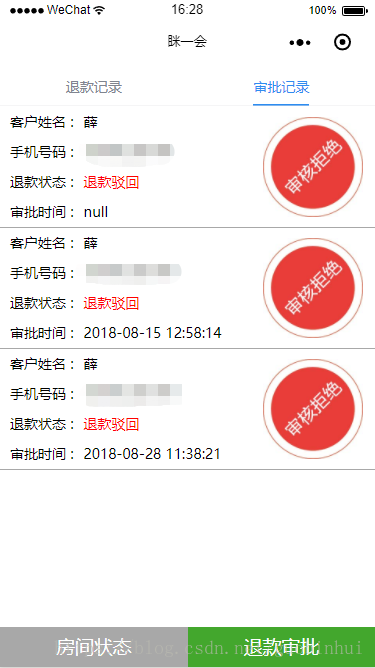
本篇项目实战项目案例就分享到这里,欢迎广大开发者和作者一起交流,编者电话(同微信18629374628) 。点赞是一种美德,分享是对作者最大的精神支持。进来看过的小伙伴们快快收藏点 赞吧