


效果:
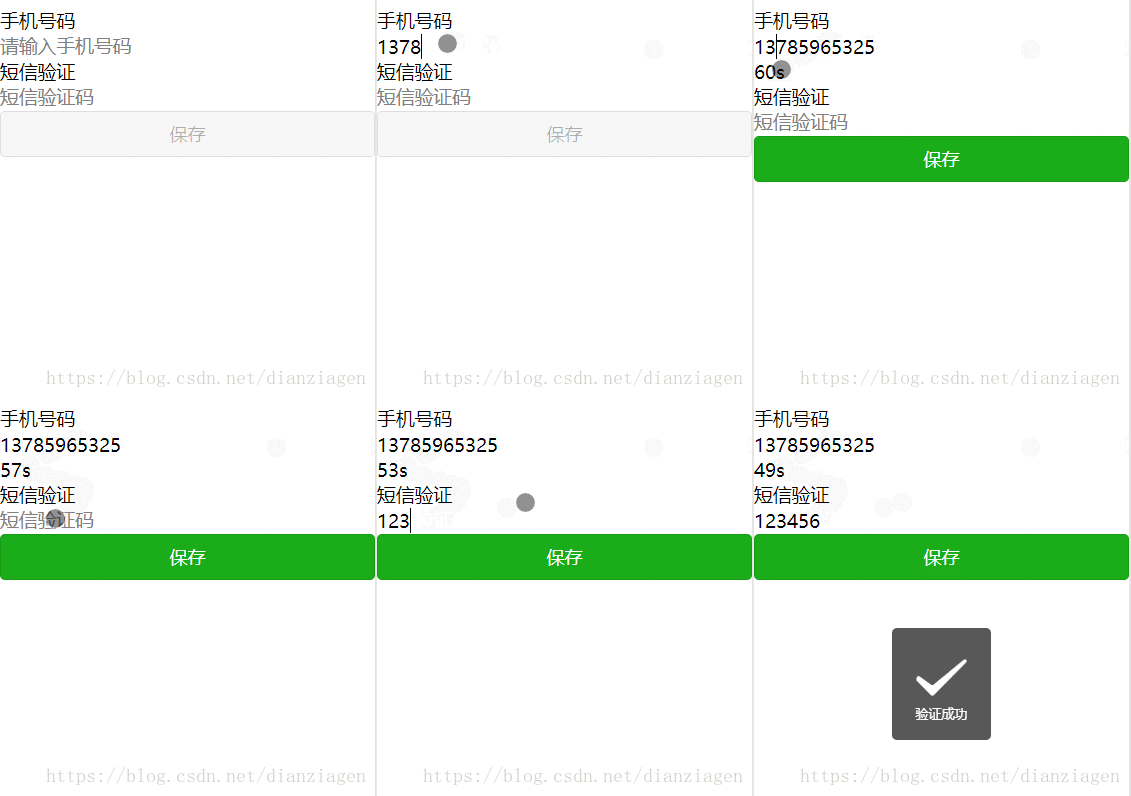
源码地址:链接:https://pan.baidu.com/s/17fbWUS1jrBLbPXyEgHKVcg 密码:ot16
参考:https://blog.csdn.net/Beijiyang999/article/details/77885021
布局
view class="section"
text手机号码/text
input placeholder="请输入手机号码" type="number" maxlength="11" bindinput="inputPhoneNum" auto-focus='true' /
text wx:if='{{send}}' class='sendMsg' bindtap='sendMsg'发送/text
text wx:if="{{alreadySend}}" class="sendMsg" bindtap="sendMsg"{{second+"s"}}/text
/view
view class="section"
text短信验证/text
input placeholder="短信验证码" type="number" maxlength="6" bindinput="addCode" /
/view
button type="{{buttonType}}" disabled="{{disabled}}" bindtap="onSubmit"保存/button
js方法函数
// pages/info-two/info-two.jsPage({/** * 页面的初始数据 */ data: { send: false, alreadySend: false, second: 60, disabled: true, buttonType: 'default', phoneNum: '', code: '', },
// 手机号部分 inputPhoneNum: function (e) { let phoneNum = e.detail.value if (phoneNum.length === 11) { let checkedNum = this.checkPhoneNum(phoneNum) if (checkedNum) { this.setData({ phoneNum: phoneNum }) console.log('phoneNum=' + this.data.phoneNum) this.showSendMsg() this.activeButton() } } else { this.setData({ phoneNum: '' }) this.hideSendMsg() } },
checkPhoneNum: function (phoneNum) { let str = /^1d{10}$/ if (str.test(phoneNum)) { return true } else { wx.showToast({ title: '手机号不正确', icon: 'none' }) return false } },
showSendMsg: function () { if (!this.data.alreadySend) { this.setData({ send: true }) } },
hideSendMsg: function () { this.setData({ send: false, disabled: true, buttonType: 'default' }) },
sendMsg: function () { console.log('发送获取验证码') this.setData({ alreadySend: true, send: false }) // this.timer() this.countdown() },
timer: function () { //Promise:ES6将其写进了语言标准 获取异步操作的消息 let promise = new Promise((resolve, reject) = { let setTimer = setInterval( () = { this.setData({ second: this.data.second - 1 }) if (this.data.second = 0) { this.setData({ second: 60, alreadySend: false, send: true }) // resolve异步操作成功 resolve(setTimer) } } , 1000) }) // 将Promise对象的状态从“未完成”变为“成功” promise.then((setTimer) = { console.log('resolve异步操作成功') clearInterval(setTimer) }) },
countdown:function() { var that=this var second=this.data.second if(second==0) { that.setData({ second: 60 }) return } var time=setTimeout(function(){ that.setData({ second: second-1 }) that.countdown(that) },1000) },
// 验证码 addCode: function (e) { console.log('验证码-addCode') this.setData({ code: e.detail.value }) this.activeButton() },
// 按钮 activeButton: function () { //let{} es6的解构赋值。大括号中的key对应item的key 其值也是相对应的 let { phoneNum, code } = this.data console.log(this.data) if (phoneNum) { this.setData({ disabled: false, buttonType: 'primary' }) } else { this.setData({ disabled: true, buttonType: 'default' }) } }, // 提交 onSubmit: function () { console.log('onSubmit') //模拟校验验证码 if(this.data.code=='123456'){ wx.showToast({ title: '验证成功', icon:'success' }) }else { wx.showToast({ title: '验证失败', icon: 'none' }) } },
/** * 生命周期函数--监听页面加载 */ onLoad: function (options) {
},
/** * 生命周期函数--监听页面初次渲染完成 */ onReady: function () {
},
/** * 生命周期函数--监听页面显示 */ onShow: function () {
},
/** * 生命周期函数--监听页面隐藏 */ onHide: function () {
},
/** * 生命周期函数--监听页面卸载 */ onUnload: function () {
},
/** * 页面相关事件处理函数--监听用户下拉动作 */ onPullDownRefresh: function () {
},
/** * 页面上拉触底事件的处理函数 */ onReachBottom: function () {
},
/** * 用户点击右上角分享 */ onShareAppMessage: function () {
}})
...










