


这里简单介绍用php后台实现获取openid并保存到数据库;
微信的登陆流程是这样的 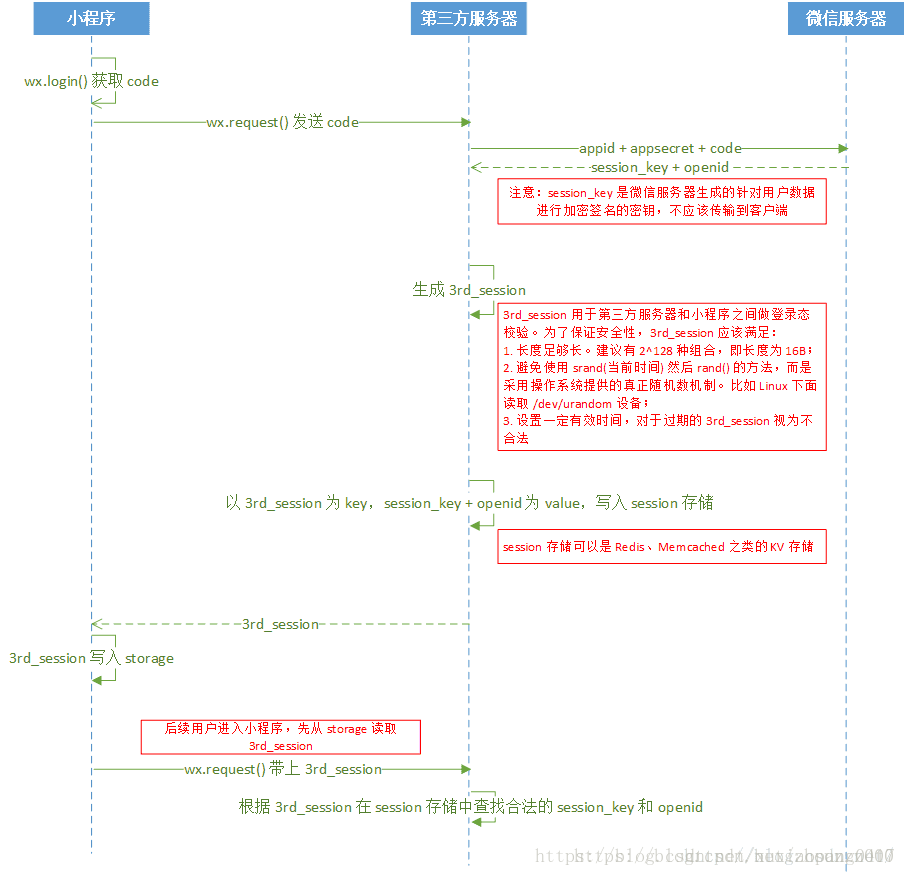
首先前端发送请求到服务器:
wx.login({ success: function (res) { var code = res.code;//发送给服务器的code wx.getUserInfo({ success: function (res) { var userNick = res.userInfo.nickName;//用户昵称 var avataUrl = res.userInfo.avatarUrl;//用户头像地址 var gender = res.userInfo.gender;//用户性别 if (code) { wx.request({ url: 'http://localhost/test/getopenid.php',//服务器的地址,现在微信小程序只支持https请求,所以调试的时候请勾选不校监安全域名 data: { code: code, nick: userNick, avaurl: avataUrl, sex: gender, }, header: { 'content-type': 'application/json' }, success: function (res) { console.log(res.data); wx.setStorageSync('name', res.data.name);//将获取信息写入本地缓存 wx.setStorageSync('openid', res.data.openid); wx.setStorageSync('imgUrl', res.data.imgurl); wx.setStorageSync('sex', res.data.sex); } }) } else { console.log("获取用户登录态失败!"); } } }) }, fail: function (error) { console.log('login failed ' + error); }}) - 1
- 2
- 3
- 4
- 5
- 6
- 7
- 8
- 9
- 10
- 11
- 12
- 13
- 14
- 15
- 16
- 17
- 18
- 19
- 20
- 21
- 22
- 23
- 24
- 25
- 26
- 27
- 28
- 29
- 30
- 31
- 32
- 33
- 34
- 35
- 36
- 37
- 38
- 39
这样就实现了将前端获取的code发送到服务器,code每次获取的都不一样;
服务器getopenid.php代码:
?phptext();function text(){ $code = $_GET['code'];//小程序传来的code值 $nick = $_GET['nick'];//小程序传来的用户昵称 $imgUrl = $_GET['avaurl'];//小程序传来的用户头像地址 $sex = $_GET['sex'];//小程序传来的用户性别 $url = 'https://api.weixin.qq.com/sns/jscode2session?appid=yourAppid&secret=appSecret&js_code=' . $code . '&grant_type=authorization_code'; //yourAppid为开发者appid.appSecret为开发者的appsecret,都可以从微信公众平台获取; $info = file_get_contents($url);//发送HTTPs请求并获取返回的数据,推荐使用curl $json = json_decode($info);//对json数据解码 $arr = get_object_vars($json); $openid = $arr['openid']; $session_key = $arr['session_key']; $con = mysqli_connect('localhost', 'root', '123');//连接数据库 if ($con) { if (mysqli_select_db($con, 'students')) { $sql1 = "select * from weixin where openid = '$openid'"; $result = mysqli_query($con, $sql1); $result = mysqli_fetch_assoc($result); if ($result!=null) {//如果数据库中存在此用户的信息,则不需要重新获取 $result = json_encode($result); echo $result; } else {//没有则将数据存入数据库 if ($sex == '0') { $sex = 'none'; } else { $sex = '1' ? 'man' : 'women'; } $sql = "insert into weixin values ('$nick','$openid','$session_key','$imgUrl','$sex')"; if (mysqli_query($con, $sql)) { $arr['nick'] = $nick; $arr['imgUrl'] = $imgUrl; $arr['sex'] = $sex; $arr = json_encode($arr); echo $arr; } else { die('failed' . mysqli_error($con)); } } } } else { die(mysqli_error()); }}?- 1
- 2
- 3
- 4
- 5
- 6
- 7
- 8
- 9
- 10
- 11
- 12
- 13
- 14
- 15
- 16
- 17
- 18
- 19
- 20
- 21
- 22
- 23
- 24
- 25
- 26
- 27
- 28
- 29
- 30
- 31
- 32
- 33
- 34
- 35
- 36
- 37
- 38
- 39
- 40
- 41
- 42
- 43
- 44
- 45
- 46
- 47
- 48
- 49










