效果图: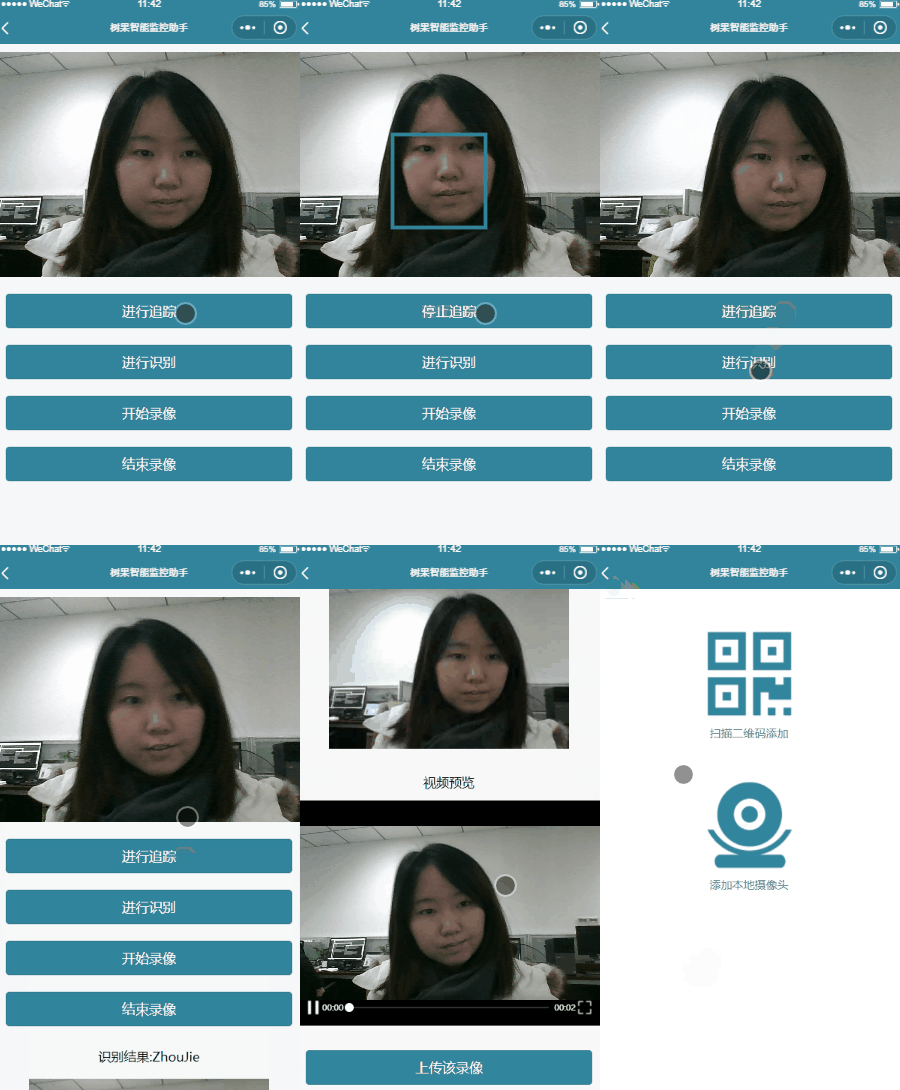
调用的百度人脸识别api,免费账户就可以,虽然有QPS限制但对于自己学习使用是足够的。
代码:
wxml:
view class="page-body" view class="page-body-wrapper" camera device-position="front" flash="off" binderror="error" style="width:100%;height:{{windowWidth}}px;"/camera canvas wx:if="{{canvasshow}}" style="width: 100%;height:{{windowWidth}}px;position:absolute;" canvas-id="canvas"/canvas view class="btn-area" button type="primary" bindtap="track" style='background-color:#31859c;' data-trackshow="{{trackshow}}"{{trackshow}}/button /view view class="btn-area" button type="primary" bindtap="search" style='background-color:#31859c;'进行人脸识别/button /view view class="btn-area" button type="primary" bindtap="startRecord" style='background-color:#31859c;'开始录像/button /view view class="btn-area" button type="primary" bindtap="stopRecord" style='background-color:#31859c;'结束录像/button /view view wx:if="{{src}}" class="preview-tips"识别结果:{{who}}/view view wx:if="{{src}}" style='display:flex;width:100%;justify-content:center;' image mode="aspectFit" src="{{src}}" style='width:50%;height:{{windowWidth/2}}px;'/image canvas style="width: 50%;height:{{windowWidth/2}}px;position:absolute;" canvas-id="canvasresult"/canvas /view view wx:if="{{videoSrc}}" class="preview-tips"视频预览/view video wx:if="{{videoSrc}}" poster="{{fengmian}}" class="video" src="{{videoSrc}}"/video view wx:if="{{videoSrc}}" class="btn-area" button type="primary" bindtap="uploadRecord" style='background-color:#31859c;'上传该录像/button /view /view/viewjs:
var app = getApp();Page({ data: { src:"", fengmian:"", videoSrc:"", who:"", openid: "", token: "", windowWidth: 0, trackshow: "进行人脸追踪", canvasshow:true, access_token:'' }, onLoad() { var that = this wx.showLoading({ title: '努力加载中', mask: true }) //屏幕宽度 var sysInfo = wx.getSystemInfoSync() that.setData({ windowWidth: sysInfo.windowWidth, }) that.ctx = wx.createCameraContext() console.log("onLoad"), that.setData({ openid: app.globalData.openid, token: app.globalData.token }); // 每次更新access_token wx.request({ url: "https://aip.baidubce.com/oauth/2.0/token?grant_type=client_credentials&client_id=" + app.globalData.baiduapikey + "&client_secret=" + app.globalData.baidusecretkey, method: 'POST', dataType: "json", header: { 'content-type': 'application/json' }, success: function (res) { // console.log(res.data.access_token); // app.globalData.access_token = res.data.access_token; that.setData({ access_token: res.data.access_token }); } }) wx.hideLoading() }, onReady: function () { }, track (e){ var that =this if (e.target.dataset.trackshow =="进行人脸追踪"){ that.setData({ trackshow: "停止人脸追踪", canvasshow: true }) that.takePhoto() that.interval = setInterval(this.takePhoto, 500) }else{ clearInterval(that.interval) that.setData({ trackshow: "进行人脸追踪", canvasshow: false }) } }, takePhoto() { console.log("takePhoto") var that = this var takephonewidth var takephoneheight that.ctx.takePhoto({ quality: 'low', success: (res) = { // console.log(res.tempImagePath), // 获取图片真实宽高 wx.getImageInfo({ src: res.tempImagePath, success: function (res) { takephonewidth= res.width, takephoneheight = res.height } }) // console.log(takephonewidth, takephoneheight) wx.getFileSystemManager().readFile({ filePath: res.tempImagePath, //选择图片返回的相对路径 encoding: 'base64', //编码格式 success: res = { //成功的回调 // console.log('data:image/png;base64,' + res.data), wx.request({ url: "https://aip.baidubce.com/rest/2.0/face/v3/detect?access_token=" + that.data.access_token, data: { image:res.data, image_type:"BASE64", max_face_num:10 }, method: 'POST', dataType: "json", header: { 'content-type': 'application/json' }, success: function (res) { console.log(res.data); if (res.data.error_code === 0) { var ctx = wx.createContext() ctx.setStrokeStyle('#31859c') ctx.lineWidth = 3 for (let j = 0; j res.data.result.face_num; j++){ var cavansl = res.data.result.face_list[j].location.left / takephonewidth * that.data.windowWidth var cavanst = res.data.result.face_list[j].location.top / takephoneheight * that.data.windowWidth var cavansw = res.data.result.face_list[j].location.width / takephonewidth * that.data.windowWidth var cavansh = res.data.result.face_list[j].location.height / takephoneheight * that.data.windowWidth ctx.strokeRect(cavansl, cavanst, cavansw, cavansh) } wx.drawCanvas({ canvasId: 'canvas', actions: ctx.getActions() }) } else{ var ctx = wx.createContext() ctx.setStrokeStyle('#31859c') ctx.lineWidth = 3 wx.drawCanvas({ canvasId: 'canvas', actions: ctx.getActions() }) } }, }) } }) } }) }, search(){ var that = this that.setData({ who: "" }) var takephonewidth var takephoneheight that.ctx.takePhoto({ quality: 'heigh', success: (res) = { // console.log(res.tempImagePath), // 获取图片真实宽高 wx.getImageInfo({ src: res.tempImagePath, success: function (res) { takephonewidth = res.width, takephoneheight = res.height } }) that.setData({ src: res.tempImagePath }), wx.getFileSystemManager().readFile({ filePath: that.data.src, //选择图片返回的相对路径 encoding: 'base64', //编码格式 success: res = { wx.request({ url: "https://aip.baidubce.com/rest/2.0/face/v3/multi-search?access_token=" + that.data.access_token, data: { image: res.data, image_type: "BASE64", group_id_list: "camera000001", max_face_num: 10, match_threshold: 60, }, method: 'POST', dataType: "json", header: { 'content-type': 'application/json' }, success: function (res) { console.log(res.data); var ctx = wx.createContext() if (res.data.error_code === 0) { ctx.setStrokeStyle('#31859c') ctx.setFillStyle('#31859c'); ctx.lineWidth = 3 for (let j = 0; j res.data.result.face_num; j++) { var cavansl = res.data.result.face_list[j].location.left / takephonewidth * that.data.windowWidth/2 var cavanst = res.data.result.face_list[j].location.top / takephoneheight * that.data.windowWidth/2 var cavansw = res.data.result.face_list[j].location.width / takephonewidth * that.data.windowWidth/2 var cavansh = res.data.result.face_list[j].location.height / takephoneheight * that.data.windowWidth/2 var cavanstext = res.data.result.face_list[j].user_list.length0?res.data.result.face_list[j].user_list[0].user_id + " " + res.data.result.face_list[j].user_list[0].score.toFixed(0) + "%":"Unknow" ctx.setFontSize(14); ctx.fillText(cavanstext, cavansl, cavanst-2) ctx.strokeRect(cavansl, cavanst, cavansw, cavansh) } wx.drawCanvas({ canvasId: 'canvasresult', actions: ctx.getActions() }) } else { that.setData({ who: res.data.error_msg }) var ctx = wx.createContext() ctx.setStrokeStyle('#31859c') ctx.lineWidth = 3 wx.drawCanvas({ canvasId: 'canvasresult', actions: ctx.getActions() }) } }, }) } }) } }) }, startRecord() { this.ctx.startRecord({ success: (res) = { console.log('startRecord') }, }) }, stopRecord() { this.ctx.stopRecord({ success: (res) = { console.log(res) this.setData({ fengmian: res.tempThumbPath, videoSrc: res.tempVideoPath }) console.log('startOver') } }) }, uploadRecord() { var that = this; wx.showLoading({ title: '上传中', }) //获取摄像头信息 wx.request({ url: app.globalData.urlHeader + '/login/cameralist', data: { openid: app.globalData.openid, token: app.globalData.token }, method: 'POST', header: { 'content-type': 'application/json' }, success: function (res) { if (res.data.code === 0) { if (res.data.data.cameras == null) { wx.request({ url: app.globalData.urlHeader + '/login/addcamera', data: { openid: app.globalData.openid, token: app.globalData.token, camera: "phone", }, method: 'POST', header: { 'content-type': 'application/json' }, success: function (res) { if (res.data.code === 0) { console.log('添加成功') } else { console.log(res.data.error) } } }) } else { var cameras = res.data.data.cameras if (cameras.includes("phone")) { return false } else { wx.request({ url: app.globalData.urlHeader + '/login/addcamera', data: { openid: app.globalData.openid, token: app.globalData.token, camera: "phone" }, method: 'POST', header: { 'content-type': 'application/json' }, success: function (res) { if (res.data.code === 0) { console.log('添加成功') } else { console.log(res.data.error) } } }) } } } else { wx.hideLoading() console.log('获取摄像头列表失败!' + res.data.error) wx.showToast({ title: '获取摄像头列表失败!', image: '../../img/about.png', duration: 1000 }) } } }) wx.uploadFile({ url: app.globalData.urlHeader + '/upload', filePath: that.data.videoSrc, name: 'file', formData: { 'cameraid':'phone', 'openid': app.globalData.openid, 'token': app.globalData.token, 'tag': 2 }, success: function (res) { console.log(res.data); var result = JSON.parse(res.data).data.filename console.log(result); wx.uploadFile({ url: app.globalData.urlHeader + '/upload/fengmian', filePath: that.data.fengmian, name: 'file', formData: { 'openid': app.globalData.openid, 'token': app.globalData.token, 'name': result }, success(res) { console.log( res.data); that.setData({ fengmian: "", videoSrc:"" }), wx.hideLoading() wx.showToast({ title: '上传成功', icon: 'success', duration: 2000 }) setTimeout(function () { wx.switchTab({ url: '../index/index' }) }, 2000) }, fail(res) { wx.hideLoading() wx.showToast({ title: '上传失败', image: '../../img/about.png', duration: 2000 }) } }) }, fail(res) { wx.hideLoading() wx.showToast({ title: '上传失败', image: '../../img/about.png', duration: 2000 }) } }) }, onUnload: function () { var that=this clearInterval(that.interval) }, error(e) { console.log(e.detail) }})wxss:
.preview-tips { margin: 50rpx 0 30rpx; }.video { margin: 20rpx auto; width: 100%; height: 300px;}page { background-color: #F8F8F8; height: 100%; font-size: 32rpx; line-height: 1.6;}.page-body { padding: 20rpx 0;}.page-body-wrapper { display: flex; flex-direction: column; align-items: center; width: 100%;}.btn-area { margin-top: 40rpx; box-sizing: border-box; width: 100%; padding: 0 30rpx;}自己的access_token获取看这里:http://ai.baidu.com/docs#/Face-Detect-V3/top
在手机端的主页效果,第二个即为演示图上传的视频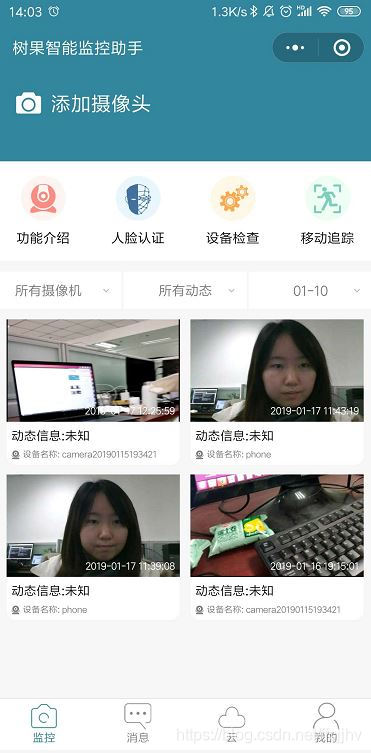
更新:改了识别结果显示方式,增加了多人识别。
效果: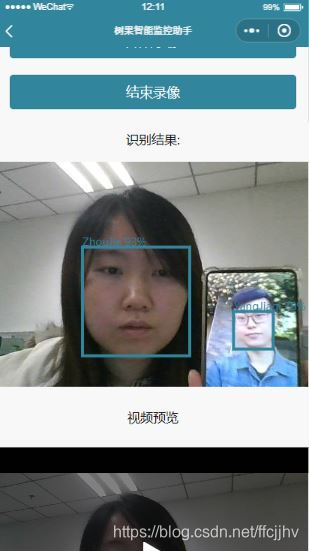
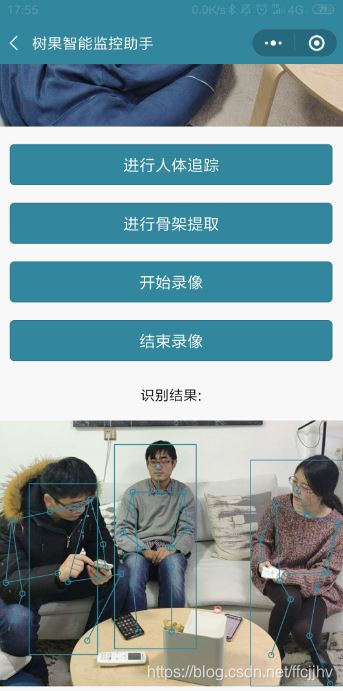
类似的骨架提取: