


我们想要实现一个简单的登录界面,如下: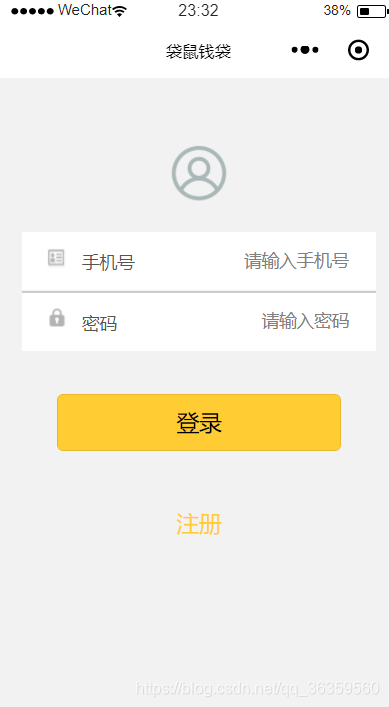
首先介绍一下实现这个需要的一些控件:
1.image
例子:
class属性是决定了它的大小、颜色、长宽高、在页面中的位置等,这些都会在wxss中定义
src顾名思义source,即决定了图像从哪里来,引用什么图像
2.input
例子:
class属性如上
placeholder决定的是input框里无内容的时候显示的提示内容
bindinput是输入框收到输入后会触发的事件,在js中定义
js中对phoneinput的定义如下: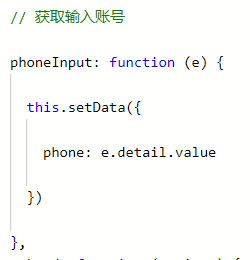
3.button
例子:
size表示按钮大小
loading决定名称前是否带 loading 图标
plain决定按钮是否镂空,背景色透明
代码如下
login.wxml
view class="container" view class="login-icon" image class="login-img" src="../../icons/u21.png"/image /view view class="login-from" !--手机号-- view class="inputView" image class="nameImage" src="../../icons/u1.png"/image label class="loginLab"手机号/label input class="inputText" placeholder="请输入手机号" bindinput="phoneInput" / /view view class="line"/view !--密码-- view class="inputView" image class="keyImage" src="../../icons/u2.png"/image label class="loginLab"密码/label input class="inputText" password="true" placeholder="请输入密码" bindinput="passwordInput" / /view !--按钮-- view class="loginBtnView" button class="loginBtn" size="{{primarySize}}" loading="{{loading}}" plain="{{plain}}" disabled="{{disabled}}" bindtap="login"登录/button /view view class="registerBtnView" button class="registerBtn" size="{{primarySize}}" loading="{{loading}}" plain="{{plain}}" disabled="{{disabled}}" bindtap="register"注册/button /view /view /viewlogin.wxss
page{ height: 100%; } .container { height: 100%; display: flex; flex-direction: column; padding: 0; box-sizing: border-box; background-color: #F2F2F2} /*登录图片*/.login-icon{ flex: none; } .login-img{ margin-top: 50px; width: 50px; height: 50px} /*表单内容*/.login-from { margin-top: 20px; flex: auto; height:100%; } .inputView { background-color: #fff; line-height: 44px; } /*输入框*/.nameImage, .keyImage { margin-left: 18px; margin-top:10px; width: 20px; height: 20px} .loginLab { margin: 15px 15px 15px 10px; color: #545454; font-size: 14px} .inputText { flex: block; float: right; text-align: right; margin-right: 22px; margin-top: 11px; color: #cccccc; font-size: 14px} .line { width: 100%; height: 1px; background-color: #cccccc; margin-top: 1px; } /*按钮*/.loginBtnView { width: 100%; height: auto; background-color: #f2f2f2; margin-top: 0px; margin-bottom: 0px; padding-bottom: 0px; } .registerBtnView { width: 100%; height: auto; background-color: #f2f2f2; margin-top: 0px; margin-bottom: 0px; padding-bottom: 0px; border:none;}.registerBtn::after{ border:none;} .loginBtn { width: 80%; background-color:#ffcc33; margin-top: 35px; }.registerBtn { width: 50%; height:40px; color:#ffcc33; background-color: #f2f2f2; margin-top: 35px; border:none;}









