主要记录自极客学院微信小程序学习视频
文章目录
- 一、样式的基本使用
- 二、样式的属性
- 2.1 尺寸
- 2.2 背景
- 2.3 边框
- 2.4 边距
- 2.5 文本
- 2.6 其他(列表、内容、表格...)
- 三、样式选择器
- 3.1基本选择器
- 3.1.1类选择器`(.name{}) `
- 3.1.2ID选择器`(#name{}) `
- 3.1.3元素选择器`(name{}) `
- 3.1.4通配符选择器`(*{}) `
- 3.1.5包含选择器`(p c{})`
- 3.1.6子元素选择器`(p c{})`
- 3.1.7邻近兄弟元素选择器`(c + c{})`
- 3.1.8通用兄弟元素选择器`(c ~ c{})`
- 3.2属性选择器
- 3.2.1`E[attr]`
- 3.2.2`E[attr="value"]`
- 3.2.3`E[attr~="value"]`
- 3.2.4`E[attr|="value"]`
- 3.2.5`E[attr^="value"]`
- 3.2.6`E[attr$="value"]`
- 3.2.7`E[attr*="value"]`
- 3.3伪类选择器
- 3.3.1 动态伪类选择器 (:link, : visited, :hover , :active , :focus)
- 3.3.2 状态伪类选择器 (:enabled , : disabled , :checked)
- 3.3.3 选择伪类选择器 (:first-child, : last-child , :nth-child() , :nth-last-child() , : nth-of-type(), :nth-last-of-type(), :first-of-type , :last-of-type , :only-child , :only-of-type)
- 3.3.4 空内容伪类选择器 (:empty)
- 3.3.5 否定伪类选择器 (:not)
- 3.3.6 伪元素 (::first-line , ::first-letter , ::before , ::after , ::selection)
一、样式的基本使用
view class="text"jekexueyuan ..../view.text {font-size: 20px;}二、样式的属性
2.1 尺寸
width : 228rpx;height : 228rpx;/**min-width:max-width:min-height:max-height:**/2.2 背景
background-color: //背景颜色background-image: //背景图片background-position:...2.3 边框
border-radius: 20%; //边框圆角border-width:10px;border-color: #ddd;border-style: solid;border: 10px solid #ddd;2.4 边距
margin: 20rpx;margin-top: 20rpx;margin-right: 20rpx;padding: 20rpx;margin: 20rpx 20rpx 20rpx 20rpx; //上 右 下 左...2.5 文本
color: red;//颜色font-size: 30px;font-weight: 10;...2.6 其他(列表、内容、表格…)
查看文档学习
三、样式选择器
3.1基本选择器
3.1.1类选择器(.name{})
class 与 .
//.wxmltext class="nickname" /text//.wxss.nickname{width:228rpx;height:228rpx;}3.1.2ID选择器(#name{})
id与#
//.wxmltext id="nickname" /text//.wxss#nickname{width:228rpx;height:228rpx;}3.1.3元素选择器(name{})
name 为元素名称
//.wxss//表示对所有的image元素都显示以下样式image{width:228rpx;height:228rpx;}3.1.4通配符选择器(*{})
//.wxss//表示对所有元素都显示以下样式*{background-color: red;} 3.1.5包含选择器(p c{})
//.wxmlviewview class="userinfo"text id="nickname" /text /viewview class="usermotto"text id="name" /text /view/view//.wxss!-- 仅 userinfo 下的text元素有效,usermotto下的text元素无效 --.userinfo text{color:red;}3.1.6子元素选择器(p c{})
//.wxmlview class="usermotto"viewtext id="nickname" /text /viewtext id="name" /text /view//.wxss!-- 能影响到nickname 和 name 两个text 元素 --.usermotto text{color:red;}/**只能影响到 name text元素,不能影响到 nickname 元素;也即是只能影响到p(父view)下一层级的c(子view),而不能影响到子View 的 子View**/.usermottotext{color:red;}3.1.7邻近兄弟元素选择器(c + c{})
//.wxmlviewview class="userinfo"text id="nickname" /text /view//以下为 userinfo 临近的 viewviewtext id="name" /text /view/view//.wxss!-- 让临近的元素具有以下属性 --.userinfo + view{color:red;}3.1.8通用兄弟元素选择器(c ~ c{})
3.2属性选择器
3.2.1E[attr]
只要某类元素 E 有该属性 attr ,不管该属性的值是什么,都会使用该样式
//.wxmlview!-- 以下view 具有 bindtap 属性,该属性的值为 bindViewTap --view bindtap="bindViewTap" class="userinfo"text id="nickname" /text /view/view//.wxssview[bindtap]{color:red;}//多个属性可以继续往后面加view[bindtap][bindtap]{background-color:red;}3.2.2E[attr="value"]
只要某类元素 E 有该属性 attr ,且该属性的值等于value ,都会使用该样式
3.2.3E[attr~="value"]
某类元素 E 有该属性 attr ,只要该属性的值中有一个值等于value ,都会使用该样式
//.wxmlview!-- 以下view 具有 class 属性,该属性的值有两个 userinfo 和 item --view bindtap="bindViewTap" class="userinfo item"text id="nickname" /text /view/view//.wxssview[class~="userinfo"]{background-color: red;}3.2.4E[attr|="value"]
某类元素 E 有该属性 attr ,只要该属性的值以value- 开头 ,都会使用该样式
//.wxmlview!-- 以下view 具有 class 属性,该属性的值为 userinfo-item ,以 userinfo- 开头 --view bindtap="bindViewTap" class="userinfo-item"text id="nickname" /text /view/view//.wxssview[class|="userinfo"]{background-color: red;}3.2.5E[attr^="value"]
某类元素 E 有该属性 attr ,该属性的值必须以value 开头 ,才会使用该样式
3.2.6E[attr$="value"]
某类元素 E 有该属性 attr ,该属性的值必须以value 结束 ,才会使用该样式
3.2.7E[attr*="value"]
某类元素 E 有该属性 attr ,该属性的值包含value ,都会使用该样式
3.3伪类选择器
3.3.1 动态伪类选择器 (:link, : visited, :hover , :active , :focus)
:focus 表示元素获得焦点的时候触发:active 表示元素被激活的时候触发,如被点击
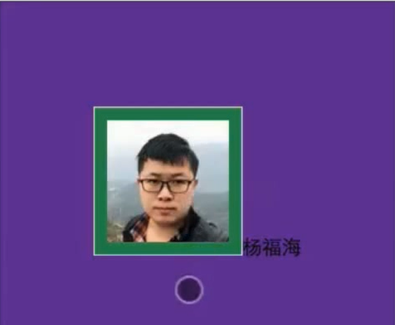
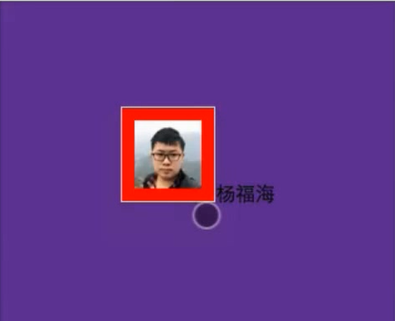
//图片头像应用了以下 ID 选择器#userinfo-avatar{width: 228rpx;height: 228rpx;background-color: seagreen;border: 1px solid #dddpadding:10px;}//加了 :active ,表示图像被点击的时候会显示的样式#userinfo-avatar:active{width: 128rpx;height: 128rpx;background-color: red;border: 1px solid #dddpadding:10px;}以下是未激活状态显示样式:绿色背景色
点击激活后显示如下:图片变小且背景色变为红色
3.3.2 状态伪类选择器 (:enabled , : disabled , :checked)
描述控件的状态,:enabled : 启用状态:disabled : 禁用状态:checked : 选中状态
3.3.3 选择伪类选择器 (:first-child, : last-child , :nth-child() , :nth-last-child() , : nth-of-type(), :nth-last-of-type(), :first-of-type , :last-of-type , :only-child , :only-of-type)
//.wxml //有三张图片viewimage class="userinfo-avatar "image class="userinfo-avatar "image class="userinfo-avatar "/view//.wxss.userinfo-avatar{width: 228rpx;height: 228rpx;background-color: seagreen;border: 1px solid #dddpadding:10px;}//:first-child 表示仅第一张图片应用以下属性,其余图片应用上面的属性.userinfo-avatar:first-child{width: 128rpx;height: 128rpx;background-color: red;border: 1px solid #dddpadding:10px;}3.3.4 空内容伪类选择器 (:empty)
3.3.5 否定伪类选择器 (:not)
3.3.6 伪元素 (::first-line , ::first-letter , ::before , ::after , ::selection)
::first-letter :第一个字母显示样式
//.wxml view class="usermotto"text class="text1"Hello World/text/view//.wxss.usermotto::first-letter{color: red;font-size:30px;}