


微信小程序登录处理 以及 wx.request的封装
- I、处理登录的逻辑
- II、wx.request的封装逻辑
- 1. wx.request的封装
- 2. wx.request的封装逻辑图
- III、关于登录 对wx.request的封装
- IV、相关代码
- 1. wx.request关于基础层的封装
- 2. wx.request 扩展层的封装
- 3. 登录页面代码
- 4.关于登录按钮的样式
相信大家做小程序的, 对微信登录的机制都有一定的了解以及想法了;
大家八仙过海 各显神通,下面这篇文章,只是我对其的了解
如果大家有好的想法 !!!请一定 与 我交流!!!
I、处理登录的逻辑
关于会遇到的问题以及处理
首先登录是个异步事件;
既然是异步事件, 那么我们肯定要在回调函数中进行处理
这样的话就要涉及到wx.request的封装;我们在下面讲关于code的获取
登录需要用户点击微信自带的button才能获取到button class='login-btn' open-type="getUserInfo" bindgetuserinfo="getUserInfo" type="warn" size="default" loading="{{loading}}" bindtap="primary" 一键登录 /button关于权限判断,以及如何判断
咱们不能所有接口都需要登录, 那样的话连审核都过不了;
这里同样需要对wx.requesrt进行封装;下面讲登录的处理逻辑图:
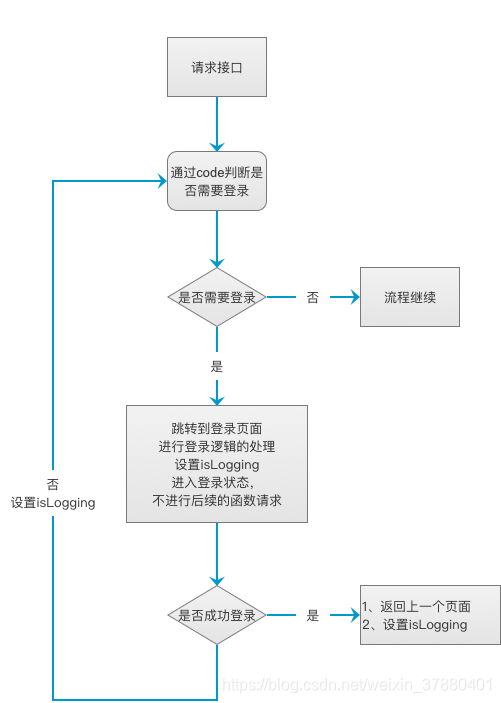
II、wx.request的封装逻辑
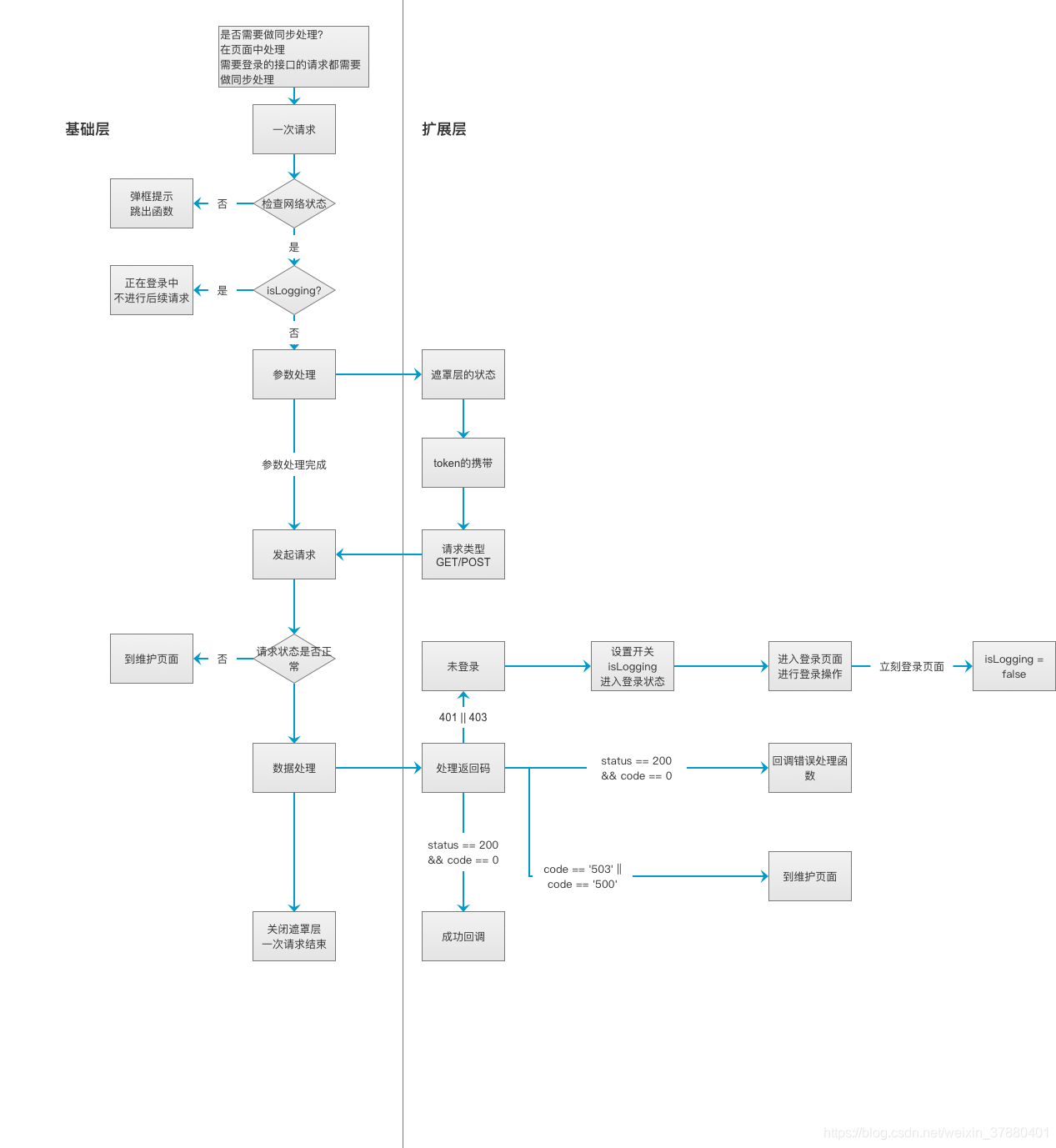
1. wx.request的封装
基础层
a. 调用扩展层的处理函数
b. wx.request请求扩展层
// beforeRequest 处理有无网络状态
// handleRequestInportData 处理请求参数
// showMask 处理遮罩层
// stopLoading 停止各种的loading
// handleResponse 处理返回结果
2. wx.request的封装逻辑图
III、关于登录 对wx.request的封装
跟后端约定好返回码 做对应的操作;
我们这边规定 如果返回 code 等于 401 || code 等于 403的话就表示没有登录
if (res.data.code == '401' || res.data.code == '403') { console.error('没登录,去登录,并且设置状态') wx.removeStorageSync('accessToken');// 清空之前的token if (that.globalData.isLogging) return true;// 正在登录中 that.globalData.isLogging = true;// 没在登录中 进入登录状态,并且设置isLogging // 登录失效且不在白名单 if (!CONFIG['API_WHITE_LIST'].includes(thisUrl)) { // 跳到登录 let pages = getCurrentPages(); for (let i in pages) { if (pages[i].route == '/pages/login/login') { // console.log(i) wx.navigateBack({ delta: pages.length - (i + 1) }) return true; } } wx.navigateTo({ url: '/pages/login/login' }); return true; } return; }IV、相关代码
1. wx.request关于基础层的封装
// 基础层: // 基于微信的request进行二次封装,myRequest是基础层 // beforeRequest 处理有无网络状态 // handleRequestInportData 处理请求参数 // showMask 处理遮罩层 // stopLoading 停止各种的loading // handleResponse 处理返回结果 myRequest: function (url, data, methods, callback, loadType, errorFun, headers) { let _this = this; // 检查是拥有网络 没有网络 就return; if (_this.beforeRequest(url)) { console.log('beforeRequest return ' + _this.globalData.isLogging); return; } // console.log(this.globalData) // 参数处理 let theData = this.handleRequestInportData(url, data, methods, callback, loadType, errorFun, headers, _this); // 处理遮罩层 this.showMask(theData.loadType); // 是否是启用模拟数据 if (DEBUG) { let responseData = myData.getData(url, data); setTimeout(() = { console.log('DEBUG response : ') console.log(responseData.data) _this.stopLoading(); callback(responseData) // _this.handleResponse(responseData, theData); }, 800) }else{ // 开始请求 wx.request({ url: theData.url, data: { ...theData.data, ..._this.globalData.otherParams }, method: theData.methods, header: theData.headers, success: function (res) { // 处理返回结果 _this.handleResponse(res, theData, _this, url); }, fail: function (err) { _this.stopLoading(); }, complete: function () { } }) } // 请求结束 },2. wx.request 扩展层的封装
// 在请求发起之前需要做的事情 处理有无网络状态 beforeRequest: function(tempUrl) { let _this = this; wx.getNetworkType({ success: function (res) { if (res.networkType == 'none') { return true; } } }) }, // 处理请求参数: handleRequestInportData: ( url, data, methods = 'post', callback = () = console.log('未传入回调callback'), loadType = 'mask', errorFun = (err) = { wx.hideLoading(); wx.showToast({ title: err.message, icon: 'none', // icon: 'success', mask: true, duration: 2000 }) console.log('未传入回调 errorFun') }, headers = {}, that ) = { let requestData = {}; if (!url) { console.error('传入myRequest的URL不可为空'); return; } // data.Authorization = 'Bearer ' + that.globalData.accessToken // console.error('Authorization: ' + data.Authorization); headers = { 'content-type': 'application/json', 'Authorization': 'Bearer ' + that.globalData.accessToken, 'enctype': 'raw' } data.referrer_uid = that.globalData.referrer_uid != 0 ? that.globalData.referrer_uid : 0; requestData.url = InterFace[url]; requestData.data = data; requestData.methods = methods; requestData.callback = callback; requestData.loadType = loadType; requestData.errorFun = errorFun; requestData.headers = headers; return requestData; }, // 处理返回结果: handleResponse: (res, theData, that, tempUrl) = { let _this = this; that.stopLoading(); if (res.data.code == '401' || res.data.code == '403') { console.error('没登录,去登录,并且设置状态') // console.error(that.globalData.isLogging) wx.removeStorageSync('accessToken'); // 正在登录中 设置 isLogging if (that.globalData.isLogging) return true; that.globalData.isLogging = true; // 登录失效且不在白名单 !wx.getStorageSync('accessToken') && !API_WHITE_LIST.includes(tempUrl) if (!CONFIG['API_WHITE_LIST'].includes(tempUrl)) { // 跳到登录 let pages = getCurrentPages(); // Tips: 判断页面栈中是否有login for (let i in pages) { if (pages[i].route == '/pages/login/login') { wx.navigateBack({ delta: pages.length - (i + 1) }) return true; } } wx.navigateTo({ url: '/pages/login/login' }); return true; } return; } if (res.data.status == 200 && res.data.code != 0) { // 调用错误处理函数 theData.errorFun(res.data) return; } else if (res.data.code == '503' || res.data.code == '500') { // 故障页面 wx.reLaunch({ url: '/pages/error/error' }
版权声明
即速应用倡导尊重与保护知识产权。如发现本站文章存在版权问题,烦请提供版权疑问、身份证明、版权证明、联系方式等发邮件至197452366@qq.com ,我们将及时处理。本站文章仅作分享交流用途,作者观点不等同于即速应用观点。用户与作者的任何交易与本站无关,请知悉。













