


老规矩,先上Demo: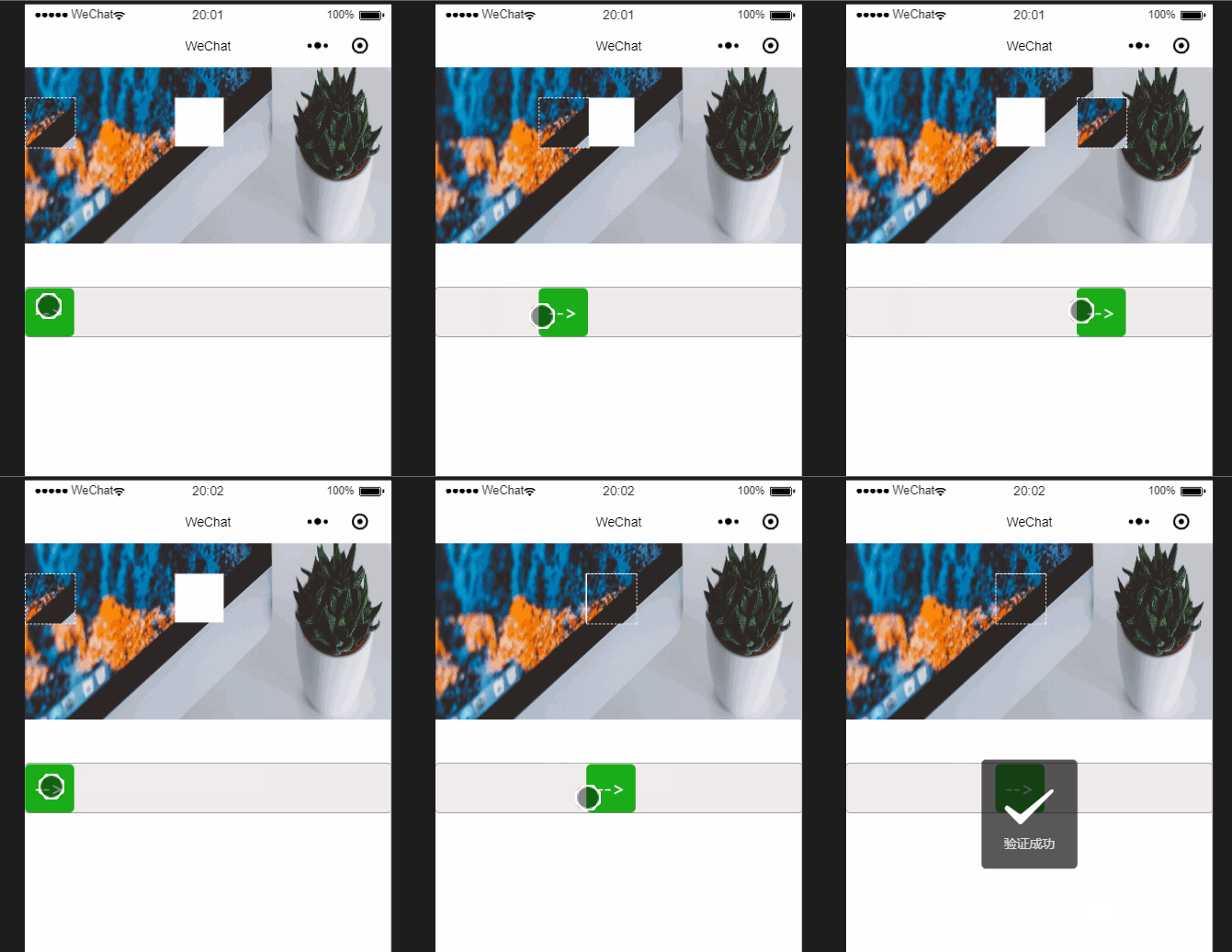
思 路
- 创建2个canvas,一个当作背景,一个当作拼图。
- 传入3个参数,
x:canvas中裁剪区域的横坐标,y:canvas中裁剪区域的纵坐标,l:拼图的边长 - 背景图使用
fill()的方法裁剪出一个洞 - 拼图使用
wx.canvasToTempFilePath的方法裁剪成一个拼图图片。 - 小程序中的触控事件
bindtouchmove,bindtouchend分别记录移动的距离和松手时的距离 - 判断移动距离和
x的差距,如果两者小于一定阈值,则验证成功,反之失败。
开始操作
创建两个canvas
在微信小程序中,由于不能操作DOM,所以要想更改样式需要在组件中用style表明,在data中修改,通过{{}}渲染出来。比如我们需要控制canvas距离顶部的高度,除了在wxss中定义以外,还可以使用canvas style='top:{{this.data.top}}rpx'这种方式实现。小程序中操作创建canvas的方法如下:
const canvas = wx.createCanvasContext('canvas1'), block = wx.createCanvasContext('block');这样就创建了两个canvas画布
定义所需参数
let l = 50, //拼图的边长 x =150+Math.random()*(canvas_width-l-150), //裁剪的x坐标 y = 10+Math.random()*(canvas_height-l-10);//裁剪的y坐标 that.setData({ block_w:l, y:y, x:x })背景图的制作
使用block.drawImage(img, 0, 0, canvas_width, canvas_height);的方法使图片绘制到canvas上。
使用globalCompositeOperation = 'xor'的方法,使裁剪的那一块变得透明。
block.beginPath() block.moveTo(x,y) block.lineTo(x,y+l) block.lineTo(x+l,y+l) block.lineTo(x+l,y) block.globalCompositeOperation = 'xor' block.fill() block.drawImage(img, 0, 0, canvas_width, canvas_height); block.draw( ) 有可能这里无法显示图片,把代码放到 onReady 下就可以了
拼图的制作
使用wx.canvasToTempFilePath方法,从另一张canvas画布上截取一块。
canvas.drawImage(img, 0, 0, canvas_width, canvas_height); canvas.draw(false, setTimeout(() = { wx.canvasToTempFilePath({ x: x, y: y, width:l, height: l, canvasId: 'canvas1', fileType: 'png', success(res) { console.log(res.tempFilePath) that.setData({ pic: res.tempFilePath }) }, fail: err = { console.log(err) } }, this) }, 500))这样res.temFilePath就是我们截取出来的拼图了。
注意!如果图片是空白的,需要添加一个定时器 setTimeout() 清除 canvas 缓存
在滑动块上添加触控事件
滑动的过程需要两个事件来完成bindtouchmove='move' bindtouchend='end'
js中创建这两个事件。
move:function(res){ let left = res.touches[0].pageX; // 由于我这里是和page没有距离,也没有加外层盒子的,所以,pageX就是位移距离。 if (left0){ this.setData({ left: left }) } else{ this.setData({ left:0 }) }},end:function(res){ let end = this.data.left, moves = this.data.x;console.log(end) })}}判断,出结果
end:function(res){ ... ...if (Math.abs(end-moves)2){ //当小于2px的可接受阈值时,验证成功 console.log('bingo') wx.showToast({ title: '验证成功', icon:'success', duration:2000 }) setTimeout(function(){ wx.redirectTo({ url: 'verification', }) },2000)}else{ this.setData({ left:0 })}}好了,大功告成。具体代码在——github:Jarry007
仅供参考,我是菜鸟,轻喷。










