


先来讲一讲原理,
第一步,布好局,把垃圾桶隐藏用绝对定位和层级控制藏在下面,在上层需要左滑的那层,编写样式,
margin-left:{{item.del ? ‘-212’:‘0’}}rpx;"三目运算符,如果前者为true,则左滑212rpx;如果为false,则不动,如果需要过渡效果的小宝贝,可以添加一个时间时间,或者改成transform,
transition:margin-left 2s;
-moz-transition:margin-left 2s; /* Firefox 4 /
-webkit-transition:margin-left 2s; / Safari and Chrome /
-o-transition:margin-left 2s; / Opera */
列表的每一项的总盒子记得绑定id,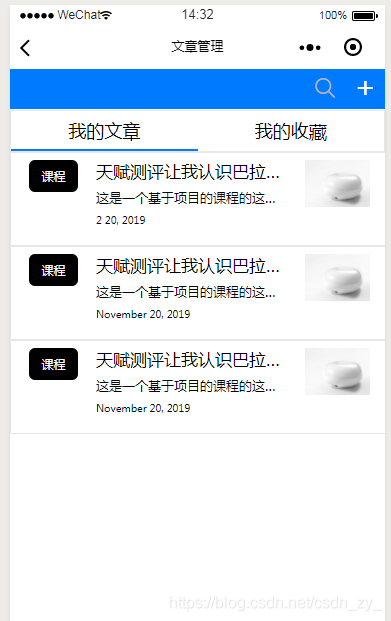
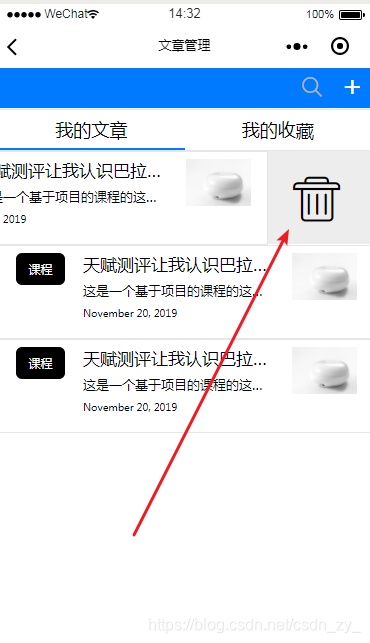
接下来是布局,
!-- //这是选项卡部分所以有一个控制显示隐藏的总盒子 -- view class='tabb1' wx:if='{{tabb12}}'!-- //for循环的盒子 -- block wx:for="{{tabb1_lict}}" wx:for-item="item" wx:key='{{index}}' !-- //列表的每一项的总盒子,包括右边的删除垃圾桶, --!-- //绑定id,绑定触摸事件(开始,移动中,结束),创建类名,编写样式 -- view id='{{item.id}}' bindtouchstart = "handletouchtart" bindtouchmove="handletouchmove" bindtouchend="handletouchend" class='clearF' style=' position: relative;' !-- //列表的左边部分,不包括垃圾桶,获取当前下标,绑定点击事件跳转到对应详情, -- !-- //编写样式,样式的值为 -- view class='tabb1_list_body ' data-index="{{index}}" catchtap="godatiles" style="margin-left:{{item.del ? '-212':'0'}}rpx;" !-- 列表左边部分的左边黑色课程 -- view class='list_black' data-index="{{index}}" 课程 /view !-- 右边主体 -- view class='list_main' data-index="{{index}}" !-- 字 -- view class='list_main_txt' data-index="{{index}}" view class='list_main_txt_top' data-index="{{index}}" p{{item.top}}/p /view view class='list_main_txt_center' data-index="{{index}}" p data-index="{{index}}"{{item.center}}/p /view view class='list_main_txt_time' data-index="{{index}}" p text-transform="Capitalize"{{item.timedate.m}} /p p{{item.timedate.d}}/p, p{{item.timedate.y}}/p /view /view !-- 图 -- !-- //jt.wiipoo.com/IGS/image/banner1.png -- image src='{{item.pic}}' data-index="{{index}}" /image /view /view !-- 垃圾桶部分 -- view class='removeesw' data-index="{{index}}" view class='removee' catchtap='removeimg' icon class='iconfont icon-lajitong1'/icon /view /view /view /block /view接下来是js部分
第一部分是准备阶段,注意id,和那个是否滑动的状态,时间的话一般是固定的条数,就放在一个数组里,套一层
data:{ isleft:false }tabb1_lict = [ { top: '天赋测评让我认识巴拉巴巴拉巴拉巴拉', center: '这是一个基于项目的课程的这是一个基于项目的课程的这是一个基于项目的课程的', txtstyle:'', timedate:{ d:20, m:"2", y:2019, time:"16:06" }, pic: '//jt.wiipoo.com/IGS/image/banner1.png', id: 1, del:false },{}]第二部分是触发的滑动开始事件
handletouchtart: function (event) { this.data.lastX = event.touches[0].pageX this.data.lastY = event.touches[0].pageY },第三阶段是滑动中
//返回绑定事件的元素,和this差不多
//获取列表的数组
//获取手指位置和上一次的手指位置,相减等于触摸滑动位置
//获取列表的当前id的那个判断是否左滑 的属性
根据xy的值的正负,判断左右还是上下滑动,
左右滑动判断哪个方向,然后把对应id的左滑样式改为true
handletouchmove: function (event) { // console.log(event) //返回绑定事件的元素,和this差不多 //获取列表的数组 //获取手指位置和上一次的手指位置,相减等于触摸滑动位置 //获取列表的当前id的那个判断是否左滑 的属性 var currentId = event.currentTarget.id; var list=this.data.tabb1_lict; var currentX = event.touches[0].pageX var currentY = event.touches[0].pageY var tx = currentX - this.data.lastX var ty = currentY - this.data.lastY var text = "" var deletedtodo = `tabb1_lict[${currentId}].isleft`; // console.log(list) // console.log(currentId) //如果,横着大于竖着,就是横着滑 //如果是横着滑,判断是左滑还是右滑, var n,m; //左右方向滑动 if (Math.abs(tx) Math.abs(ty)) { if (tx 0){ // text = "向左滑动" for (var i in list) { //遍历数组找到当前id //就让del的值为true控制列表左滑的那个样式 //其他的则左滑样式消失 //然后刷新列表 if (list[i].id == currentId){ list[i].del = true; n = i; var n_txt = `tabb1_lict[${n}].del`; }else{ if(list[i].del){ m = i; var m_txt = `tabb1_lict[${m}].del`; } list[i].del = false; } } // console.log(n_txt + ' ' + m_txt) // this.setData({ // n_txt: true // }) // if (m_txt){ // this.setData({ // m_txt: false // }) // } this.setData({ tabb1_lict:list }) // console.log(this.data.tabb1_lict) } else if (tx 0) { //右滑的话所有的都回归原来的样子,更新数组 for (var i in list) { list[i].del = false; if (list[i].del) n=i; } // var n_txt = `tabb1_lict[${n}].del`; // this.setData({ // n_txt:false // }) // text = "向右滑动" this.setData({ tabb1_lict:list }) } } //上下方向滑动 else { // if (ty 0) // text = "向上滑动" // else if (ty 0) // text = "向下滑动" } //将当前坐标进行保存以进行下一次计算 this.data.lastX = currentX this.data.lastY = currentY },第四部分
滑动结束事件
handletouchend: function (event) { this.data.currentGesture = 0; this.setData({ text: "没有滑动", }); },









