


前言
刚接触微信小程序,之前有使用vue的底子,今天就分享一个自己封装的下拉组件(参考别人的组件按自己需求修改的),个人是不是很喜欢造轮子,如果有现成的都喜欢复制粘贴改改哈哈,都是之前公司养的坏毛病。
需求
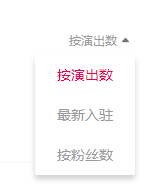
项目需要一个下拉框进行数据筛选,微信小程序有提供自己的一个picker,但是跟我们设计需求不一样,微信小程序好像不支持select标签,如果支持,样式也改不到理想状态,所以最终还是封装了个组件。效果如下。
代码
子组件
component/select/select.wxml
view class='com-selectBox' view class='com-sContent' bindtap='selectToggle' view class='com-sTxt' {{ nowText }}/view image src='../../img/arrow.png' class='com-sImg' animation="{{animationData}}"/image /view view class='com-sList' wx:if="{{selectShow}}" view wx:for="{{propArray}}" data-index="{{index}}" data-id="{{item.id}}" wx:key='' class="com-sItem {{num==item.id?'cur':''}}" bindtap='setText'{{item.text}}/view /view/view
component/select/select.wxml
Component({ /** * 组件的属性列表 */ properties: { propArray: { type: Array, }, defalutSelect:{ type:String } }, /** * 组件的初始数据 */ data: { selectShow: false, //初始option不显示 nowText: "请选择", //初始内容 animationData: {}, //右边箭头的动画 num: '' }, attached() { // 在组件实例进入页面节点树时执行 this.initSelect(); }, /** * 组件的方法列表 */ methods: { initSelect: function () { var nowData = this.properties.propArray; var seletedID = this.properties.defalutSelect; if (seletedID){ var nowText = nowData.find(obj = obj.id == seletedID).text this.setData({ selectShow: false, nowText: nowText, num: seletedID }) } }, //option的显示与否 selectToggle: function() { var nowShow = this.data.selectShow; //获取当前option显示的状态 //创建动画 var animation = wx.createAnimation({ timingFunction: "ease" }) this.animation = animation; if (nowShow) { animation.rotate(0).step(); this.setData({ animationData: animation.export() }) } else { animation.rotate(180).step(); this.setData({ animationData: animation.export() }) } this.setData({ selectShow: !nowShow }) }, //设置内容 setText: function(e) { var nowData = this.properties.propArray; //当前option的数据是引入组件的页面传过来的,所以这里获取数据只有通过this.properties var nowIdx = e.target.dataset.id; //当前点击的索引 var nowText = nowData.find(obj = obj.id == nowIdx).text //当前点击的内容 //再次执行动画,注意这里一定,一定,一定是this.animation来使用动画 this.animation.rotate(0).step(); this.setData({ selectShow: false, nowText: nowText, num: nowIdx, animationData: this.animation.export() }) this.triggerEvent('selected', { selectedID: e.target.dataset.id }); } }})component/select/select.wxss
.com-selectBox{ width: 100px; color: #999BA0;}.com-sContent{ font-size: 12px; position: relative; height: 30px; line-height: 30px;}.com-sContent .com-sImg{ position: absolute; right: 5px; top: 50%; width: 9px; height: 9px; margin-top: -4px; transition: all .3s ease;}.com-sTxt{ overflow: hidden; text-overflow: ellipsis; white-space: nowrap; padding:0 18px 0 6px; font-size: 12px; text-align: right}.com-sList{ width: inherit; position: absolute; text-align: center; box-sizing: border-box; background:rgba(255,255,255,1); box-shadow:0px 4px 8px 0px rgba(22,22,22,0.2); border-radius:2px; z-index: 3; max-height: 120px; overflow: auto;}.com-sItem{ height: 40px; line-height: 40px; padding: 0 6px; overflow: hidden; text-overflow: ellipsis; white-space: nowrap; font-size: 14px;}.com-sItem.cur{ color: #E50150;}使用
需要在要使用的页面上注册,如果没有默认选择,defalut-select就不用传。
index.json
{ "usingComponents": { "Select": "/component/select/select" }}index.wxml
Select prop-array='{{selectArray}}' defalut-select='{{sortType}}' bind:selected='selectEvent'/Selectindex.js
data: { selectArray: [ { id: 2, text: "按演出数" }, { id:3, text: "最新入驻" }, { id: 1, text: "按粉丝数" } ], sortType:2 },/* 下拉组件 */ selectEvent: function (e) { this.setData({ sortType: e.detail.selectedID, pageIndex: 1, }); this.Get(); }补个箭头的资源
data:image/png;base64,iVBORw0KGgoAAAANSUhEUgAAABIAAAASCAMAAABhEH5lAAAAOVBMVEUAAABxc3dxc3dxc3dxc3dxc3dxc3dxc3dxc3dxc3dxc3dxc3dxc3dxc3dxc3dxc3dxc3dxc3dxc3f8k1LPAAAAEnRSTlMAcBfg9evkbDAc1MxQRjchDwj+8q3fAAAAR0lEQVQY07XMSQ7AIAxDUTelQGfI/Q+LiKIo7OEtvyxjuTNtJhVJkZ1d0uXTLYkON6p6Zi0S1B90QzBZSiA4b08Zg4f5w3wNWN0E/KGu24gAAAAASUVORK5CYII=
参考










