


废话不多说,先上个效果图,值得一看就往下看,因为基本上也没什么难度。
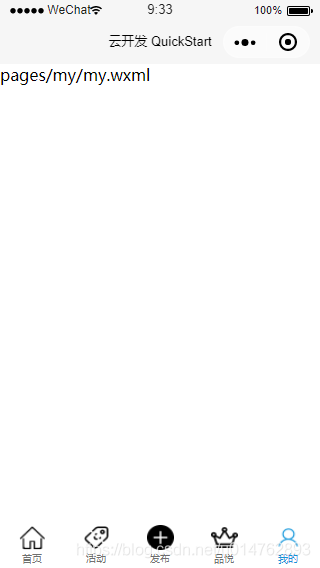
上图实现5个导航页面事件,首先在阿里巴巴的图标库下载10个图标,分别为5个导航事件的选中效果和未选中效果,蓝底图和灰底图。阿里巴巴图标库连接:https://www.iconfont.cn/
项目配置文件app.json文件下添加以下代码
"tabBar": { "color": "#707070", "selectedColor": "#1296db", "borderStyle": "white", "list": [ { "selectedIconPath": "images/ic_bottom_blue_home.png", "iconPath": "images/ic_bottom_gray_home.png", "pagePath": "pages/home/home", "text": "首页" }, { "selectedIconPath": "images/ic_bottom_blue_activity.png", "iconPath": "images/ic_bottom_gray_activity.png", "pagePath": "pages/activity/activity", "text": "活动" }, { "selectedIconPath": "images/ic_bottom_blue_release.png", "iconPath": "images/ic_bottom_gray_release.png", "pagePath": "pages/release/release", "text": "发布" }, { "selectedIconPath": "images/ic_bottom_blue_brand.png", "iconPath": "images/ic_bottom_gray_brand.png", "pagePath": "pages/brand/brand", "text": "品悦" }, { "selectedIconPath": "images/ic_bottom_blue_my.png", "iconPath": "images/ic_bottom_gray_my.png", "pagePath": "pages/my/my", "text": "我的" } ] }属性说明:
color:未选中时字符颜色
selectedColor:选中时字符颜色
borderStyle:导航栏背景颜色
selectedIconPath:选中后显示的图片路径
iconPath:未选中时显示的图片路径
pagePath:导航页面路径
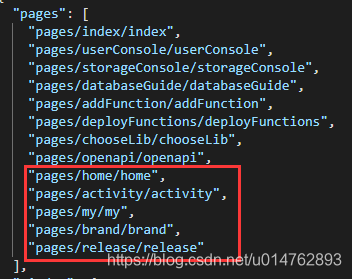
注意:一定要在pages下配置分别页面路径,否则导航栏将不起效果。
如下图:
如此,整个效果就OK了。










