


做过微信小程序的伙伴都知道,当我们需要实现一个小程序中类似于新闻资讯的功能时,需要我们调用一个外部实时更新的新闻数据接口,从而将数据展示在我们的手机页面上。那么我们该如何实现这个功能呢?下面我们来实现一下:
新闻列表wxml:
view class="read" wx:for="{{readList}}" wx:key="{{index}}"image src='{{item.img_url}}' class='news-img'/imageview class='read-info'view class='news-title' bindtap='titleComment' data-newsid="{{item.id}}"{{item.title}}/viewview class='vin'text class='content'摘要:{{item.zhaiyao}}/text/view/view/viewJS方法:
/*** 生命周期函数--监听页面加载*/onLoad: function (options) {this.getNewsList();console.log(options);},//新闻列表加载getNewsList: function () {var that=this//预加载wx.showLoading({title: '加载中',})wx.cloud.callFunction({name:'newslist',data:{start:this.data.readList.length,count:10}}).then(res={console.log(res);that.setData({readList: that.data.readList.concat(JSON.parse(res.result).message)//写入新闻列表内容})wx.hideLoading();}).catch(err={console.log(err);wx.hideLoading();})},//加载新闻详情titleComment:function(event){wx.navigateTo({url: `../newscomment/newscomment?readid=${event.target.dataset.readid}`,})},此外,这里还需调用一个云函数来调用外部的新闻类api:// 云函数入口文件const cloud = require('wx-server-sdk')cloud.init()var rp = require('request-promise');// 云函数入口函数exports.main = async (event, context) = {return rp(`http://www.liulongbin.top:3005/api/getnewslist?key=0df993c66c0c636e29ecbb5344252a4a&start=${event.start}&count=${event.count}`).then(function(res){console.log(res);return res;}).catch(function(err){console.error(err);})}wxss样式:
.news-img{width: 300rpx;height: 200rpx;margin-left: 2rpx;}.news-title{color: #0d2142;font-size: 36rpx;font-weight: bolder;}.read{display: flex;height: 200rpx;padding: 10rpx;border-bottom: 1px solid #eee;font-size: 30rpx;}.read-info{flex: 6;padding: 6rpx;}.news-sorce{color: rgb(14, 70, 192);font-size: 26rpx;}.vin{font-size: 28rpx;margin-top: 8rpx;}.slide-image{width: 100%;height: 400rpx;}.content{text-overflow: -o-ellipsis-lastline;overflow: hidden;text-overflow: ellipsis;display: -webkit-box;-webkit-line-clamp: 2;-webkit-box-orient: vertical;align-content: center;font-size: 30rpx;color: #888;}效果截图: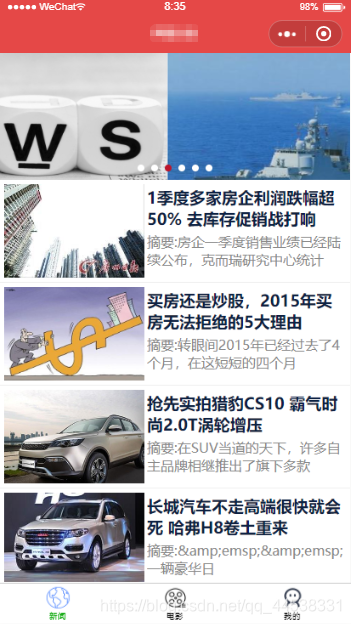
这样你就可以实现一个新闻资讯的功能啦。因为详情页还有一点小bug,这里就不展示出来了,嘿嘿。










