


效果如下图: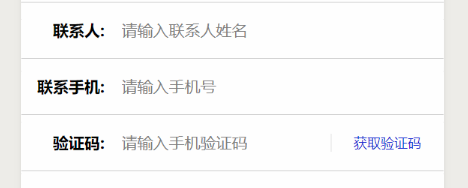
wxml部分如下:
!--验证码-- view class="mod t-name" style='position:relative' text class="key"验证码:/text input type="digit" bindinput="bindKeyInput" data-inputname="phoneCode" value='{{phoneCode}}' class="input" maxlength="100" placeholder="请输入手机验证码" / text class='logbook'/text text class='getkey' bindtap="clickGainCode"{{tipsCode}}/text /viewcss部分代码如下:
.mod{ display: flex; flex-direction: row; justify-content: space-between; align-items: center; height: 100rpx; padding: 0 20rpx; border-bottom:1rpx solid #ccc; box-sizing: border-box;}.mod .key{ font-size: 28rpx; font-weight: bold; text-align: right; width: 160rpx;}.t-name{ background-color: rgb(254,254,254); box-sizing: border-box;}.t-name .input{ width: 540rpx; font-size: 28rpx; margin-left: 30rpx;}.logbook { font-size: 24rpx; width: 150rpx; text-align: right; font-weight: bold;}.getkey { width: 200rpx; position: absolute; right: 0rpx; text-align: center; color: rgb(31, 45, 210); font-size: 24rpx; border-left: 1px solid #f0f0f0;}js的data里定义如下内容:
data: {tipsCode: "获取验证码", timeNum: 60, clikType: false, phone: null, phoneCode: null, }获取验证码方法如下:
bindKeyInput: function(e) { this.data[e.currentTarget.dataset.inputname] = e.detail.value; this.setData(this.data); }, //获取验证码时的显示时间 getTime() { var that = this; var timer = setInterval(function() { that.data.timeNum--; if (that.data.timeNum = 0) { that.setData({ tipsCode: "重新获取验证码", timeNum: timeOut, clikType: false }); clearInterval(timer); } else { that.setData({ tipsCode: "重新发送" + that.data.timeNum + "秒", }) } }, 1000) }, //输入手机号获取验证码 gainCode() { var that = this; if (this.data.phone == '' || this.data.phone == null) { wx.showToast({ title: '手机号不能为空', icon: 'none', }) } else { that.setData({ clikType: true }) if (this.data.timeNum timeOut) { } else { wx.request({ url: wxapp_api_url + '/common/getCode', header: { 'content-type': 'application/x-www-form-urlencoded' }, method: "get", data: { phone: this.data.phone }, success: function(res) { that.getTime(); } }) } } }, // 点击获取手机验证码 clickGainCode(e) { if (!this.data.clikType) { this.gainCode(); } },









