


微信小程序上传图片很简单:
//点击选择图片 chooseimage:function(){ var that = this; wx.chooseImage({ count: 9, // 默认9 sizeType: ['original', 'compressed'], // 可以指定是原图还是压缩图,默认二者都有 sourceType: ['album', 'camera'], // 可以指定来源是相册还是相机,默认二者都有 success: function(res) { that.setData({ tempFilePaths: that.data.tempFilePaths.concat(res.tempFilePaths)//在已有的基础上进行拼接 }) } }) },这里的setData里面是当你选择照片之后,再一次出发函数时候,会在原有的基础上增加照片,而不是覆盖掉,有兴趣可以看一下concat的含义
这里就选择了照片,可以显示在界面上
image class="icon-image" background-size="contain" wx:for="{{tempFilePaths}}" src='{{item}}' data-id='{{index}}' bindtap='delete'/image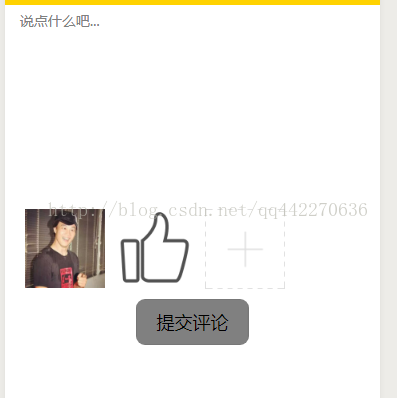
然后是多图上传的过程,这里我上传到公司oss里面,源码:
upload:function(){ for (var i = 0; i this.data.tempFilePaths.length; i++) { // console.log("000") this.upload_file(this.data.tempFilePaths[i]) } }, upload_file: function (filepath) { var that = this; wx.uploadFile({ url: 'https://***********************/imgs', header: { 'content-type': 'multipart/form-data' }, filePath: filepath, name: 'file', formData: { file: filepath }, success:function(res){ that.setData({ mes:JSON.parse(res.data), images: that.data.images.concat(JSON.parse(res.data).data.filePath)//把字符串解析成对象 }) // console.log(that.data.mes.data.filePath) // console.log(that.data.images.length + "**********") // wx.showToast({ // title: 'success', // }) }, fail: function (res) { wx.showToast({ title: '图片加载失败', }) } }) }但是当我点击提交的时候,就会出现图片为空的问题,这是因为,我们在提交的事件中肯定是先写上传图片的方法,
让后是提交的方法,但是由于微信小程序是异步,在for循环没有执行完就触发了提交的事件,这造成图片为空的问题。
我搜了很多答案出来,但是由于是接触不久,完全没看懂,什么Promis之类的,只能自己想办法,就在选择图片的时候就把图片上传了,然后返回路径:
//点击选择图片 chooseimage:function(){ var that = this; wx.chooseImage({ count: 9, // 默认9 sizeType: ['original', 'compressed'], // 可以指定是原图还是压缩图,默认二者都有 sourceType: ['album', 'camera'], // 可以指定来源是相册还是相机,默认二者都有 success: function(res) { that.setData({ tempFilePaths: that.data.tempFilePaths.concat(res.tempFilePaths)//在已有的基础上进行拼接 }) that.upload(); that.setData({ temp: that.data.tempFilePaths.length//用来解决 for 循环比 异步 快 }) } }) }, upload:function(){ for (var i = this.data.temp; i this.data.tempFilePaths.length; i++) { // console.log("000") this.upload_file(this.data.tempFilePaths[i]) } },你会发现我加了一个temp,这样就会解决问题,可以实现上传,但是删除的时候需要把上传的也删除掉,而不是单单的吧集合里面的删除掉。
源码:
// pages/comment/cmment.jsconst app = getApp()Page({ /** * 页面的初始数据 */ data: { mes:{}, content:'', tempFilePaths:[], userInfo: {}, hasUserInfo: false, canIUse: wx.canIUse('button.open-type.getUserInfo'), images:[], temp:0, infoId:'', sendtype:'' }, /** * 生命周期函数--监听页面加载 */ onLoad: function (options) { console.log(options.infoId+"infoID") this.setData({ infoId: options.infoId, sendtype: options.sendtype }) }, /** * 页面上拉触底事件的处理函数 */ onReachBottom: function () { }, confirmSubmit:function(e){ console.log(e.detail.value) }, //点击选择图片 chooseimage:function(){ var that = this; wx.chooseImage({ count: 9, // 默认9 sizeType: ['original', 'compressed'], // 可以指定是原图还是压缩图,默认二者都有 sourceType: ['album', 'camera'], // 可以指定来源是相册还是相机,默认二者都有 success: function(res) { that.setData({ tempFilePaths: that.data.tempFilePaths.concat(res.tempFilePaths)//在已有的基础上进行拼接 }) that.upload(); that.setData({ temp: that.data.tempFilePaths.length//用来解决 for 循环比 异步 快 }) } }) }, //点击删除图片 delete: function (e){ var index = e.currentTarget.dataset.id; this.data.tempFilePaths.splice(index,1) //渲染数据 this.setData({ tempFilePaths: this.data.tempFilePaths }) }, //提交评论 formBindsubmit: function (e) { // console.log(this.data.images.length + "*****"); // for (var i = 0; i this.data.images.length; i++){ // console.log(this.data.images[i]); // } console.log(this.data.infoId + "infoID不能用?") wx.request({ url: 'https://*******/saveComments', method: 'POST', header: { 'content-type': 'application/json', 'user-token': 'OXJ*****',//usertoken }, data: { relevantId: this.data.infoId, type: 1,//this.data.type, content:e.detail.value.content, images:this.data.images, }, success: function (res) { if (res.statusCode = 200) { wx.showModal({ title: '提示', content: '评论成功', }) return; } else { wx.showModal({ title: '提示', content: '评论失败', }) } } }) // wx.navigateTo({ // url: '../article/article?id= ' + this.data.infoId // }) }, upload:function(){ for (var i = this.data.temp; i this.data.tempFilePaths.length; i++) { // console.log("000") this.upload_file(this.data.tempFilePaths[i]) } }, upload_file: function (filepath) { var that = this; wx.uploadFile({ url: 'https://********/fileupload/uploader/imgs', header: { 'content-type': 'multipart/form-data' }, filePath: filepath, name: 'file', formData: { file: filepath }, success:function(res){ that.setData({ mes:JSON.parse(res.data), images: that.data.images.concat(JSON.parse(res.data).data.filePath)//把字符串解析成对象 }) // console.log(that.data.mes.data.filePath) // console.log(that.data.images.length + "**********") // wx.showToast({ // title: 'success', // }) }, fail: function (res) { wx.showToast({ title: '图片加载失败', }) } }) }}) 









