


界面分析
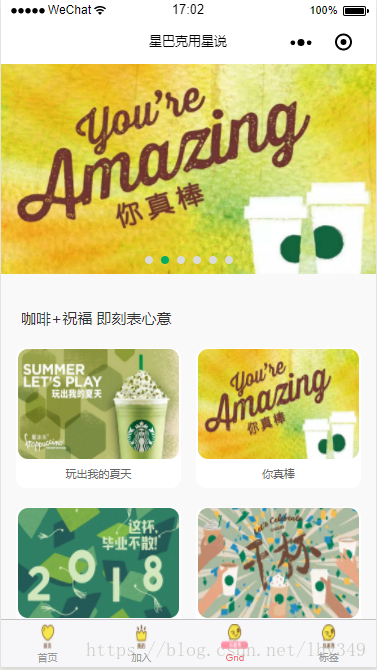
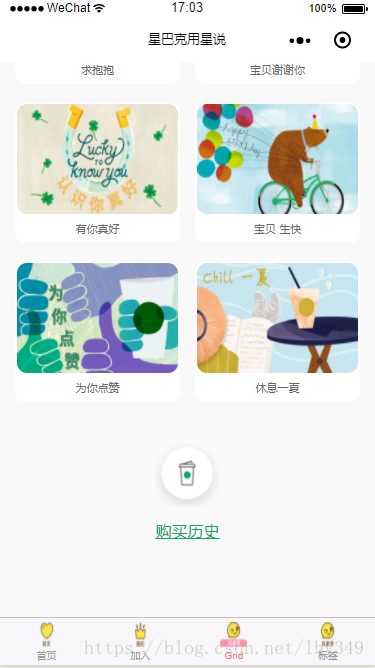
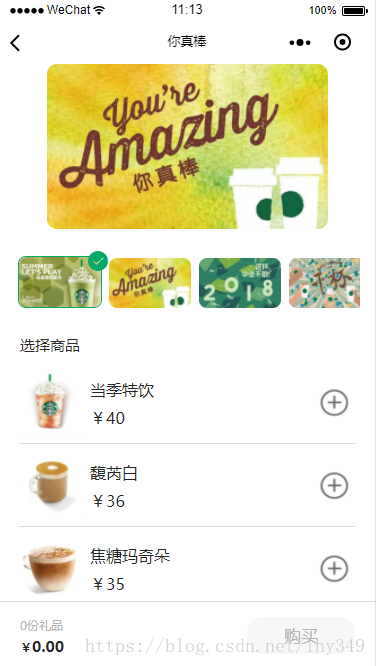
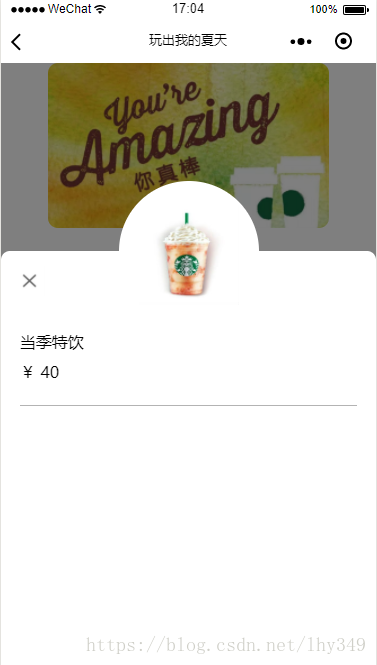
通过上面的效果图,本示例包含两个界面,第一个界面产品列表界面,包含头部Banner,中间的产品列表和底部的Bottom,第二个界面产品详情界面,包含顶部大图、横向滑动列表、商品列表和商品详情弹窗,接下来分别实现相应的界面:
首界面实现
1.布局文件
首先我们要编写首界面的布局文件grid.wxml:
swiper indicator-dots="{{indicatorDots}}" autoplay="{{autoplay}}" interval="{{interval}}" duration="{{duration}}" indicator-color='#dbdbdb' indicator-active-color='#00ae61' block wx:for="{{imgUrls}}" swiper-item image src="{{item.toppic}}" class="slide-image" bindtap='toBannerInfo' data-index='{{index}}' width="355" height="150"/ /swiper-item /block/swiperview class="pro-body" text class='pro-title'咖啡+祝福 即刻表心意/text view class='items-list' block class='pro-item' wx:for="{{proList}}" view class='pro-bodydiv' bindtap='toProListInfo' data-index='{{index}}' image class='pro-img' src='{{item.toppic}}'/ view class='pro-name'{{item.name}}/view /view /block /view view class='pro-bottom' view view bindtap='toProHistory' image class='pro-pay' src='/images/img_pay.jpg'/ /view text class='pro-history'购买历史/text /view /view/view在该布局文件中,使用微信小程序swiper控件实现首页顶部轮播图,通过该控件的相关属性,设置轮播图自动播放,显示时间,角标颜色等属性信息。
2.布局属性
编辑grid.wxss文件,用于设置grid.wxml中相关控件的属性信息。
swiper { width: 100%; height: 420rpx;}swiper image { width: 100%; height: 100%; display: block;}.pro-body { width: 100%; height: 100%; padding: 0; margin: 0; padding-top: 60rpx; background: #f9f9f9;}.pro-title { font-size: 30rpx; color: #333333; margin-left: 40rpx;}.items-list { width: 100%; display: flex; flex-flow: row wrap; align-content: flex-start; overflow: hidden; padding-left: 2%; padding-right: 2%;}.pro-item { width: 100%; height: 100%; padding: 0; margin: 0;}.pro-bodydiv { flex:0 0 44%; height: 280rpx; margin-top: 5%; margin-left: 2%; margin-right: 2%; border-radius: 20rpx; background: white; text-align: center;}.pro-img { left: 0px; top: 0px; width: 98%; height: 220rpx; margin-top: 3rpx; border-radius: 20rpx}.pro-name { font-size: 23rpx; color: #666666; position: relative; width: 100%; top: 5rpx; align-content: center; text-align: center;}.pro-bottom { width: 100%; height: 100%; margin-top: 80rpx; margin-bottom: 150rpx; text-align: center;}.pro-pay { width: 130rpx; height: 130rpx; margin-bottom: 10rpx;}.pro-history { font-size: 33rpx; color: #0ca862; text-decoration: underline; }其中,为实现Grid布局需设置items-list属性值display: flex;flex-flow: row wrap; align-content: flex-start;
3.JS文件
编辑grid.js用于控件的数据处理:
// pages/grid/grid.jsPage({ /** * 页面的初始数据 */ data: { imgUrls: [ { "toppic": "/images/img_bann1.jpg", "name": "玩出我的夏天" }, { "toppic": "/images/img_bann2.jpg", "name": "你真棒" }, { "toppic": "/images/img_bann3.jpg", "name": "毕业季" }, { "toppic": "/images/img_bann4.jpg", "name": "干杯" }, { "toppic": "/images/img_bann5.jpg", "name": "求抱抱" }, { "toppic": "/images/img_bann6.jpg", "name": "宝贝谢谢你" } ], indicatorDots: true, autoplay: true, interval: 5000, duration: 1000, proList:[ { "toppic": "/images/img_bann1.jpg", "name": "玩出我的夏天" }, { "toppic": "/images/img_bann2.jpg", "name": "你真棒" }, { "toppic": "/images/img_bann3.jpg", "name": "毕业季" }, { "toppic": "/images/img_bann4.jpg", "name": "干杯" }, { "toppic": "/images/img_bann5.jpg", "name": "求抱抱" }, { "toppic": "/images/img_bann6.jpg", "name": "宝贝谢谢你" }, { "toppic": "/images/img_bann7.jpg", "name": "有你真好" }, { "toppic": "/images/img_bann8.jpg", "name": "宝贝 生快" }, { "toppic": "/images/img_bann9.jpg", "name": "为你点赞" }, { "toppic": "/images/img_bann10.jpg", "name": "休息一夏" } ] }, /** * 生命周期函数--监听页面加载 */ onLoad: function (options) { this.getImgUrls(); }, getImgUrls: function () { var self = this; wx.request({ url: '你的服务器地址...', method: "GET", success(res) { console.log(res) self.setData({ // imgUrls: res.data.bannerList, // proList: res.data.centerList, // bottomItem: res.data.bottom }) } }) }, toBannerInfo: function (e) { var index = e.currentTarget.dataset.index; var imgUrls = this.data.imgUrls; var name = imgUrls[index].name; var toppic = imgUrls[index].toppic; // wx.showToast({ // title: name + '', // }) wx.navigateTo({ url: '/pages/gridinfo/gridinfo?name=' + name + '&toppic=' + toppic, }) }, toProListInfo: function (e) { var index = e.currentTarget.dataset.index; var proList = this.data.proList; var name = proList[index].name; var toppic = proList[index].toppic; // wx.showToast({ // title: name + '', // }) wx.navigateTo({ url: '/pages/gridinfo/gridinfo?name=' + name + '&toppic=' + toppic, }) }, toProHistory: function (e) { wx.showToast({ title: '购买历史', }) }, /** * 生命周期函数--监听页面初次渲染完成 */ onReady: function () { }, /** * 生命周期函数--监听页面显示 */ onShow: function () { }, /** * 生命周期函数--监听页面隐藏 */ onHide: function () { }, /** * 生命周期函数--监听页面卸载 */ onUnload: function () { }, /** * 页面相关事件处理函数--监听用户下拉动作 */ onPullDownRefresh: function () { }, /** * 页面上拉触底事件的处理函数 */ onReachBottom: function () { }, /** * 用户点击右上角分享 */ onShareAppMessage: function () { }})由于没有服务器相关数据,本示例使用了本地数据来实现,如果有网络数据可直接修改wx.request()方法中的url地址即可,其中
indicatorDots: true,autoplay: true,interval: 5000,duration: 1000,为顶部轮播图的相关属性信息,
wx.navigateTo({ url: '/pages/gridinfo/gridinfo?name=' + name + '&toppic=' + toppic,})为界面跳转,同时向gridinfo界面传递name和toppic参数。
至此,第一个界面首界面基本实现。
详情界面实现
1.布局文件
在Page目录下创建一个新的目录,命名为gridinfo,在该目录下创建一个Page,命名为gridinfo,编辑gridinfo.wxml布局文件,该布局标题为上个界面的商品名称,该布局文件包含一个顶部图片布局,横向图片列表布局,纵向的商品列表布局,悬浮的底部布局和商品详情的弹窗布局,布局文件如下:
!--pages/gridinfo/gridinfo.wxml--view class='pro-top' image src='{{toppic}}'//viewview class='pro-mid'scroll-view class='pro-scroll' scroll-x='true' style="white-space: nowrap; display: flex" block class='pro-lists' wx:for="{{proList}}" view class='pro-item' style='display: inline-block' bindtap='toProListInfo' data-index='{{index}}' image class="{{item.showView?'pro-itempic_show':'pro-itempic_hide'}}" src='{{item.pic}}'/ icon class="{{item.showView?'pro-selectpic_show':'pro-selectpic_hide'}}" type='success' size='20' color='#03a964'/ /view /block/scroll-view/viewview class='pro-selecttitle'text选择商品/text/viewview class='pro-productlists' view class='pro-productitem' wx:for="{{productList}}" image class='pro-productpic' bindtap='toProductInfo' data-index='{{index}}' src='{{item.pic}}'/ text class='pro-productname' bindtap='toProductInfo' data-index='{{index}}'{{item.name}}/text text class='pro-productprice' bindtap='toProductInfo' data-index='{{index}}'¥{{item.price}}/text










