


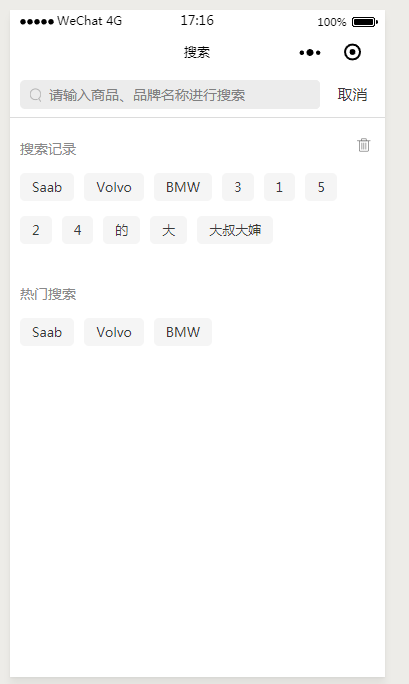
先看上面是效果图,下面开始贴代码。
html:
view class="SearchBox" view class="Search_input_top_box" view class="Search_ico_box" image class="Search_ico" src="../../images/home_icon_search_nor@2x.png"/image /view input class="Search_Input" focus="{{name_focus}}" placeholder='请输入商品、品牌名称进行搜索' bindinput='inputvalue' value="{{input_value}}"/input view class="Search_btn" bindtap='search'{{SearchText}}/view /view view class="Search_xian"/view !--搜索记录盒子-- view class="Search_record_box" view class="Search_record_text" text搜索记录/text image bindtap='delete_list' src='../../images/search_icon_del_nor@2x.png'/image /view !--记录词的盒子-- view class="History_box" view class="History-list" text wx:for="{{listarr}}" data-text="{{item}}" wx:key="key" bindtap='this_value'{{item}}/text /view /view /view !--热门搜索盒子-- view class="hot_box" view class="hot_box_text" text热门搜索/text /view !--热门词的盒子-- view class="History_box" view class="History-list" text wx:for="{{hostarr}}" data-text="{{item}}" wx:key="key" bindtap='this_value'{{item}}/text /view /view /view/viewcss:
/* pages/search/search.wxss */page { background: #ffffff;}.Search_input_top_box { margin-top: 12rpx; position: relative; margin-bottom: 16rpx;}.Search_Input { width: 600rpx; height: 58rpx; border-radius: 5px; background: #ececec; margin-left: 20rpx; display: inline-block; vertical-align: middle; padding-left: 58rpx; box-sizing: border-box; font-size: 28rpx; color: #393939;}.Search_btn { display: inline-block; width: 130rpx; height: 58rpx; font-size: 30rpx; color: #393939; /* margin-top: 18rpx; */ vertical-align: middle; line-height: 58rpx; text-align: center;}.Search_ico { width: 100%; height: 100%;}.Search_ico_box { position: absolute; left: 40rpx; top: 5rpx; width: 23rpx; height: 28rpx; z-index: 999;}.Search_xian { width: 100%; height: 1rpx; background: #dcdcdc; margin-bottom: 32rpx;}.Search_record_texttext { font-size: 28rpx; color: #898989; margin-left: 20rpx;}.hot_box_texttext { font-size: 28rpx; color: #898989; margin-left: 20rpx;}.hot_box_text { margin-top: 40rpx;}.Search_record_textimage { width: 44rpx; height: 44rpx; vertical-align: middle; float: right; margin-right: 20rpx;}.History-list { margin-left: 20rpx; margin-top: 28rpx; margin-right: 20rpx;}.History-listtext { display: inline-block; height: 56rpx; border-radius: 5px; background: #f5f5f5; max-width: 100%; padding-left: 24rpx; padding-right: 24rpx; line-height: 56rpx; font-size: 26rpx; color: #393939; margin-bottom: 20rpx; overflow: hidden; text-overflow: ellipsis; white-space: nowrap; box-sizing: border-box; margin-right: 20rpx;}js:
Page({ /** * 页面的初始数据 */ data: { inpuVal: "",//input框内值 listarr: [],//创建数组 SearchText: '取消',//按钮变动值 keydown_number: 0,//检测input框内是否有内容 input_value: "",//value值 hostarr: [],//热门搜索接收请求存储数组 name_focus:true//获取焦点 }, //取值input判断输入框内容修改按钮 inputvalue: function (e) { this.setData({ inputVal: e.detail.value }) if (e.detail.cursor != 0) { this.setData({ SearchText: "搜索", keydown_number: 1 }) } else { this.setData({ SearchText: "取消", keydown_number: 0 }) } }, //搜索方法 search: function () { if (this.data.keydown_number == 1) { let This = this; //把获取的input值插入数组里面 let arr = this.data.listarr; console.log(this.data.inputVal) console.log(this.data.input_value) //判断取值是手动输入还是点击赋值 if (this.data.input_value == ""){ // console.log('进来第er个') // 判断数组中是否已存在 let arrnum = arr.indexOf(this.data.inputVal); console.log(arr.indexOf(this.data.inputVal)); if (arrnum != -1) { // 删除已存在后重新插入至数组 arr.splice(arrnum,1) arr.unshift(this.data.inputVal); }else{ arr.unshift(this.data.inputVal); } } else { console.log('进来第一个') let arr_num = arr.indexOf(this.data.input_value); console.log(arr.indexOf(this.data.input_value)); if (arr_num != -1) { arr.splice(arr_num, 1) arr.unshift(this.data.input_value); } else { arr.unshift(this.data.input_value); } } console.log(arr) //存储搜索记录 wx.setStorage({ key: "list_arr", data: arr }) //取出搜索记录 wx.getStorage({ key: 'list_arr', success: function (res) { This.setData({ listarr: res.data }) } }) this.setData({ input_value: '', }) } else { console.log("取消") } }, //清除搜索记录 delete_list: function () { //清除当前数据 this.setData({ listarr: [] }); //清除缓存数据 wx.removeStorage({ key: 'list_arr' }) }, //点击赋值到input框 this_value:function(e){ this.setData({ name_focus: true }) let value = e.currentTarget.dataset.text; this.setData({ input_value:value, SearchText: "搜索", keydown_number: 1 }) }, /** * 生命周期函数--监听页面加载 */ onLoad: function (options) { let This = this; //设置当前页标题 wx.setNavigationBarTitle({ title: '搜索' }); //读取缓存历史搜索记录 wx.getStorage({ key: 'list_arr', success: function (res) { This.setData({ listarr: res.data }) } }) //请求热门搜索 wx.request({ url: 'http://192.168.1.222:8081/StaticPage/list.json', //仅为示例,并非真实的接口地址 method: 'GET', data: {}, success: function (res) { This.setData({ hostarr: res.data.History }) }, fail: function (err) { console.log(err) } }) },)}









