


微信小程序同声传译 Face2FaceTranslator 开发
腾讯开源了微信小程序的同声传译插件 Face2FaceTranslator ;开发者可以在小程序使用同声传译的功能,以下是本人在项目中做的 demo;我们的小程序是用美团的 mpvue 做的。
Face2FaceTranslator github链接(官方demo)
Face2FaceTranslator 官方开发文档
第一步:配置微信公众平
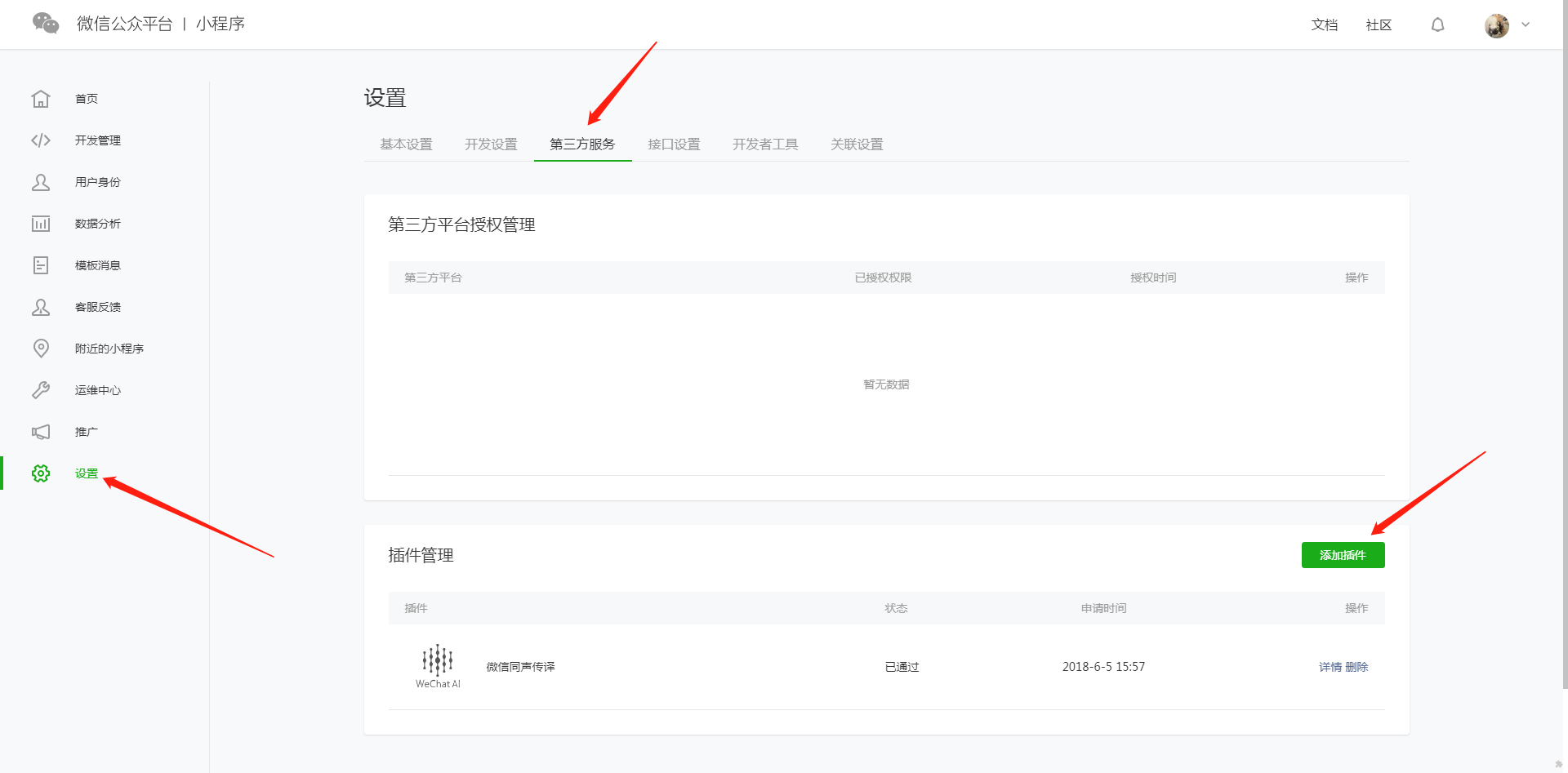
首先,需要在微信公众平台配置,以下是配置步骤:
打开微信公众平台,点击设置 = 第三方服务 = 添加插件
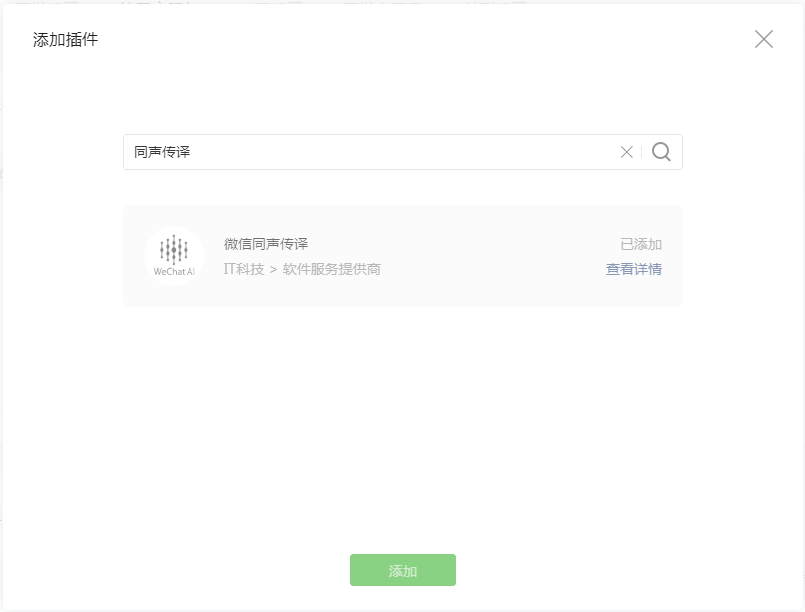
搜索同声传译,点击添加:
第二步:在代码里添加功能:
以下代码为关键部分代码,因为用 mpvue 开发,所以为 vue 编程风格,开发者可以根据自己情况进行修改。
首先要在 main.js 中配置
// main.js 需要在配置文件中配置插件export default { config: { pages: [ '^pages/imSceneDoctor/imSceneDoctor', ], window: { backgroundTextStyle: 'light', backgroundColor: "#000", navigationBarBackgroundColor: '#ffffff', navigationBarTitleText: '同声传译 demo', navigationBarTextStyle: 'black' }, plugins: { "WechatSI": { "version": "0.0.6", "provider": "wx069ba97219f66d99" } } }}然后在开发的文件使用 (imSceneDoctor.vue 中关键的代码)。
// imSceneDoctor.vuetemplate ul class="footer-box-bottom" li class="bottom-item" @touchstart='streamRecord(0)' @touchend='streamRecordEnd()' figure class="bottom-item-content" img class="bottom-item-image" src="https://m.allinmed.cn/static/image/imScene/picture@2x.png" width="350" height="234"/ figcaption class="bottom-item-description"智能语音/figcaption /figure /li li class="bottom-item" @touchstart='streamRecord(1)' @touchend='streamRecordEnd()' figure class="bottom-item-content" img class="bottom-item-image" src="https://m.allinmed.cn/static/image/imScene/pictures@2x.png" width="350" height="234"/ figcaption class="bottom-item-description"中=英/figcaption /figure /li li class="bottom-item" @touchstart='streamRecord(2)' @touchend='streamRecordEnd()' figure class="bottom-item-content" img class="bottom-item-image" src="https://m.allinmed.cn/static/image/imScene/pictures@2x.png" width="350" height="234"/ figcaption class="bottom-item-description"英=中/figcaption /figure /li /ul/templatescript type="text/ecmascript-6" // 获取**全局唯一**的语音识别管理器**recordRecoManager** const plugin = requirePlugin("WechatSI"); const manager = plugin.getRecordRecognitionManager(); export default { data() { return { currentTranslateVoice: '', // 当前播放语音路径 sendTextContent:'', // 展示的语音内容 connectNum: 0, recordType:0, // 录音类型:0,中文录音;1,中文翻译英文;2,英文翻译中文 } }, onLoad() { this.getRecordAuth(); }, mounted() { this.initRecord(); }, methods: { // 权限询问 getRecordAuth () { wx.getSetting({ success(res) { console.log("succ") console.log(res) if (!res.authSetting['scope.record']) { wx.authorize({ scope: 'scope.record', success() { // 用户已经同意小程序使用录音功能,后续调用 wx.startRecord 接口不会弹窗询问 console.log("succ auth") }, fail() { console.log("fail auth") } }) } else { console.log("record has been authed") } }, fail(res) { console.log("fail") console.log(res) } }) }, /** * 初始化语音识别回调 * 绑定语音播放开始事件 */ initRecord: function() { //有新的识别内容返回,则会调用此事件 manager.onRecognize = (res) = { let currentData = Object.assign({}, this.sendTextContent, { text: res.result, }) this.sendTextContent = res.result; } // 识别结束事件 manager.onStop = (res) = { let text = res.result console.log('识别结束'); console.log(res); this.sendTextContent = res.result; if (this.recordType) { this.translateText(res.result) } } // 识别错误事件 manager.onError = (res) = { console.log(res); } // 语音播放开始事件 wx.onBackgroundAudioPlay(res={ const backgroundAudioManager = wx.getBackgroundAudioManager() let src = backgroundAudioManager.src this.currentTranslateVoice = src; }) }, /** * 按住按钮开始语音识别 */ streamRecord: function(type) { // 先清空背景音 let param; wx.stopBackgroundAudio(); this.recordType = type; if (type == 2) { param = 'en_US'; } else { param = "zh_CN"; } manager.start({ lang: param, }) }, /** * 松开按钮结束语音识别 */ streamRecordEnd: function(e) { manager.stop() }, /** * 翻译 */ translateText: function(text) { let lfrom = this.recordType === 1 ? 'zh_CN' : 'en_US'; let lto = this.recordType === 1 ? 'en_US':'zh_CN'; plugin.translate({ lfrom: lfrom, lto: lto, content: text, tts: true, success: (resTrans)={ console.log(resTrans); let passRetcode = [ 0, // 翻译合成成功 -10006, // 翻译成功,合成失败 -10007, // 翻译成功,传入了不支持的语音合成语言 -10008, // 翻译成功,语音合成达到频率限制 ] if(passRetcode.indexOf(resTrans.retcode) = 0 ) { this.sendTextContent = resTrans.result; } else { console.warn("翻译失败", resTrans, item) } }, fail: function(resTrans) { console.error("调用失败",resTrans, item) }, complete: resTrans = { wx.hideLoading() } }) }, } }/script备注:
以上只是个小 demo,并且正常运行,然而并没有考虑多种边界情况,如果开发者需要在项目正常使用,也请参考官方demo(上方有 github 地址)。










