第15课 微信小程序behavior组件间的数据共享:
先看看目录结构:
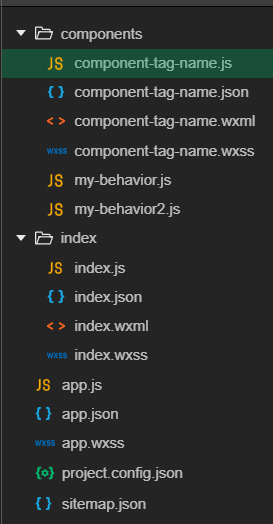
我们先编写一下两my-behavior的代码:
这里是my-behavior.js的代码://behavior内还可以嵌套引入behavior
// my-behavior.js//引入behaviors2就相当于把behaviors2里面的方法与数据都加到这里面var myBehavior2 = require('my-behavior2')module.exports = Behavior({ behaviors: [myBehavior2], properties: { myBehaviorProperty: { type: String } }, data: { myBehaviorData: '这是myBehavior内的数据' }, attached: function () { }, methods: { myBehaviorMethod: function () { console.log('这是执行myBehavior内的方法') } }})这里是my-behavior2.js的代码:
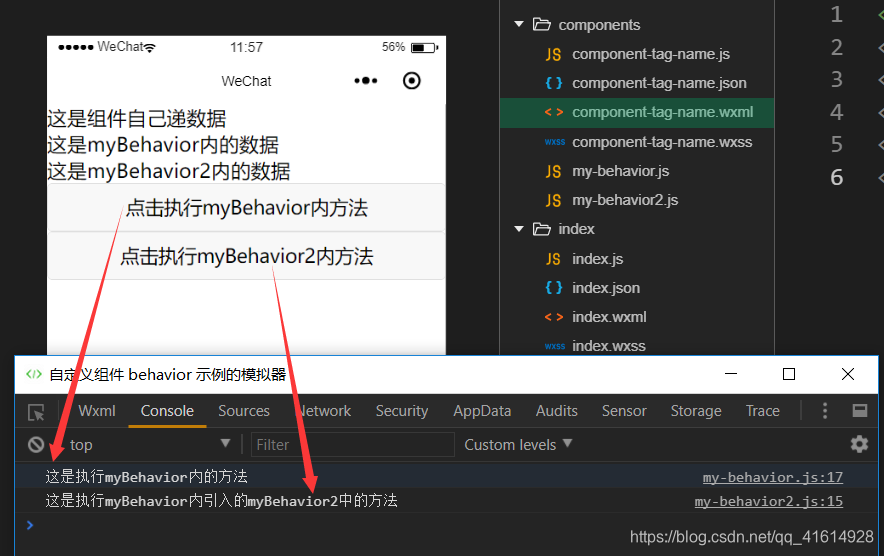
// my-behavior2.jsmodule.exports = Behavior({ behaviors: [], properties: { myBehaviorProperty2: { type: String } }, data: { myBehaviorData2: '这是myBehavior2内的数据' }, attached: function () { }, methods: { myBehaviorMethod2: function () { console.log('这是执行myBehavior内引入的myBehavior2中的方法') } }})下面是组件内代码:
组件component-tag-name.js内代码:
// components/component-tag-name.js//引入behaviors 实现组件间代码共享var myBehavior = require('my-behavior')Component({ behaviors: [myBehavior], //挂载上Behavior即可使用其里面的方法与数据 data: { me: '这是组件自己递数据' }, methods: { }})组件component-tag-name.wxml内代码:
<!-- 组件模板 --><view>{{me}}</view><view>{{myBehaviorData}}</view><view>{{myBehaviorData2}}</view><button bindtap="myBehaviorMethod">点击执行myBehavior内方法</button><button bindtap="myBehaviorMethod2">点击执行myBehavior2内方法</button>组件component-tag-name.json内代码:
{ "component": true, "usingComponents": {}}index.wxml内直接写上组件:
先在index.json内引入组件:
{ "usingComponents": { "my-component": "/components/component-tag-name" }}index.wxml写上即可
<!-- 引用组件的页面模版 --><my-component></my-component>运行效果如下: