


话不多说,美图镇楼:
下面先来看看效果
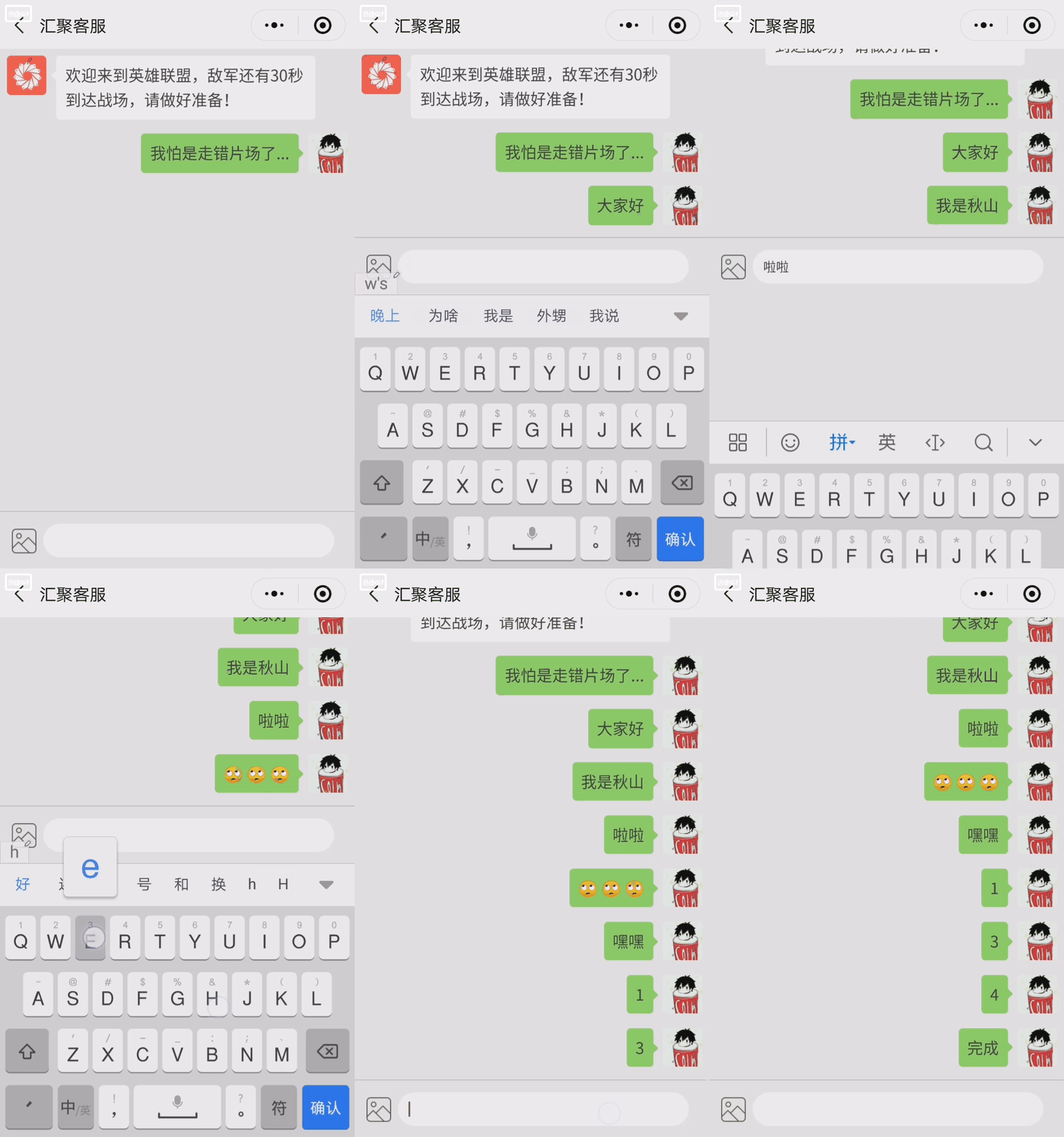
为实现这样的效果,首先要解决两个问题:
1.点击输入框弹出软键盘后,将已有的少许聊天内容弹出,导致看不到的问题;
2.键盘弹出或收起时,聊天消息没有自动滚到最底部。
首先解决第二个问题,自动滚动到最底部,这很简单,这里提供三种方法(推荐第三种):
1.计算每条消息的最大高度,设置scroll-top=(单条msg最大高度 * msg条数)px。
2.用 将展示msg的目标scroll-view包裹,
通过js获取到该view的实际高度:
var that = this;var query = wx.createSelectorQuery();query.select('.scrollMsg').boundingClientRect(function(rect) {that.setData({scrollTop: rect.height+'px';});}).exec();3.(推荐)将所有msg都编号如:msg-0,msg-1,msg-2… 直接锁定最后一条msg,滚动到那里。
在scroll-view中添加:scroll-into-view='{{toView}}',
在wx:for后面添加:wx:for-index="index",
在每个msg布局中添加:id='msg-{{index}}',
最后直接:
this.setData({toView: 'msg-' + (msgList.length - 1)})到这里第二个问题解决了,那么我们回过来解决第一个问题:
(点击输入框弹出软键盘后,将已有的少许聊天内容弹出,导致看不到的问题)
1.首先我们需要将input的自动向上推给关掉,这里有个坑:
在input组件中添加:adjust-position='{{false}}',
而不是:adjust-position='false'。
这么做虽然不再向上推,但却导致了软键盘弹起时,会遮挡屏幕下部分的消息。
2.如何解决软键盘弹起时,会遮挡屏幕下部分的消息?
当软键盘弹起时,将scroll-view的高度缩短至软键盘遮挡不到的屏幕上方部分,当软键盘收起时,再将scroll-view的高度还原,这样解决了遮挡问题。
提示:
input中的bindfocus='focus'可获取软键盘高度并监听软键盘弹起,bindblur='blur'可监听软键盘收起,var windowHeight = wx.getSystemInfoSync().windowHeight;可获得屏幕高度。
scrollHeight(滚动条高度) = windowHeight(屏幕高度) - 软键盘高度;
最后将input组件放在软键盘上面就完成了。
|
|
|
|
|
|
|
各位要不要代码?
|
|
|
|
|
|
|
contact.js:
// pages/contact/contact.jsconst app = getApp();var inputVal = '';var msgList = [];var windowWidth = wx.getSystemInfoSync().windowWidth;var windowHeight = wx.getSystemInfoSync().windowHeight;var keyHeight = 0;/** * 初始化数据 */function initData(that) { inputVal = ''; msgList = [{ speaker: 'server', contentType: 'text', content: '欢迎来到英雄联盟,敌军还有30秒到达战场,请做好准备!' }, { speaker: 'customer', contentType: 'text', content: '我怕是走错片场了...' } ] that.setData({ msgList, inputVal })}/** * 计算msg总高度 */// function calScrollHeight(that, keyHeight) {// var query = wx.createSelectorQuery();// query.select('.scrollMsg').boundingClientRect(function(rect) {// }).exec();// }Page({ /** * 页面的初始数据 */ data: { scrollHeight: '100vh', inputBottom: 0 }, /** * 生命周期函数--监听页面加载 */ onLoad: function(options) { initData(this); this.setData({ cusHeadIcon: app.globalData.userInfo.avatarUrl, }); }, /** * 生命周期函数--监听页面显示 */ onShow: function() { }, /** * 页面相关事件处理函数--监听用户下拉动作 */ onPullDownRefresh: function() { }, /** * 页面上拉触底事件的处理函数 */ onReachBottom: function() { }, /** * 获取聚焦 */ focus: function(e) { keyHeight = e.detail.height; this.setData({ scrollHeight: (windowHeight - keyHeight) + 'px' }); this.setData({ toView: 'msg-' + (msgList.length - 1), inputBottom: keyHeight + 'px' }) //计算msg高度 // calScrollHeight(this, keyHeight); }, //失去聚焦(软键盘消失) blur: function(e) { this.setData({ scrollHeight: '100vh', inputBottom: 0 }) this.setData({ toView: 'msg-' + (msgList.length - 1) }) }, /** * 发送点击监听 */ sendClick: function(e) { msgList.push({ speaker: 'customer', contentType: 'text', content: e.detail.value }) inputVal = ''; this.setData({ msgList, inputVal }); }, /** * 退回上一页 */ toBackClick: function() { wx.navigateBack({}) }})contact.wxml:
<!--pages/contact/contact.wxml--><view> <scroll-view scroll-y scroll-into-view='{{toView}}' style='height: {{scrollHeight}};'> <!-- <view class='scrollMsg'> --> <block wx:key wx:for='{{msgList}}' wx:for-index="index"> <!-- 单个消息1 客服发出(左) --> <view wx:if='{{item.speaker=="server"}}' id='msg-{{index}}' style='display: flex; padding: 2vw 11vw 2vw 2vw;'> <view style='width: 11vw; height: 11vw;'> <image style='width: 11vw; height: 11vw; border-radius: 10rpx;' src='../../images/contact_member.png'></image> </view> <view style='width: 4vw; height: 11vw; margin-left: 0.5vw; display: flex; align-items: center; z-index: 9;'> <image style='width: 4vw;' src='../../images/left_msg.png' mode='widthFix'></image> </view> <view class='leftMsg'>{{item.content}}</view> </view> <!-- 单个消息2 用户发出(右) --> <view wx:else id='msg-{{index}}' style='display: flex; justify-content: flex-end; padding: 2vw 2vw 2vw 11vw;'> <view class='rightMsg'>{{item.content}}</view> <view style='width: 4vw; height: 11vw; margin-right: 0.5vw; display: flex; align-items: center; z-index: 9;'> <image style='width: 4vw;' src='../../images/right_msg.png' mode='widthFix'></image> </view> <view style='width: 11vw; height: 11vw;'> <image style='width: 11vw; height: 11vw; border-radius: 10rpx;' src='{{cusHeadIcon}}'></image> </view> </view> </block> <!-- </view> --> <!-- 占位 --> <view style='width: 100%; height: 18vw;'></view> </scroll-view> <view class='inputRoom' style='bottom: {{inputBottom}}'> <image style='width: 7vw; margin-left: 3.2vw;' src='../../images/pic_icon.png' mode='widthFix'></image> <input bindconfirm='sendClick' adjust-position='{{false}}' value='{{inputVal}}' confirm-type='send' bindfocus='focus' bindblur='blur'></input> </view></view>contact.wxss:
/* pages/contact/contact.wxss */page { background-color: #f1f1f1;}.inputRoom { width: 100vw; height: 16vw; border-top: 1px solid #cdcdcd; background-color: #f1f1f1; position: fixed; bottom: 0; display: flex; align-items: center; z-index: 20;}input { width: 76vw; height: 9.33vw; background-color: #fff; border-radius: 40rpx; margin-left: 2vw; padding: 0 3vw; font-size: 28rpx; color: #444;}.leftMsg { font-size: 35rpx; color: #444; line-height: 7vw; padding: 2vw 2.5vw; background-color: #fff; margin-left: -1.6vw; border-radius: 10rpx; z-index: 10;}.rightMsg { font-size: 35rpx; color: #444; line-height: 7vw; padding: 2vw 2.5vw; background-color: #96EB6A; margin-right: -1.6vw; border-radius: 10rpx; z-index: 10;}到此就结束了,希望能帮到各位,记得拿走时请扣6
有问题在评论区留言 或 加QQ群104420392 找我










