


微信小程序开发交流qq群 173683895
 承接微信小程序开发。扫码加微信。
小程序 WebSocket 常见问题:(本文已解决的)
1.自动断开链接,重连但是只能存在两个 WebSocket 的问题。
---1兼容情况:1.1 正常聊天过一段时间 WebSocket 自动断开后重新链接,并且保存之前的聊天记录
---1兼容情况:1.2 在用户黑屏但是没退出小程序过一段时间时 WebSocket 自动断开链接后重新链接,并且保存之前的聊天记录
---1兼容情况:1.3 在聊天室的页面,点击右上角返回按钮,页面会自动执行卸载,这个时候 WebSocket 是没有销毁的,再次进入时会同时存在两个WebSocket,第三次进入就会报错了(只能同时存在两个 WebSocket )。
解决方案:因为需要兼容的情况比较多,解决方案可详见代码。具体思路就是,添加一个自动重连的开关。(必须WebSocket 销毁以后才能新建WebSocket )根据情况判断是否重连 WebSocket 。
2. 录音成功,但是发送给后端接收不到语音文件。
解决办法:在已录制完指定帧大小的事件回调函数中, 使用 wx.arrayBufferToBase64(res.frameBuffer),把得到的arrayBuffer 转为 Base64 再传给后端,同时设置 signType: 'BASE64'。
3.录音传输给后端时,后端BASE64 解码失败的问题。
解决方案:与后端确认 录音文件的采样率、编码码率、音频格式、帧大小是否一致。
推荐设置:
var recorder = wx.getRecorderManager(); const options = { duration: 10000, //指定录音的时长,单位 ms sampleRate: 16000, //采样率 numberOfChannels: 1, //录音通道数 encodeBitRate: 24000, //编码码率 format: 'mp3', //音频格式,有效值 aac/mp3 frameSize: 12, //指定帧大小,单位 KB } recorder.start(options) //开始录音4.如何自动把页面聚焦在最新的聊天信息
效果图: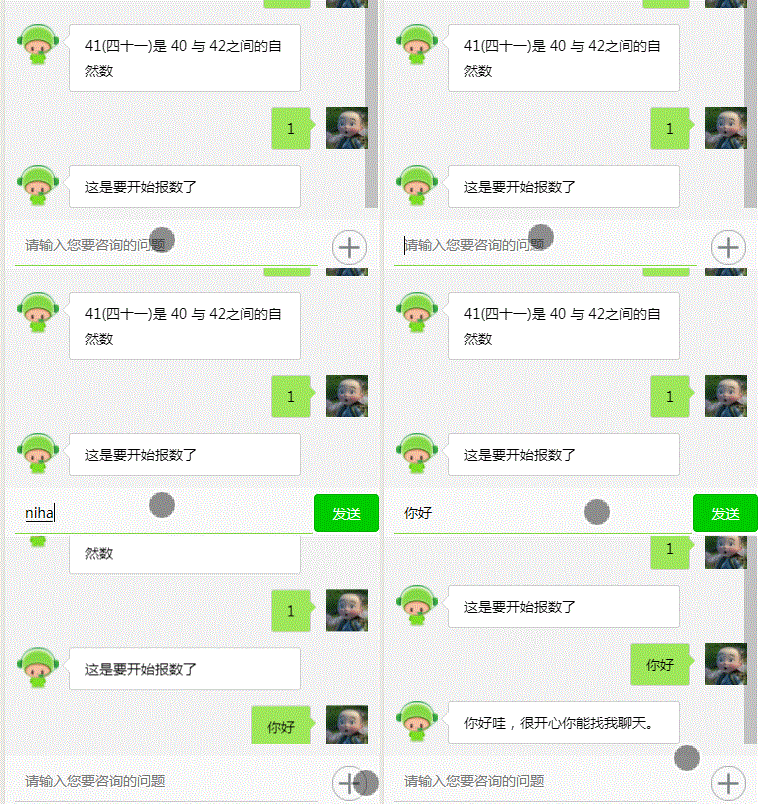
解决方案:在聊天信息的list 赋值成功后执行一次公共页面聚焦的方法:
// 公共聚焦方法,方法比较笨,但是过度效果平滑流畅 bottom: function() { var that = this; this.setData({ scrollTop: 100000 }) },//调用示例: this.setData({ allContentList: that.data.allContentList, }) this.bottom();5.用户输入空格并发送,这个时候聊天冒泡框样式肯定会变形,因为没有空格行高。
解决方案: css 设置冒泡框最低高度 ---- min-height: 80rpx;(数值根据需求自定义)
6.聊天冒泡框的小三角形怎么实现?三角形还想要给它边框,又如何实现?
效果图: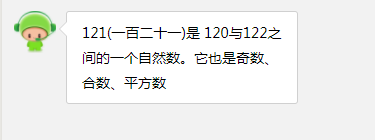
实现步骤:设置文字冒泡框的样式-在文字冒泡框内新建一个盒子设置相对定位,里面放一个em和一个span标签,设置绝对定位,利用边框设置透明色,示例代码:
<view class='new_txt_ai'> <view class='arrow'> <em></em> <span></span> </view> <view class='ai_content'> 121(一百二十一)是 120与122之间的一个自然数。它也是奇数、合数、平方数 </view></view>.new_txt_ai { width: 460rpx; border-radius: 7rpx; left: 20rpx; background-color: #fff; position: relative; border: 1px solid #d0d0d0; float: left;}.new_txt_ai .arrow { position: relative; width: 40rpx; left: -30rpx;}.new_txt_ai .arrow em { position: absolute; border-style: solid; border-width: 15rpx; top: 20rpx; border-color: transparent #d0d0d0 transparent transparent;}.new_txt_ai .arrow span { position: absolute; top: 20rpx; border-style: solid; border-width: 15rpx; border-color: transparent #fff transparent transparent; left: 2rpx;}.ai_content { word-break: break-all; padding: 17rpx 30rpx 17rpx 30rpx;}还有很多常见问题就不多啰嗦了,直接上代码吧。因业务原因,发送图片和录音功能的代码暂时注释,注释打开可用。
聊天室实现效果图:
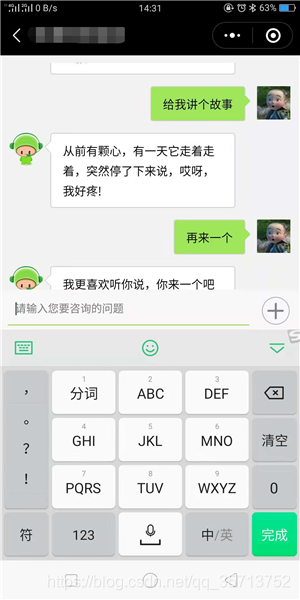
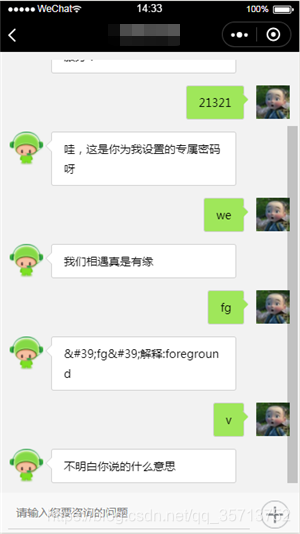
全部相关代码,代码逻辑比较多但是思路清晰,可塑性较强。提供借鉴参考。
js源码
// pages/index/to_news/to_news.js var app = getApp();var util = require("../../utils/util.js");var socketOpen = false;var uuid = '', time_ = "1";var recorder = wx.getRecorderManager();const innerAudioContext = wx.createInnerAudioContext() //获取播放对象var frameBuffer_Data, session, SocketTask, string_base64, open_num = 0, submitTo_string, onUnload_num = 0, autoRestart, onHide_s = false;Page({ data: { listCustmerServiceBanner: [], indicatorDots: false, autoplay: false, interval: 5000, duration: 1000, user_input_text: '', //用户输入文字 inputValue: '', time: '', returnValue: '', if_send: false, add: true, cross: false, // is_my: true, text: '12432' allContentList: [{}, { is_ai: [] }], num: 0 }, // 页面加载 onLoad: function(e) { autoRestart = true; //是否重启 console.log('onLoad') if (e && e.ofOperatorType) { this.setData({ ofOperatorType: e.ofOperatorType }) } else { this.setData({ ofOperatorType: 2 }) } // if (onUnload_num < 1) { this.webSocket_open() // } }, onShow: function(e) { onHide_s = false }, onHide: function() { autoRestart = false; onHide_s = true console.log('onHide') }, onUnload: function() { onUnload_num++; autoRestart = false; console.log('onUnload') this.close(); }, // 页面加载完成 onReady: function() { var that = this; this.on_recorder(); this.bottom() }, // 创建websocket webSocket_open: function () { var that = this; console.log('开始创建') // 创建Socket SocketTask = wx.connectSocket({ url: app.webS_url, header: { 'content-type': 'application/json' }, method: 'post', success: function(res) { console.log('WebSocket连接创建', res) }, fail: function(err) { wx.showToast({ title: '网络异常!', }) console.log(err) }, }) that.initSocket(); }, // 提交文字 submitTo: function(e) { submitTo_string =false console.log('提交文字') console.log("SocketTask", SocketTask) let that = this; if (that.data.inputValue == "") { return; } var data = { cmd: 1, type: 1, signType: 'BASE64', session: session, body: that.data.inputValue, } console.log('提交文字data:', socketOpen, data) if (socketOpen) { // 如果打开了socket就发送数据给服务器 sendSocketMessage(data) if (session != undefined && session != null) { this.data.allContentList.push({ is_my: true, text: this.data.inputValue }); this.setData({ allContentList: this.data.allContentList, if_send: false, inputValue: '' }) } that.bottom() } else { submitTo_string=true; this.webSocket_open() } }, // socket监听事件 initSocket: function () { var that = this; console.log("aaa", SocketTask) SocketTask.onOpen(res => { socketOpen = true; open_num++ if (session == undefined || session == null) { // repositoryType = 1 联通 2 移动 3 电信 // ofTypeint进入客服小程序类型 1, 小程序跳转 2,搜索 // ofOperatorTypeint否运营商类型1,移动 2,联通 3,电信 // wy_appidString否小程序appid if (app.appid) { var data = { cmd: 2, ofType: 1, wy_appid: app.appid } } else { var data = { cmd: 2, ofType: 2, ofOperatorType: that.data.ofOperatorType // ofOperatorType: 1 } } sendSocketMessage(data) } console.log('监听 WebSocket 连接打开事件。', res) }) SocketTask.onClose(onClose => { console.log('监听 WebSocket 连接关闭事件。', onClose) session = null; SocketTask = false; socketOpen = false; // if (!autoRestart && onHide_s) { // this.webSocket_open() // } // if (autoRestart) { // this.webSocket_open() // } }) SocketTask.onError(onError => { console.log('监听 WebSocket 错误。错误信息', onError) session = null; }) SocketTask.onMessage(onMessage => { var onMessage_data = JSON.parse(onMessage.data); console.log("onMessage:", onMessage_data) // if (onMessage_data == 'session为空') { // if (submitTo_string) { // console.log('submitTo_string2222222222') // that.submitTo() // } // return; // } if (onMessage_data.minipTitle) { wx.setTopBarText({ text: onMessage_data.minipTitle, }) } let is_ai_arr = onMessage_data.body; // 登录。默认发送一条消息给用户展示,不展示已解决未解决 if (onMessage_data.cmd == 3) { that.session_pro = new Promise(function (resolve) { session = onMessage_data.session; if (submitTo_string) { console.log('submitTo_string11111111') that.submitTo() } resolve(session) }) var messageTime = util.formatTime(onMessage_data.messageTime); // if (open_num < 2){ if (is_ai_arr.length == 1) { that.data.allContentList.push({ is_ai: is_ai_arr, solve_show: false, show_answer: true, messageTime: messageTime }); } else { console.log('is_ai_arr:', is_ai_arr) that.data.allContentList.push({ is_ai: is_ai_arr, show_answer: false, solve_show: false, messageTime: messageTime }); } // } this.setData({ listCustmerServiceBanner: onMessage_data.listCustmerServiceBanner, staffServicePhone: onMessage_data.staffServicePhone, allContentList: that.data.allContentList }) } else { // 正常接收消息 uuid = onMessage_data.messageRecordUuid; var messageTime; time_ = onMessage_data.messageTime; if (time_ + 1000 * 60 * 10 > onMessage_data.messageTime) { messageTime = 0; } else { messageTime = util.formatTime(onMessage_data.messageTime); } let arr_list = that.data.allContentList if (is_ai_arr.length == 1) { arr_list.push({ show_answer: true, is_ai: is_ai_arr, messageTime: messageTime, solve_show: true, no_problem: false, yse_problem: false }); } else { arr_list.push({ show_answer: false, is_ai: is_ai_arr, messageTime: messageTime, solve_show: true, no_problem: false, yse_problem: false }); } that.setData({ allContentList: arr_list }) } that.bottom(); }) }, // 点击轮播图 swiper_item_click: function (e) { var id = e.target.id console.log(id); var item_banners = this.data.listCustmerServiceBanner[id]; var page = item_banners.page; // 类型1、自己小程序、2、其它小程序 3、H5 switch (item_banners.type) { case 1: wx.navigateTo({ url: page, }) break; case 2: wx.navigateToMiniProgram({ appId: item_banners.appid, path: page, extraData: {}, envVersion: 'release', success(res) { // 打开成功 } }) break; case 3: wx.navigateTo({ url: web + '?url=' + page, }) break; } }, // 关闭 close: function (e) { if (SocketTask) { SocketTask.close(function (close) { console.log('关闭 WebSocket 连接。', close) }) } }, // 解决问题 is_problem: function(e) { console.log('e.target.id', e.currentTarget.dataset.id) console.log('item', e.currentTarget.dataset.item) var id = e.currentTarget.dataset.id; var item = e.currentTarget.dataset.item; // id=1 已解决 0 未解决 var yse_problem = this.data.allContentList[item].yse_problem; var no_problem = this.data.allContentList[item].no_problem; if (yse_problem || no_problem) { console.log(12) return } else { if (id == 1) { this.setData({ ['allContentList[' + item + '].yse_problem']: true }) } else if (id == 0) { this.setData({ ['allContentList[' + item + '].no_problem']: true }) } console.log(this.data.allContentList[item].yse_problem, this.data.allContentList[item].no_problem) this.bottom(); } var url = app.httpUrl + '/v1/userFeedbackResult.do' var data = { 'session': app.http_session, 'type': id, 'uuid': uuid } console.log('userFeedbackResult提交的数据:', data) util.request(url, 'POST', data, '', function(res) { console.log('userFeedbackResult返回的数据:', res.data) }, function(err) { console.log(err) }) }, // 跳转小程 minip: function(e) { console.log(e) wx.navigateToMiniProgram({ appId: e.target.dataset.appid, path: e.target.dataset.path, extraData: {}, envVersion: 'develop', success(res) { // 打开成功 } }) }, // 跳转WEB link: function(e) { console.log(e.target.id) wx.navigateTo({ url: '../web/web?link=' + e.target.id, }) }, // 点击加号 add_icon_click: function(e) { console.log(e.target.id) // e.target.id == 1 点击加号 ==2 点击 X if (e.target.id == 2) { this.setData({ add: true, cross: false, input_bottom: 0 }) } else if (e.target.id == 1) { this.setData({ add: false, cross: true, input_bottom: 240 }) } }, // 自动添加问题答案 add_question: function(e) { var that = this; let answer = e.currentTarget.dataset.answer; let messageTime = e.currentTarget.dataset.messagetime; let question = e.currentTarget.dataset.question; console.log('question:', question, 'answer:', answer, 'messageTime', messageTime); this.data.allContentList.push({ is_my: true, text: question }); this.setData({ allContentList: this.data.allContentList, if_send: false, inputValue: '' }) that.bottom(); setTimeout(function() { that.data.allContentList.push({ is_ai: [{ answer: answer, type: 1 }], solve_show: true, show_answer: true, messageTime: false, text: question }); that.setData({ allContentList: that.data.allContentList, }) that.bottom(); }, 1000) }, // 拨打电话 phone_click: function() { var that = this; wx.showModal({ title: '', content: '是否拨打' + that.data.staffServicePhone + '人工客服电话', success: function(res) { if (res.confirm) { wx.makePhoneCall({ phoneNumber: that.data.staffServicePhone //仅为示例,并非真实的电话号码 }) } else if (res.cancel) { console.log('用户点击取消') } } }) }, // 输入框 bindKeyInput: function(e) { console.log(e.detail.value) if (e.detail.value == "") { this.setData({ if_send: false, inputValue: e.detail.value }) } else { this.setData({ if_send: true, inputValue: e.detail.value }) } }, // 获取到焦点 focus: function(e) { var that = this; console.log(e.detail.height) this.setData({ focus: true, add: true, cross: false, input_bottom: e.detail.height }) }, // 失去焦点 no_focus: function(e) { if (this.data.cross) { this.setData({ focus: false, input_bottom: 240, }) } else { this.setData({ focus: false, input_bottom: 0 }) } }, // 获取hei的id节点然后屏幕焦点调转到这个节点 bottom: function() { var that = this; this.setData({ scrollTop: 100000 }) }, hide_bg: function() { this.setData({ block: false }) }, // 点击录音事件 my_audio_click: function(e) { console.log('my_audio_click执行了', e) var index = e.currentTarget.dataset.id; console.log('url地址', this.data.allContentList[index].audio); innerAudioContext.src = this.data.allContentList[index].audio innerAudioContext.seek(0); innerAudioContext.play(); }, // 手指点击录音 voice_ing_start: function() { var that = this; this.setData({ voice_ing_start_date: new Date().getTime(), //记录开始点击的时间 }) const options = { duration: 10000, //指定录音的时长,单位 ms sampleRate: 16000, //采样率 numberOfChannels: 1, //录音通道数 encodeBitRate: 24000, //编码码率 format: 'mp3', //音频格式,有效值 aac/mp3 frameSize: 12, //指定帧大小,单位 KB } recorder.start(options) //开始录音 this.animation = wx.createAnimation({ duration: 1200, }) //播放按钮动画 that.animation.scale(0.8, 0.8); //还原 that.setData({ spreakingAnimation: that.animation.export() }) }, // 录音监听事件 on_recorder: function() { var that = this; recorder.onStart((res) => { console.log('开始录音'); }) recorder.onStop((res) => { console.log('停止录音,临时路径', res.tempFilePath); // _tempFilePath = res.tempFilePath; var x = new Date().getTime() - this.data.voice_ing_start_date if (x > 1000) { that.data.allContentList.push({ is_my: true, audio: res.tempFilePath, length: x / 1000 * 30 }); that.setData({ allContentList: that.data.allContentList }) } }) recorder.onFrameRecorded((res) => { var x = new Date().getTime() - this.data.voice_ing_start_date if (x > 1000) { console.log('onFrameRecorded res.frameBuffer', res.frameBuffer); string_base64 = wx.arrayBufferToBase64(res.frameBuffer) // console.log('string_base64--', wx.arrayBufferToBase64(string_base64)) if (res.isLastFrame) { that.session_pro.then(function(session) { var data = { audioType: 3, cmd: 1, type: 2, signType: 'BASE64', session: session, body: string_base64, } console.log('that.data.allContentList', that.data.allContentList) sendSocketMessage(data) }) // 进行下一步操作 } else { that.session_pro.then(function(session) { var data = { cmd: 1, audioType: 2, type: 2, signType: 'BASE64', session: session, body: string_base64 } console.log('录音上传的data:', data) sendSocketMessage(data) }) } } }) }, // 手指松开录音 voice_ing_end: function() { var that = this; that.setData({ voice_icon_click: false, animationData: {} }) this.animation = ""; var x = new Date().getTime() - this.data.voice_ing_start_date if (x < 1000) { console.log('录音停止,说话小于1秒!') wx.showModal({ title: '提示', content: '说话要大于1秒!', }) recorder.stop(); } else { // 录音停止,开始上传 recorder.stop(); } }, // 点击语音图片 voice_icon_click: function() { this.setData({ voice_icon_click: !this.data.voice_icon_click }) },})//通过 WebSocket 连接发送数据,需要先 wx.connectSocket,并在 wx.onSocketOpen 回调之后才能发送。function sendSocketMessage(msg) { var that = this; if (app.http_session != "") { msg.http_session = app.http_session console.log('通过 WebSocket 连接发送数据', JSON.stringify(msg)) SocketTask.send({ data: JSON.stringify(msg) }, function(res) { console.log('已发送', res) }) } else { app.promise.then(function(http_session) { msg.http_session = http_session; console.log('通过 WebSocket 连接发送数据', JSON.stringify(msg)); SocketTask.send({ data: JSON.stringify(msg) }, function(res) { console.log('已发送', res); }) }) }}wxml源码
<!-- <button bindtap='close'>关闭</button><button bindtap='open'>打开</button> --><!-- <swiper indicator-dots="{{indicatorDots}}" autoplay="{{autoplay}}" interval="{{interval}}" duration="{{duration}}"> <block wx:for="{{listCustmerServiceBanner}}" wx:key=''> <swiper-item> <image src="{{item.picUrl}}" bindtap='swiper_item_click' id='{{index}}' class="slide-image" /> </swiper-item> </block></swiper> --><view class='page_bg' wx:if='{{block}}' bindtap='hide_bg' /><view class='btn_bg' wx:if='{{block}}'> <view wx:for="{{link_list}}" wx:key='index'> <button class="sp_tit" id='{{index}}' bindtap='list_item'>查看详情 {{item}} </button> </view></view><scroll-view class="history" scroll-y="true" scroll-with-animation scroll-top="{{scrollTop}}"> <block wx:key="{{index}}" wx:for="{{allContentList}}"> <block wx:if="{{item.is_my}}"> <view class='my_right new_txt'> <view class='time' wx:if='{{item.messageTime&&item.messageTime!=0}}'> {{item.messageTime}} </view> <view class='p_r page_r' style='margin-right: 25rpx;' wx:if='{{item.text}}'> <view class='new_txt'> <view class='new_txt_my'> <view class='arrow'> <em></em> <span></span> </view> <text decode="true">{{item.text}}</text> </view> </view> <open-data class='new_img' type="userAvatarUrl"></open-data> </view> <view class='p_r page_r' style='margin-right: 25rpx;' wx:if='{{item.audio}}' bindtap='my_audio_click' data-id='{{index}}'> <view class='new_txt_my_2' style=' width:{{item.length}}px'> <image class='my_audio' src='/images/yuyin_icon.png'></image> </view> <span class='_span'></span> <open-data class='new_img' type="userAvatarUrl"></open-data> </view> </view> </block> <!-- <view class='you_left' id='id_{{allContentList.length}}'> --> <block wx:if="{{item.is_ai&&item.is_ai!=''}}"> <view class='you_left' style='width:100%;' id='id_{{allContentList.length}}' wx:key="{{index}}"> <view class='time' wx:if='{{item.messageTime}}'> {{item.messageTime}} </view> <view class='p_r' style='margin-left: 20rpx;'> <image class='new_img' src='/images/top_img.png'></image> <view class='new_txt'> <view class='new_txt_ai'> <view class='arrow'> <em></em> <span></span> </view> <!-- {{item.text}} --> <view class='ai_content'> <block wx:for='{{item.is_ai}}' wx:for-item='itt' wx:for-index='indexi' wx:key=''> <text wx:if='{{itt.type=="1"&&item.show_answer}}' decode="true" >{{itt.answer}}</text> <block wx:if='{{itt.type=="1"&&!item.show_answer}}'> <text decode="true" wx:if='{{indexi==0}}'>{{itt.answer}}</text> <view decode="true" style='color:#0000EE' bindtap='add_question' data-messagetime='{{itt.messageTime}}' data-question='{{itt.question}}' data-answer='{{itt.answer}}'>· {{itt.question}}?</view> </block> <text wx:if='{{item.type=="2"}}' decode="true" style='color:#0000EE' bindtap='link' id='{{item.link}}'>{{item.text}}</text> <image wx:if='{{item.type=="3"}}' style='width:{{item.w}}rpx;height:{{item.h}}rpx;' src='{{item.src}}'></image> <text wx:if='{{item.type=="10"}}' decode="true" data-path='{{item.path}}' data-appid='{{item.appId}}' bindtap='minip'>{{item.text}}</text> </block> </view> <!-- <view class='is_ai_btn' wx:if='{{item.solve_show&&item.is_ai[0].answer!="我不明白"}}'> <view bindtap='is_problem' data-id='1' data-item='{{index}}' style=' {{item.yse_problem?"color: red;":""}}'> <image src='{{item.yse_problem?"/images/in_zan.png":"/images/zan.png"}}' /> 已解决 </view> <view bindtap='is_problem' data-id='0' data-item='{{index}}' class='two' style=' {{item.no_problem?"color: #00B1FF;":""}}'> <image src='{{item.no_problem?"/images/in_zan_no.png":"/images/zan_no.png"}}' /> 未解决 </view> </view> --> <view class='yes_problem_log' wx:if="{{item.yse_problem&&item.solve_show}}" style=''>感谢您的反馈,我们会再接再厉!</view> <view class='yes_problem_log' style='color:#32CF3C' wx:if="{{item.no_problem&&item.solve_show}}" bindtap='phone_click'>拨打人工客服</view> </view> </view> </view> </view> </block> </block></scroll-view><!-- 遮罩 --><view class='zezhao' wx:if='{{cross}}' bindtap='add_icon_click' id='2'></view><!-- 输入框 --><view class='{{cross?"in_voice_icon":""}}'> <view class="sendmessage" wx:if='{{!cross}}' style='bottom:{{input_bottom}}px'> <input type="text" style='{{focus?"border-bottom: 1px solid #88DD4B;":""}}' adjust-position='{{false}}' cursor-spacing='5' bindinput="bindKeyInput" value='{{inputValue}}' focus='{{focus}}' bindblur='no_focus' bindfocus="focus" confirm-type="done" placeholder="请输入您要咨询的问题"/> <button wx:if='{{if_send&&inputValue!=""}}' bindtap="submitTo" class='user_input_text'>发送</button> <image class='add_icon' bindtap='add_icon_click' id='1' wx:if='{{add&&!if_send&&inputValue==""}}' src='/images/jia_img.png'></image> <image class='add_icon' bindtap='add_icon_click' id='2' wx:if='{{cross}}' src='/images/audio/cross37.png'></image> </view> <view wx:if='{{cross}}' class='item' bindtap='phone_click'> <image class='img' src='/images/yuyin_icon.png'></image> <view class='text'>人工客服</view> </view></view><!-- <view class='zezhao' wx:if='{{add_icon_click}}' bindtap='add_icon_click'></view> --><!-- <view class='in_voice_icon'> <view class="sendmessage_2"> <input type="text" bindinput="bindKeyInput" adjust-position='{{false}}' value='{{inputValue}}' focus='{{focus}}' bindfocus="focus" confirm-type="done" placeholder="" /> <image class='add_icon' bindtap='add_icon_click' src='/images/audio/cross37.png'></image> </view> <view class='item' bindtap='phone_click'> <image class='img' src='/images/yuyin_icon.png'></image> <view class='text'>人工客服</view> </view></view> -->wxss源码
page { background-color: #f2f2f2; height: 100%; padding: 0 auto; margin: 0 auto;}swiper { height: 180rpx;}swiper swiper-item .slide-image { width: 100%; height: 180rpx;}.jia_img { height: 80rpx; width: 90rpx;}.time { text-align: center; padding: 5rpx 20rpx 5rpx 20rpx; border-radius: 10rpx; display: block; height: 38rpx; line-height: 38rpx; position: relative; margin: 0 auto; margin-bottom: 20rpx; width: 90rpx; color: white; font-size: 26rpx; background-color: #dedede;}.tab { bottom: 120rpx;}.tab_1 { position: fixed; bottom: 50rpx; width: 200rpx; font-size: 26rpx; left: 50%; margin-left: -45rpx; height: 100rpx;}.tab_2 { right: 30rpx; position: fixed;}/* 聊天 */.my_right { float: right; margin-top: 30rpx; position: relative;}.my_audio { height: 60rpx; width: 60rpx; z-index: 2; position: relative; top: 10rpx; left: 20rpx;}.you_left { margin-top: 30rpx; float: left; position: relative; padding-left: 5rpx;}.new_img { width: 85rpx; height: 85rpx; overflow: hidden;}.page_r { float: right;}.new_txt { min-width: 380rpx; width: 460rpx; word-break: break-all;}.new_txt_my { border-radius: 7rpx; background: #9fe75a; position: relative; right: 30rpx; min-height: 50rpx; padding: 17rpx 30rpx 17rpx 30rpx; float: right; border: 1px solid #d0d0d0;}.new_txt_my .arrow { position: absolute; z-index: 2; width: 40rpx; right: -38rpx;}.new_txt_my .arrow em { position: absolute; border-style: solid; border-width: 15rpx; border-color: transparent transparent transparent #d0d0d0; top: 1rpx;}.new_txt_my .arrow span { position: absolute; top: 5rpx; border-style: solid; border-width: 15rpx; border-color: transparent transparent transparent #9fe75a;}.new_txt_my_2 { word-break: break-all; border-radius: 7rpx; background: #9fe75a; min-width: 330rpx; max-width: 530rpx; padding: 17rpx 30rpx 17rpx 30rpx; float: right;}.new_txt_ai { width: 460rpx; border-radius: 7rpx; left: 20rpx; background-color: #fff; position: relative; border: 1px solid #d0d0d0; float: left;}.new_txt_ai .arrow { position: relative; width: 40rpx; left: -30rpx;}.new_txt_ai .arrow em { position: absolute; border-style: solid; border-width: 15rpx; top: 20rpx; border-color: transparent #d0d0d0 transparent transparent;}.new_txt_ai .arrow span { position: absolute; top: 20rpx; border-style: solid; border-width: 15rpx; border-color: transparent #fff transparent transparent; left: 2rpx;}.ai_content { word-break: break-all; padding: 17rpx 30rpx 17rpx 30rpx;}.sanjiao { top: 25rpx; position: relative; width: 0px; height: 0px; border-width: 15rpx; border-style: solid;}.my { border-color: transparent transparent transparent #9fe75a;}.you { border-color: transparent #fff transparent transparent;}._span { border-color: #fff transparent transparent; top: -17px;}.is_ai_btn { border-radius: 0 0 7px 7px; border-top: 1px solid #d0d0d0; background: white; position: relative; bottom: 0; left: 0; width: 100%; height: 80rpx; line-height: 80rpx; display: flex; flex-direction: row; text-align: center;}.is_ai_btn view { width: 50%;}.is_ai_btn image { width: 32rpx; position: relative; top: 4rpx; height: 32rpx;}.is_ai_btn .two { border-left: 1px solid #d0d0d0;}.yes_problem_log { border-top: 1px solid #d0d0d0; height: 80rpx; text-align: center; line-height: 80rpx;}.voice_icon { width: 60rpx; height: 60rpx; margin: 0 auto; padding: 10rpx 10rpx 10rpx 10rpx;}.add_icon { width: 70rpx; height: 70rpx; margin: 0 auto; padding: 20rpx 10rpx 10rpx 15rpx;}.voice_ing { width: 90%; height: 75rpx; line-height: 85rpx; text-align: center; border-radius: 15rpx; border: 1px solid #d0d0d0;}.zezhao { height: 100%; position: absolute; top: 0; left: 0; z-index: 2; width: 100%; background: rgba(0, 0, 0, 0.5);}.in_voice_icon { z-index: 3; left: 0; bottom: 0; width: 100%; position: absolute; height: 500rpx; background: #f8f8f8;}.in_voice_icon .item { position: relative; left: 50%; margin-left: -60rpx; margin-top: 180rpx; text-align: center; width: 120rpx;}.in_voice_icon .img { width: 120rpx; height: 120rpx; border-radius: 15rpx;}.in_voice_icon .text { font-size: 32rpx; margin-top: 20rpx; background: white; width: 200rpx; margin-left: -40rpx; border-radius: 15rpx; height: 80rpx; line-height: 80rpx;}.sendmessage { width: 100%; z-index: 2; display: flex; position: fixed; bottom: 0px; background-color: #f8f8f8; flex-direction: row; height: 100rpx;}.sendmessage input { width: 78%; height: 80rpx; line-height: 80rpx; font-size: 28rpx; margin-top: 10rpx; margin-left: 20rpx; border-bottom: 1px solid #d0d0d0; padding-left: 20rpx;}.sendmessage button { border: 1px solid white; width: 18%; height: 80rpx; background: #0c0; color: white; line-height: 80rpx; margin-top: 10rpx; font-size: 28rpx;}.hei { height: 20rpx;}.history { /* height: 73%; */ height: 88%; display: flex; font-size: 14px; line-height: 50rpx; position: relative; top: 20rpx;}.icno_kf { position: fixed; bottom: 160rpx; margin: 0 auto; text-align: center; left: 50%; margin-left: -40rpx; width: 100rpx; height: 100rpx; border-radius: 50%;}引用的util文件源码:
// 手机号码验证function isUnicoms(mobileNo) { //移动:134(0 - 8) 、135、136、137、138、139、147、150、151、152、157、158、159、178、182、183、184、187、188、198 //联通:130、131、132、145、155、156、175、176、185、186、166 //电信:133、153、173、177、180、181、189、199 // 1,移动 2,联通 3,电信 var move = /^((134)|(135)|(136)|(137)|(138)|(139)|(147)|(150)|(151)|(152)|(157)|(158)|(159)|(178)|(182)|(183)|(184)|(187)|(188)|(198))d{8}$/g; var link = /^((130)|(131)|(132)|(155)|(156)|(145)|(185)|(186)|(176)|(175)|(170)|(171)|(166))d{8}$/g; var telecom = /^((133)|(153)|(173)|(177)|(180)|(181)|(189)|(199))d{8}$/g; if (move.test(mobileNo)) { return '1'; } else if (link.test(mobileNo)) { return '2'; } else if (telecom.test(mobileNo)) { return '3'; } else { return '非三网号段'; }}// 网络请求function request(url, method, data, message, _success, _fail) { wx.showNavigationBarLoading() if (message != "") { wx.showLoading({ title: message }) } wx.request({ url: url, data: data, header: { 'content-type': 'application/x-www-form-urlencoded' }, method: method, success: function (res) { _success(res) wx.hideNavigationBarLoading() if (message != "") { wx.hideLoading() } }, fail: function (err) { if (err) { _fail(err) } 









