



上一篇文章创建新项目后,点击进入项目,可以看到目录结构:
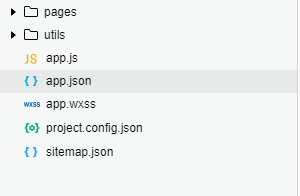
pages:页面路径列表
window:默认窗口表现
tabBar:底部tab栏
点击进入app.json,
{ "pages": [ "pages/home/home", //新建的首页路径(放在首位的路径最先展示) "pages/index/index", //小程序自带路径 -> 获取头像信息 "pages/logs/logs", //小程序自带路径 ->日志 "pages/list/list", //新建的分类页面路径 "pages/mine/mine" //新建的我的页面路径 ], "window": { "backgroundTextStyle": "light", //下拉 loading 的样式,仅支持 dark / light "navigationBarBackgroundColor": "#000", //顶部导航栏颜色 "navigationBarTitleText": "微信小程序", //顶部导航栏标题 "navigationBarTextStyle": "white" // 标题颜色,仅支持black/white }, "style": "v2", "sitemapLocation": "sitemap.json", "tabBar": { "color": "#fff", //文字颜色 "selectedColor": "#00FF00", //选中时文字颜色 "backgroundColor": "#000", //tab背景色 //tab 的列表:list ,最少 2 个、最多 5 个 "list": [ { "pagePath": "pages/home/home", //页面路径 "iconPath": "images/home.png", //图片路径,未选中时 "selectedIconPath": "images/home1.png", //图片路径 选中时 "text": "首页" //tab按钮文字 }, { "pagePath": "pages/list/list", "iconPath": "images/list.png", "selectedIconPath": "images/list1.png", "text": "分类" }, { "pagePath": "pages/mine/mine", "iconPath": "images/my.png", "selectedIconPath": "images/my1.png", "text": "我的" } ] }}
在list列表中的图片路径,可以再目录中新建一个图片文件夹来保存图标,查找对应的图标可以在 Iconfont-阿里巴巴矢量图标库 中进行查找。
目前正在学习小程序,这是作为新手的我自己写的笔记,哪里写的不准确还请指点,补充。
小程序









