


.微信小程序开发中toast也是重要的消息提示方式.
提示框:
wx.showToast(OBJECT)
显示消息提示框
OBJECT参数说明:
示例代码:
?| 12345 | wx.showToast({ title:'成功', icon:'success', duration: 2000}) |
wx.hideToast()
隐藏消息提示框
?| 123456789 | wx.showToast({ title:'加载中', icon:'loading', duration: 10000}) setTimeout(function(){ wx.hideToast()},2000) |
wx.showModal(OBJECT)
显示模态弹窗
OBJECT参数说明: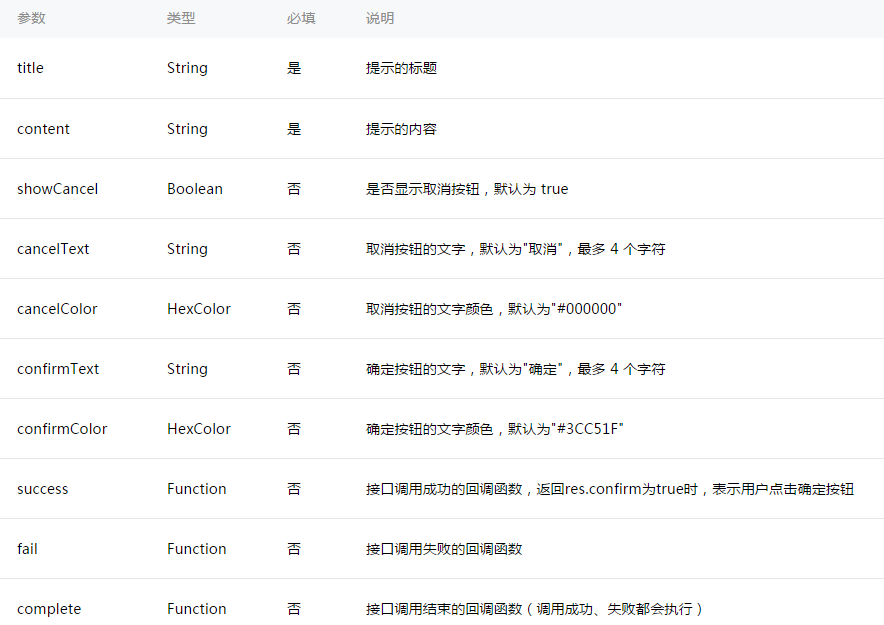
示例代码:
?| 123456789 | wx.showModal({ title:'提示', content:'这是一个模态弹窗', success:function(res) { if(res.confirm) { console.log('用户点击确定') } }}) |
wx.showActionSheet(OBJECT)
显示操作菜单
OBJECT参数说明: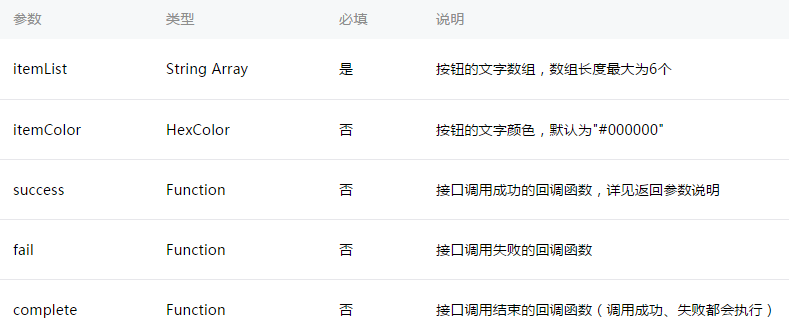
success返回参数说明: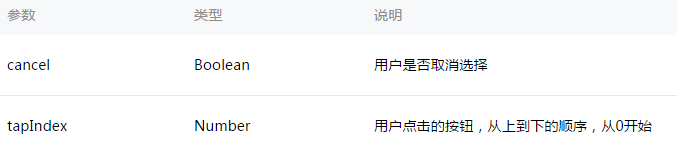
示例代码:
?| 12345678 | wx.showActionSheet({ itemList: ['A','B','C'], success:function(res) { if(!res.cancel) { console.log(res.tapIndex) } }}) |
设置导航条
<view>提示:{{tip}}</view><button type="default" bindtap="showModal">点击我弹出modal对话框</button><view> <modal title="modal对话框" hidden="{{modalHidden}}" confirm-text="确定" cancel-text="取消" bindconfirm="modalBindaconfirm" bindcancel="modalBindcancel">您好,我是modal对话框</modal></view>wx.setNavigationBarTitle(OBJECT)
动态设置当前页面的标题。
OBJECT参数说明: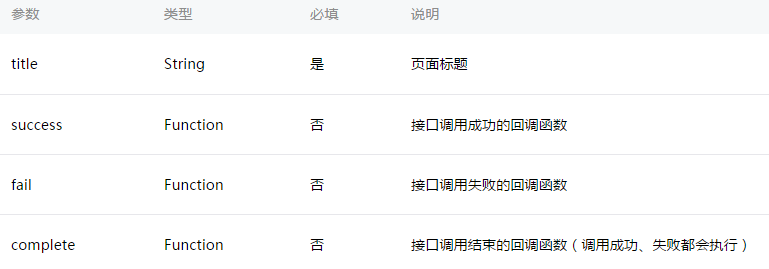
示例代码:
?| 123 | wx.setNavigationBarTitle({ title:'当前页面'}) |
wx.showNavigationBarLoading()
在当前页面显示导航条加载动画。
wx.hideNavigationBarLoading()
隐藏导航条加载动画。
页面跳转:
wx.navigateTo(OBJECT)
保留当前页面,跳转到应用内的某个页面,使用wx.navigateBack可以返回到原页面。
OBJECT参数说明: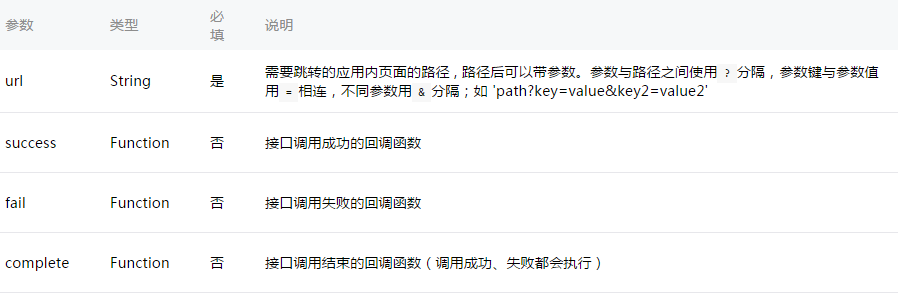
示例代码:
?| 123 | wx.navigateTo({ url:'test?id=1'}) |
| 123456 | //test.jsPage({ onLoad:function(option){ console.log(option.query) }}) |
注意:为了不让用户在使用小程序时造成困扰,我们规定页面路径只能是五层,请尽量避免多层级的交互方式。
wx.redirectTo(OBJECT)
关闭当前页面,跳转到应用内的某个页面。
OBJECT参数说明: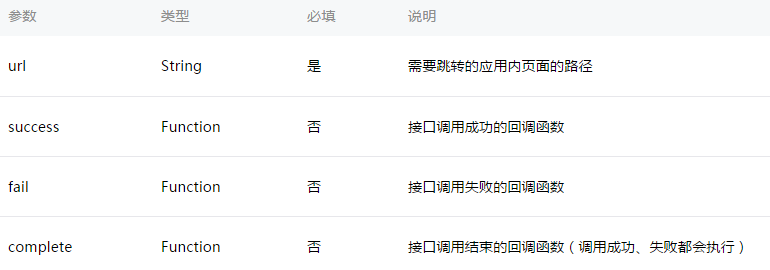
示例代码:
?| 123 | wx.redirectTo({ url:'test?id=1'}) |
wx.navigateBack(OBJECT)
关闭当前页面,返回上一页面或多级页面。可通过 getCurrentPages()) 获取当前的页面栈,决定需要返回几层。
OBJECT参数说明:
动画:
wx.createAnimation(OBJECT)
创建一个动画实例animation。调用实例的方法来描述动画。最后通过动画实例的export方法导出动画数据传递给组件的animation属性。
注意: export 方法每次调用后会清掉之前的动画操作
OBJECT参数说明: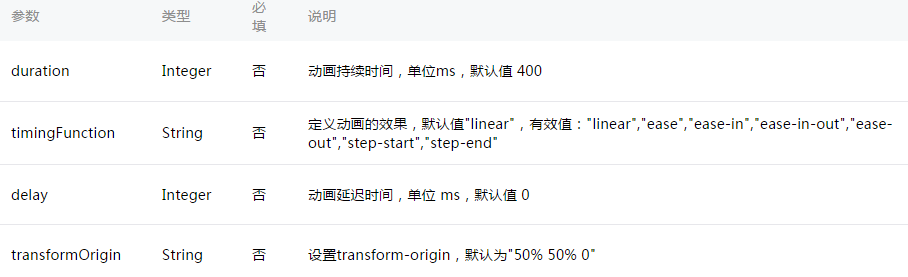
| 123456 | var animation = wx.createAnimation({ transformOrigin:"50% 50%", duration: 1000, timingFunction:"ease", delay: 0}) |
animation
动画实例可以调用以下方法来描述动画,调用结束后会返回自身,支持链式调用的写法。
样式:
旋转:
缩放: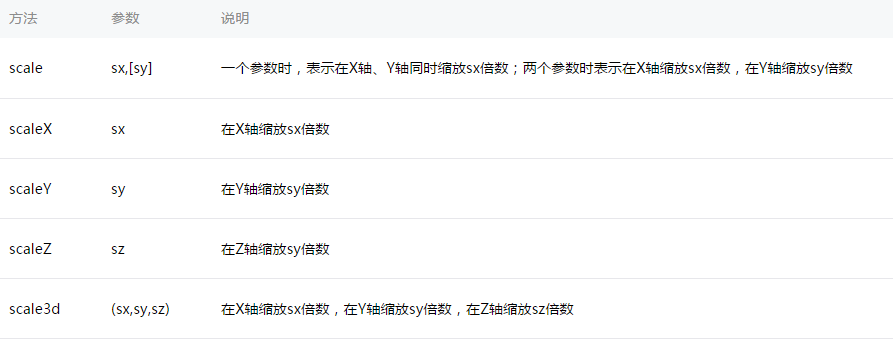
偏移: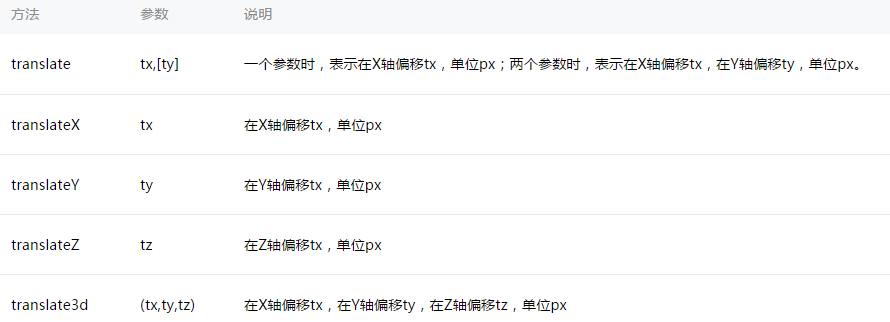
倾斜:
矩阵变形:
动画队列
调用动画操作方法后要调用 step() 来表示一组动画完成,可以在一组动画中调用任意多个动画方法,一组动画中的所有动画会同时开始,一组动画完成后才会进行下一组动画。step 可以传入一个跟 wx.createAnimation() 一样的配置参数用于指定当前组动画的配置。
示例:
?| 1 | <viewanimation="{{animationData}}"style="background:red;height:100rpx;width:100rpx"></view> |
| 12345678910111213141516171819202122232425262728293031323334353637383940414243444546474849 | Page({ data: { animationData: {} }, onShow:function(){ varanimation = wx.createAnimation({ duration: 1000, timingFunction:'ease', }) this.animation = animation animation.scale(2,2).rotate(45).step() this.setData({ animationData:animation.export() }) setTimeout(function() { animation.translate(30).step() this.setData({ animationData:animation.export() }) }.bind(this), 1000) }, rotateAndScale:function() { // 旋转同时放大 this.animation.rotate(45).scale(2, 2).step() this.setData({ animationData:this.animation.export() }) }, rotateThenScale:function() { // 先旋转后放大 this.animation.rotate(45).step() this.animation.scale(2, 2).step() this.setData({ animationData:this.animation.export() }) }, rotateAndScaleThenTranslate:function() { // 先旋转同时放大,然后平移 this.animation.rotate(45).scale(2, 2).step() this.animation.translate(100, 100).step({ duration: 1000 }) this.setData({ animationData:this.animation.export() }) }}) |
wx.hideKeyboard()
收起键盘。
wx.stopPullDownRefresh()
停止当前页面下拉刷新。详见 页面相关事件处理函数。
小程序









