


微信小程序开发-获取微信运动步数
思路:小程序传参数code,encryptedData,iv给后台,后台把encryptedData数据解密即可。
步骤:
1、根据 appid,secret,code 获取到 session_key
API地址为:https://developers.weixin.qq.com/miniprogram/dev/dev_wxwork/dev-doc/qywx-api/login/code2session.html
2、获取微信运动加密数据(如果开通了微信运动权限的话) encryptedData,iv
API地址为:https://developers.weixin.qq.com/miniprogram/dev/api/open-api/werun/wx.getWeRunData.html
3、根据参数 appid,session_key,encryptedData,iv 解密微信运动数据
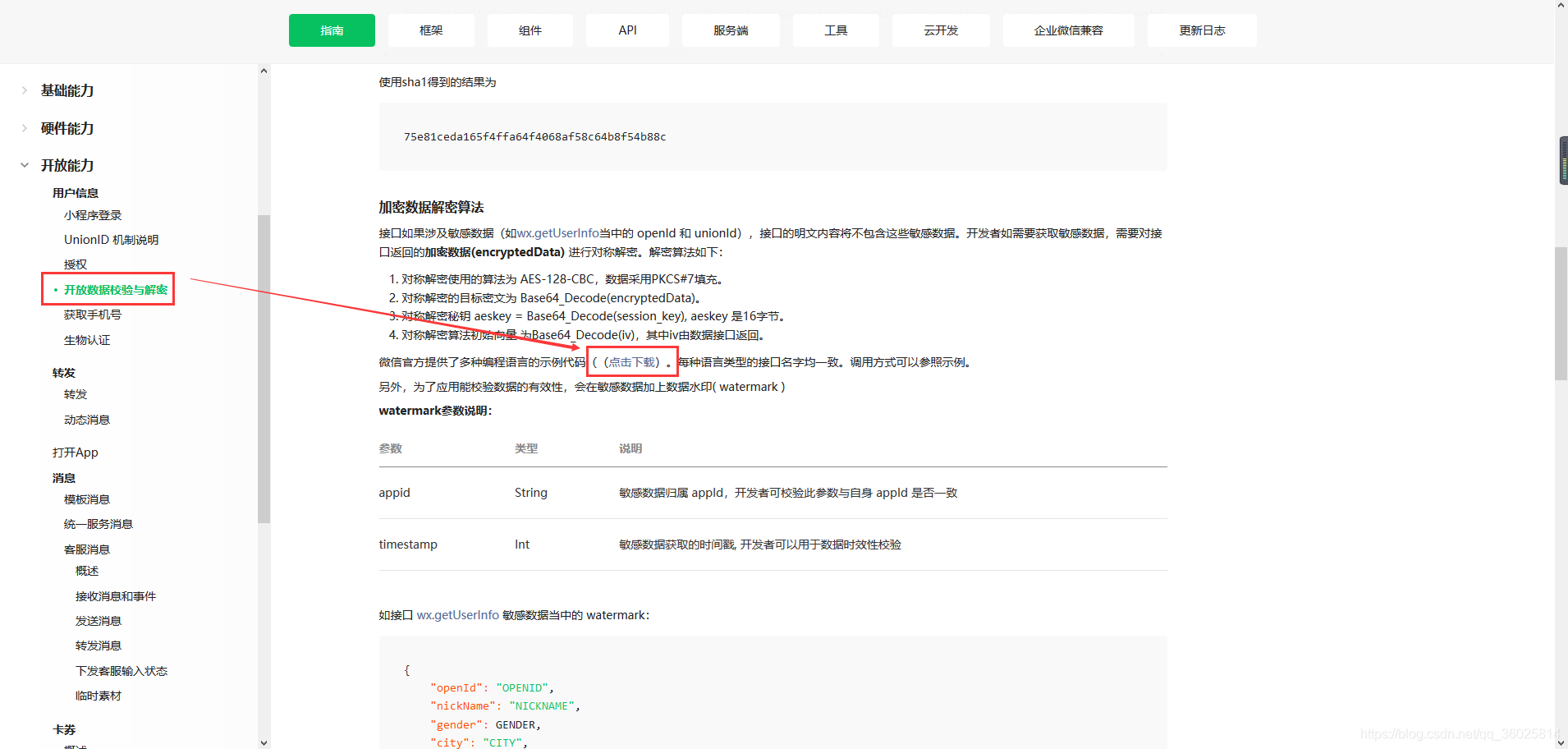
API地址为:https://developers.weixin.qq.com/miniprogram/dev/framework/open-ability/signature.html
注:这个地址有多种编程语言解密encryptedData数据的示例代码,
地址为:https://res.wx.qq.com/wxdoc/dist/assets/media/aes-sample.eae1f364.zip
如下图所示
4、PHP代码
public function getstepAction(){$post = $_POST;//POST方式传,GET传:会把参数中的+号解析成空格,会有这个问题。$code = isset( $post['code'] ) ? $post['code'] : '';$encryptedData= isset( $post['encryptedData'] ) ? $post['encryptedData'] : '';;$iv = isset( $post['iv'] ) ? $post['iv'] : '';;if( !$code )die('缺少code参数!');//根据参数获取session_key$appid = '已知';$appsecret = '已知';$weixin = $this->curl_get_https( "https://api.weixin.qq.com/sns/jscode2session?appid=$appid&secret=$appsecret&js_code=$code&grant_type=authorization_code" );//$weixin = file_get_contents("https://api.weixin.qq.com/sns/jscode2session?appid=$appid&secret=$appsecret&js_code=$code&grant_type=authorization_code");$jsondecode = json_decode($weixin, true); //json字符串转为数组//var_dump($array);die;//$openid = isset( $array['openid'] ) ? $array['openid'] : '';//获取openid//$unionid = isset( $array['unionid'] ) ? $array['unionid'] : '';//获取$session_key = isset( $array['session_key'] ) ? $array['session_key'] : '';//if( ! $openid )die('openid获取失败!');//根据session_key,encryptedData,iv 解析字符串,获取步数信息if($encryptedData && $iv){require_once APP_PATH."/library/Wx/wxBizDataCrypt.php";//引入解密类,注意大小写$pc = new WXBizDataCrypt($appid, $session_key);$errCode = $pc->decryptData( $encryptedData, $iv, $stepData );if ($errCode == 0) {//解析成功,更新数据$stepData = json_decode($stepData, true);//最近30天步数信息$stepData = $stepData['stepInfoList'];$stepData = end($stepData);$step = $stepData['step'];//拿到了最近一天的步数,看你怎么处理了echo "最近一天的步数为 [ {$step} ]步";}else {print($errCode . "");}}die();}/** * * @todo GET方式调用接口,返回json格式数据 * @param unknown $url * 请求路径 * @return unknown json格式数据 */function curl_get_https($url, $post_data = []) {$curl = curl_init (); // 启动一个CURL会话curl_setopt ( $curl, CURLOPT_URL, $url );curl_setopt ( $curl, CURLOPT_HEADER, 0 );curl_setopt ( $curl, CURLOPT_RETURNTRANSFER, 1 );curl_setopt ( $curl, CURLOPT_SSL_VERIFYPEER, false ); // 跳过证书检查if ($post_data) {// 设置post方式提交curl_setopt ( $curl, CURLOPT_POST, 1 );// 设置post数据curl_setopt ( $curl, CURLOPT_POSTFIELDS, $post_data );}// curl_setopt($curl, CURLOPT_SSL_VERIFYHOST, true); // 从证书中检查SSL加密算法是否存在$tmpInfo = curl_exec ( $curl ); // 返回api的json对象curl_close ( $curl ); // 关闭URL请求return $tmpInfo; // 返回json对象}5、返回结果 $stepData :用户过去三十天微信运动步数
{ "stepInfoList": [ { "timestamp": 1557158400, "step": 0 }, { "timestamp": 1557244800, "step": 0 }, { "timestamp": 1557331200, "step": 0 }, { "timestamp": 1557417600, "step": 0 }, { "timestamp": 1557504000, "step": 0 }, { "timestamp": 1557590400, "step": 0 }, { "timestamp": 1557676800, "step": 0 }, { "timestamp": 1557763200, "step": 0 }, { "timestamp": 1557849600, "step": 0 }, { "timestamp": 1557936000, "step": 0 }, { "timestamp": 1558022400, "step": 0 }, { "timestamp": 1558108800, "step": 0 }, { "timestamp": 1558195200, "step": 0 }, { "timestamp": 1558281600, "step": 0 }, { "timestamp": 1558368000, "step": 0 }, { "timestamp": 1558454400, "step": 0 }, { "timestamp": 1558540800, "step": 0 }, { "timestamp": 1558627200, "step": 0 }, { "timestamp": 1558713600, "step": 0 }, { "timestamp": 1558800000, "step": 0 }, { "timestamp": 1558886400, "step": 0 }, { "timestamp": 1558972800, "step": 0 }, { "timestamp": 1559059200, "step": 0 }, { "timestamp": 1559145600, "step": 0 }, { "timestamp": 1559232000, "step": 0 }, { "timestamp": 1559318400, "step": 0 }, { "timestamp": 1559404800, "step": 0 }, { "timestamp": 1559491200, "step": 0 }, { "timestamp": 1559577600, "step": 0 }, { "timestamp": 1559664000, "step": 0 }, { "timestamp": 1559750400, "step": 2010 } ], "watermark": { "timestamp": 1559788371, "appid": "wxd************" }}微信小程序










