


微信小程序之使用canvas给微信头像加小红旗
情境:新中国成立70周年,普天同庆。昨天看到朋友圈中被刷屏的@官方微信 给自己的头像加小红旗。服务器被卡爆,很多朋友说换头像不成功。
任务:打算自己写一个小程序实现这个换小红旗的功能。
行动:于是去看了一眼给头像加小红旗的入口页面,看了下里面的功能。
结果:自己写了一个小程序并实现了加小红旗的功能,与官方的不完全一致,功能点是差不多的。
实现效果如下: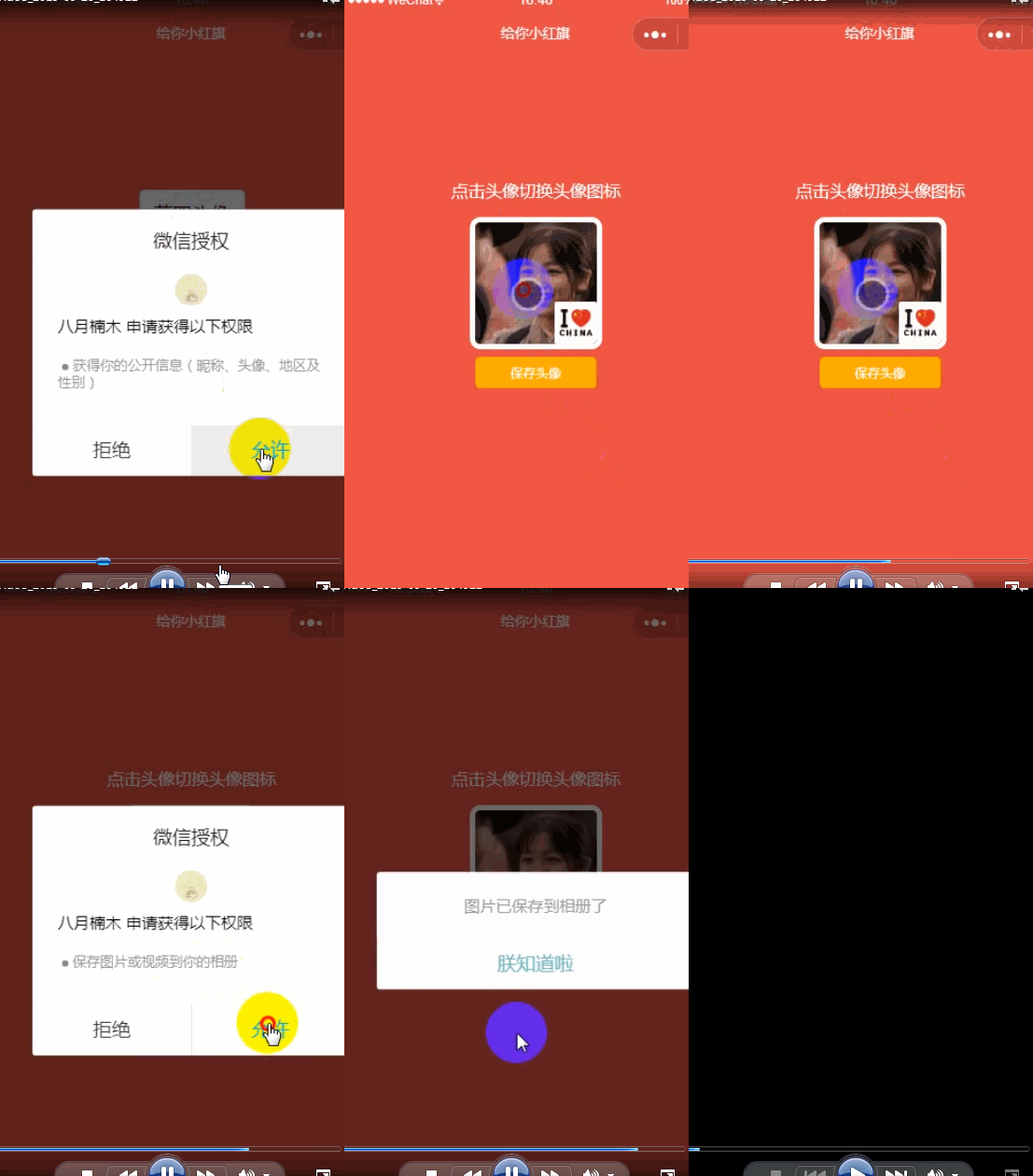
其实这里面主要就是读取了一下用户登录的信息,头像是从用户信息中取的,然后小图标是在网上找了几个自己比较喜欢的图标放上去的。
首先分析一下整个过程:先读取用户的登录信息,将用户头像渲染出来,然后把自己喜欢的小图标放在右下角,最后使用canvas把用户的头像和小图标画出来再保存到本地相册。
小程序存储用户信息中返回的用户头像是一个链接,在这里面遇到的坑就是canvas无法直接用链接进行绘画,所以需要使用getImageInfo方法把这个链接转换成本地资源才能进行绘画
我的wxml代码如下:
<view class="container"> <canvas canvas-id="shareImg" style="width:200px;height:200px;position:absolute;left:100%"></canvas> <view class="userinfo"> <button wx:if="{{!hasUserInfo && canIUse}}" open-type="getUserInfo" bindgetuserinfo="getUserInfo" class="userBtn"> 获取头像 </button> <block wx:else> <text class="title">点击头像切换头像图标</text> <image bindtap="change" class="userinfo-avatar" src="{{userInfo.avatarUrl}}" mode="cover"> <view class="photo" style="background:url({{images[index]}}) no-repeat top/cover"></view> </image> <button class="save" bindtap="downloadFile">保存头像</button> </block> </view></view>wxss代码如下:
/**index.wxss**/.userBtn { margin-top: 250rpx; }.userinfo { display: flex; flex-direction: column; align-items: center;}.title{ margin: 230rpx 0 30rpx; font-size: 32rpx; color: #fff;}.userinfo-avatar { width: 230rpx; height: 230rpx; border-radius: 20rpx; border: 10rpx solid #fff; position: relative;}.photo { width: 80rpx; height: 80rpx; position: absolute; border-radius: 5rpx; bottom: 0; right: 0;}.save { width: 230rpx; font-size: 24rpx; color: #fff; background: rgb(255, 174, 0); margin-top: 15rpx;}重要的是以下的js代码
//index.js//获取应用实例const app = getApp()Page({ data: { userInfo: {}, hasUserInfo: false, canIUse: wx.canIUse('button.open-type.getUserInfo'), images: ["../../images/0.jpg", "../../images/1.jpg", "../../images/2.jpg", "../../images/3.jpg", "../../images/4.jpg", "../../images/5.jpg", "../../images/6.jpg"], index: 0, canvasHidden: true, image: "" }, downloadFile(event) { //绘制canvas图 let that = this; const ctx = wx.createCanvasContext('shareImg') wx.getImageInfo({ src: that.data.userInfo.avatarUrl, success: function(res) { that.setData({ image: res.path }) // console.log(res) ctx.drawImage(that.data.image, 0, 0, 200, 200) ctx.drawImage('../../images/' + that.data.index + '.jpg', 120, 120, 80, 80) ctx.setTextAlign('left') ctx.stroke() ctx.draw() } }) //获取相册授权 wx.getSetting({ success(res) { if (!res.authSetting['scope.writePhotosAlbum']) { wx.authorize({ scope: 'scope.writePhotosAlbum', success() { that.savaImageToPhoto(); } }) } else { that.savaImageToPhoto(); } } }) }, savaImageToPhoto: function() { let that = this; wx.showLoading({ title: '努力生成中...' }) wx.canvasToTempFilePath({ x: 0, y: 0, width: 200, height: 200, destWidth: 200, destHeight: 200, canvasId: 'shareImg', success: function(res) { // console.log(res) wx.hideLoading() wx.saveImageToPhotosAlbum({ filePath: res.tempFilePath, success(res) { wx.showModal({ content: '图片已保存到相册了', showCancel: false, confirmText: '朕知道啦', confirmColor: '#72B9C3', success: function(res) { if (res.confirm) { // console.log('用户点击确定'); that.setData({ hidden: true }) } } }) } }) }, fail: function(res) { console.log(res) } }) }, change(event) { if (this.data.index > 5) { this.setData({ index: 0 }) } else { this.setData({ index: this.data.index + 1 }) } // console.log(this.data.index, event) }, onLoad: function() { if (app.globalData.userInfo) { this.setData({ userInfo: app.globalData.userInfo, hasUserInfo: true }) } else if (this.data.canIUse) { // 由于 getUserInfo 是网络请求,可能会在 Page.onLoad 之后才返回 // 所以此处加入 callback 以防止这种情况 app.userInfoReadyCallback = res => { this.setData({ userInfo: res.userInfo, hasUserInfo: true }) console.log(res) } } else { // 在没有 open-type=getUserInfo 版本的兼容处理 wx.getUserInfo({ success: res => { app.globalData.userInfo = res.userInfo this.setData({ userInfo: res.userInfo, hasUserInfo: true }) } }) } }, getUserInfo: function(e) { console.log(e) app.globalData.userInfo = e.detail.userInfo this.setData({ userInfo: e.detail.userInfo, hasUserInfo: true }) }})这里还有一点要注意的是需要在本地设置中勾选此项不校验合法域名
以上代码即可实现想要的效果,这里遇到过的坑是canvas不能使用hidden隐藏,canvas绘画不能使用网络资源。下一篇博客中我会详细说明这里的坑怎么填。










