


写论坛不难,重点是各页面之间的信息传递!
先放成品图,虽然有点单调。。。。但是麻雀虽小五脏俱全!
论坛功能:
1. 发帖(带图片)
2. 浏览各帖
3. 评论
4. 搜素帖子
5. 作者删自己的贴
以上是论坛必备的功能,缺哪个都不完整哦~
贴心代码详解(一)会讲发帖部分
发帖页面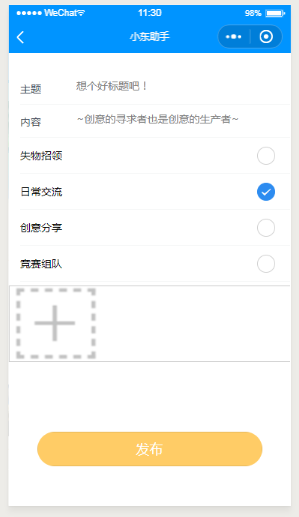
页面看起来还是很简单的,因为服务器大小不够,所以我们设置每个人只能发一张图。
在这个页面里java后台负责图片上传,前端给后台图片filePath就OK了。
这里使用了iview weapp组件
js代码
var app = getApp()//获取urlPage({ data: { img_arr: [], title: '', detail:'', fruit: [{ id: 1, name: '失物招领', }, { id: 2, name: '日常交流' }, { id: 3, name: '创意分享' }, { id: 4, name: '竞赛组队', }], current: "日常交流"//默认值 }, handleFruitChange({ detail = {} }) { this.setData({ current: detail.value });}, formSubmit: function (e) { this.upload(e) },/** * 问题: *一张图片上传 */ upload: function (e) { /* var that = this wx.login({ success: function(res) { wx.request({ url: app.globalData.url+'onlogin', //本地调试,是获取不到code的,所以要实现,还是得传服务 data: { "code": res.code }, header: { 'content-type': 'application/json' // 默认值 }, success: function (res) { console.log(res.data.openid) var OD=res.data.openid 以上内容为获取用户openid,可以不要*/if(that.data.img_arr[0]==null)//当用户不发图时{ wx.request({ header: { 'content-type': 'application/x-www-form-urlencoded' }, url: app.globalData.url+'post', data:{ 'content': e.detail.value.content, 'title': e.detail.value.title, 'category': that.data.current, "oppidA":OD }, method: 'POST', success: function (res) { if (res) { wx.showToast({ title: '已提交至管理员审核,请耐心等待!', duration: 3000 }); setTimeout(() => { wx.switchTab({ url: '../../pages/list/list', }) }, 1000);//发完贴1秒自动跳转到帖子列表页 }} } )}else{//当用户发图时 setTimeout(() => { for (var i = 0; i < (this.data.img_arr.length); i++) { console.log(that.data.img_arr[0]) wx.uploadFile({ url: app.globalData.url+'post', filePath: that.data.img_arr[0], name: 'file', header: { 'content-type': 'application/x-www-form-urlencoded'//一定要用这个 }, formData: { 'content': e.detail.value.content, 'title': e.detail.value.title, 'category': that.data.current, "oppidA":OD } , success: function (res) { if (res) { wx.showToast({ title: '已提交至管理员审核,请耐心等待!', duration: 3000 }); setTimeout(() => { wx.switchTab({ url: '../../pages/list/list', }) }, 1000); } } }) that.setData({ formdata: '' }) }, 1000);}}})}}) }, upimg: function () { var that = this; if (this.data.img_arr.length < 1) { wx.chooseImage({//选择图片 count:1,//一张图片 sizeType: ['original', 'compressed'], success: function (res) { that.setData({ img_arr: that.data.img_arr.concat(res.tempFilePaths) }) } }) } }, onLoad: function() { },});json内容部分:
{ "usingComponents": { "i-input": "../../dist/input/index" , "i-button": "../../dist/button/index", "i-card": "../../dist/card/index", "i-toast": "../../dist/toast/index", "i-radio-group": "../../dist/radio-group/index", "i-radio": "../../dist/radio/index" }}wxml
<text ></text><form bindsubmit="formSubmit" id='1' bindreset="formReset"> <i-input name="title" type="textarea" title="主题" autofocus placeholder="想个好标题吧!" /> <i-input name="content" type="textarea" title="内容" placeholder="~创意的寻求者也是创意的生产者~" /> <i-panel title="group-水果"> <i-radio-group current="{{current}}" bindchange="handleFruitChange"> <i-radio wx:for="{{fruit}}" position="{{position}}" wx:key="{{item.id}}" value="{{item.name}}"> </i-radio> </i-radio-group></i-panel> <view class="big-logos"> <view class='big-logos_img'> <image bindtap="upimg" src='http://www.ar1es.cn/cimg.png' name="files"></image> </view> <block wx:for="{{img_arr}}" wx:key="{{index}}"> <view class='logoinfo'> <image src='{{item}}'></image> </view> </block> </view> <text ></text> <text ></text> <button class='btn' formType="submit">发布</button> </form> css
page{ width:750rpx; height:100%;
版权声明
即速应用倡导尊重与保护知识产权。如发现本站文章存在版权问题,烦请提供版权疑问、身份证明、版权证明、联系方式等发邮件至197452366@qq.com ,我们将及时处理。本站文章仅作分享交流用途,作者观点不等同于即速应用观点。用户与作者的任何交易与本站无关,请知悉。










