


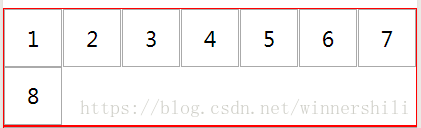
横向排列
效果
wxml
<view class="container1"> <view>1</view> <view>2</view> <view>3</view> <view>4</view> <view>5</view> <view>6</view> <view>7</view> <view>8</view></view>wxss
.container1 { display: flex; /**指定flex 布局*/ flex-direction:row; /**布局内item 方向*/ flex-wrap:wrap; /**不够了就换行*/ justify-content:space-between; /**主轴两边对其*/ border:red 1pt solid; /**显示边框*/} .container1 view{ display: flex; /**指定flex 布局*/ width:100rpx; /**宽度*/ height:100rpx; /**高度*/ justify-content:center; /**主轴居中*/ align-items:center; /**交叉轴居中*/ border: 1pt #aaa solid; /**显示边框*/}纵向列表
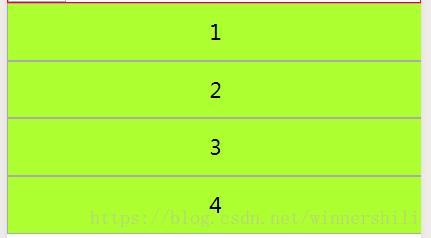
效果
wxml
<view class="container2"> <view>1</view> <view>2</view> <view>3</view> <view>4</view></view>wxss
.container2 { display: flex; /**指定flex 布局*/ flex-direction:column; /**主轴 方向*/} .container2 view{ border: 1pt #aaa solid; /**显示边框*/ width:100%; /**宽度*/ height:100rpx; /**高度指定*/ background-color: greenyellow; text-align: center; /**文字居中*/ line-height: 100rpx; /**文字居中*/}简单的登录界面
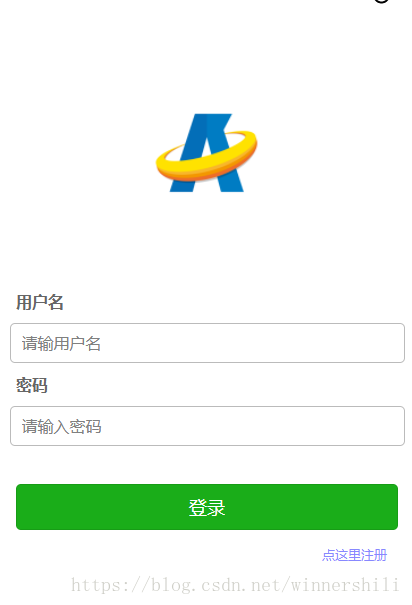
效果
wxml
<view class='container'> <image class='logo' src='/images/avic_logo.png'></image> <text class="input_text">用户名</text> <input name="username" placeholder='请输用户名'></input> <text class="input_text">密码</text> <input type='password' placeholder='请输入密码'></input> <button class="submit" form-type='submit' type='primary'>登录</button> <text class="reg">点这里注册</text></view>.container { display: flex; /**指定flex 布局*/ flex-direction:column; /**布局内item 方向*/ justify-content:center; /**主轴居中*/ align-items: center; padding: 0rpx 30rpx 0 30rpx;} .logo{ margin:150rpx 0rpx 150rpx 0rpx; width: 200rpx; height: 200rpx;}.input_text{ width: 100%; font-size: 30rpx; color:#666; margin-bottom: 20rpx; font-weight: bold;}input{ width: 100%; height: 70rpx; border: 1rpx #bbb solid; border-radius: 10rpx; margin-bottom: 20rpx; font-size: 30rpx; padding-left: 20rpx;}.submit{ margin-top: 50rpx; width:100%;}.reg{ margin-right: 20rpx; margin-top: 30rpx; font-size: 25rpx; align-self: flex-end; color: #88f}微信小程序










