


前言
实现效果
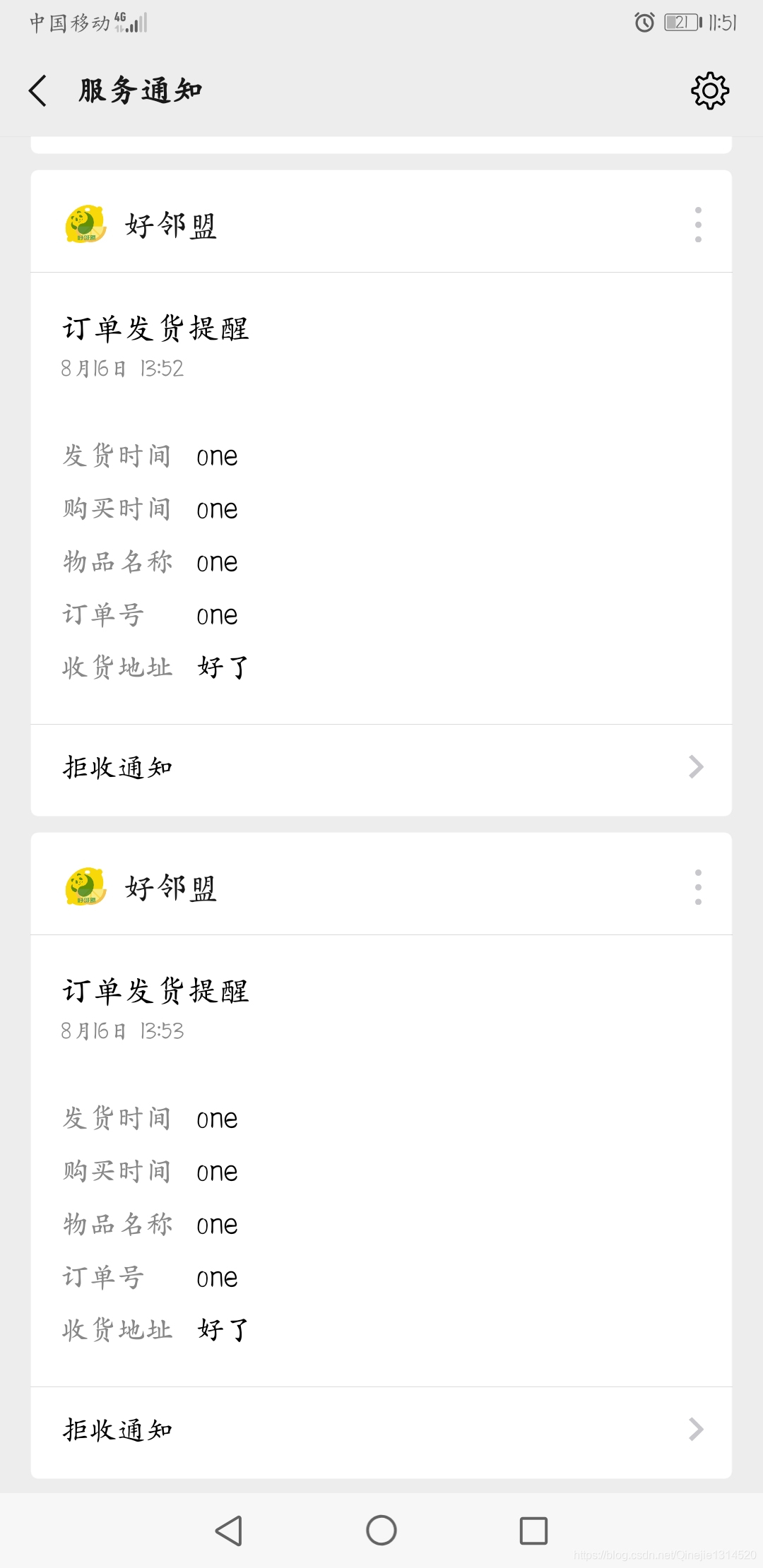
实现必要
- 一个微信小程序,去微信申请就可以,测试号也是可以的
- 小程序里面去申请一个模板消息
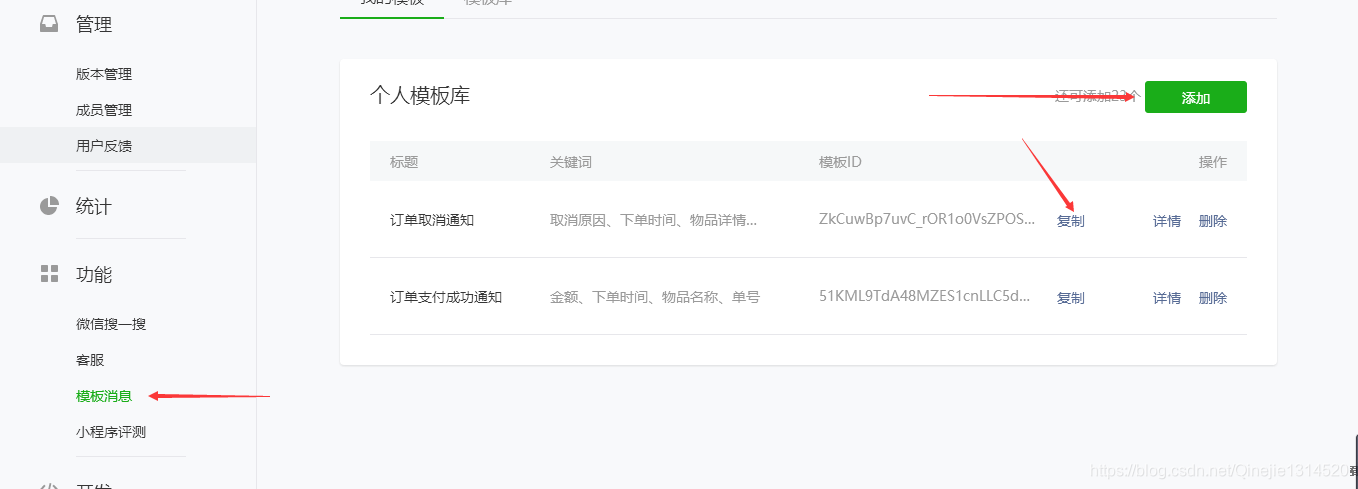
代码实现
下面代码没有问题,这是我项目当中截取的部分。下面代码是我项目中直接复制过来的。仅供参考。具体实现代码在最底下
import com.alibaba.fastjson.JSON;import com.example.community.app.user.common.HttpClient;import com.example.community.app.user.common.TemplateData;import com.example.community.common.redis.RedisService;import org.springframework.beans.factory.annotation.Autowired;import org.springframework.beans.factory.annotation.Value;import org.springframework.stereotype.Component;import java.util.HashMap;import java.util.List;import java.util.Map;@Componentpublic class MessagePush { @Autowired RedisService redisService; @Value("${customer.app.secret}") private String AppSecret; @Value("${customer.app.id}") private String AppId; @Value("${official.app.secret}") private String OfficialAppSecret; @Value("${official.app.id}") private String OfficialAppId; @Value("${service.template.message.order.payment.successful}") private String ServicePushOrderPayMentSuccess; @Value("${service.template.message.order.cancellation}") private String ServicePushOrderCancellation; @Value("${service.template.message.order.deliver}") private String ServicePushOrderDeliver; @Value("${official.template.message.order.payment.successful}") private String OfficialPushOrderPayMentSuccess; @Value("${wx.getAccessToken}") private String AccessTokenUrl; @Value("${wx.service.template.message.send}") private String ServiceTemplateMessageSendUrl; public Object getServiceAccessToken(){ Object acc = redisService.get("service_push_access_token"); if(acc == null){ String res = HttpClient.doGet(AccessTokenUrl+"?grant_type=client_credential&appid="+AppId+"&secret="+AppSecret); Map mapType = JSON.parseObject(res,Map.class); redisService.set("service_push_access_token", mapType.get("access_token"), 7150L); return mapType.get("access_token"); } return acc; } //小程序服务通知 public String pushServiceMessage(Integer type, String touser, String form_id, List<String> keywords){ Map<String, Object>map = new HashMap<>(); map.put("touser", touser); switch (type){ case 1:map.put("template_id", ServicePushOrderPayMentSuccess); break;//支付成功 case 2:map.put("template_id", ServicePushOrderCancellation); break;//取消订单 case 3:map.put("template_id", ServicePushOrderDeliver);break;//发货通知 default: map.put("template_id", ServicePushOrderPayMentSuccess); break; } map.put("form_id", form_id); Map<String, Object>map1 = new HashMap<>(); for(int i = 0; i < keywords.size(); i++){ map1.put("keyword"+(i+1), new TemplateData(keywords.get(i), null)); } map.put("data", map1); return HttpClient.doPost(ServiceTemplateMessageSendUrl+"?access_token="+getServiceAccessToken(), map); }}具体实现代码,裁剪后的代码。下面的代码可以直接复制然后运行即可,缺少的包导入进去
import com.alibaba.fastjson.JSON;import org.springframework.beans.factory.annotation.Autowired;import org.springframework.beans.factory.annotation.Value;import org.springframework.stereotype.Component;import java.util.HashMap;import java.util.List;import java.util.Map;public class MessagePush { private String AppSecret = “小程序密匙,在小程序管理页面可以找到”; private String AppId = “小程序appip,在小程序管理页面可以找到”; private String ServicePushOrderPayMentSuccess = "t1ictRv_Hv7-ww6TM_7BheLu02UUl_SurJxPHc09YEg";//订单支付成功的模板的id private String AccessTokenUrl = “https://api.weixin.qq.com/cgi-bin/token”;//获取小程序后台鉴权接口,可以不变 private String ServiceTemplateMessageSendUrl = “https://api.weixin.qq.com/cgi-bin/message/wxopen/template/send”;//发送模板消息调用的接口 public Object getServiceAccessToken(){ String res = HttpClient.doGet(AccessTokenUrl+"?grant_type=client_credential&appid="+AppId+"&secret="+AppSecret); Map mapType = JSON.parseObject(res,Map.class); return mapType.get("access_token"); return acc; } //小程序服务通知 //表单提交场景下,为 submit 事件带上的 formId;支付场景下,为本次支付的 prepay_id,这些对应就是form_id //touser微信对象的openid //keywords对应模板消息的各个参数的值 public String pushServiceMessage(Integer type, String touser, String form_id, List<String> keywords){ Map<String, Object>map = new HashMap<>(); map.put("touser", touser); switch (type){ case 1:map.put("template_id", ServicePushOrderPayMentSuccess); break;//支付成功 default: map.put("template_id", ServicePushOrderPayMentSuccess); break; } map.put("form_id", form_id); Map<String, Object>map1 = new HashMap<>(); for(int i = 0; i < keywords.size(); i++){ map1.put("keyword"+(i+1), new TemplateData(keywords.get(i), null)); } map.put("data", map1); return HttpClient.doPost(ServiceTemplateMessageSendUrl+"?access_token="+getServiceAccessToken(), map); }}发送http请求的工具类
package com.example.community.app.user.common;import com.alibaba.fastjson.JSONObject;import org.apache.http.HttpEntity;import org.apache.http.client.ClientProtocolException;import org.apache.http.client.config.RequestConfig;import org.apache.http.client.methods.CloseableHttpResponse;import org.apache.http.client.methods.HttpGet;import org.apache.http.client.methods.HttpPost;import org.apache.http.entity.StringEntity;import org.apache.http.impl.client.CloseableHttpClient;import org.apache.http.impl.client.HttpClients;import org.apache.http.util.EntityUtils;import java.io.IOException;import java.util.Map;public class HttpClient { public static String doGet(String url) { CloseableHttpClient httpClient = null; CloseableHttpResponse response = null; String result = ""; try { // 通过址默认配置创建一个httpClient实例 httpClient = HttpClients.createDefault(); // 创建httpGet远程连接实例 HttpGet httpGet = new HttpGet(url);// // 设置请求头信息,鉴权// httpGet.setHeader("Authorization", "Bearer da3efcbf-0845-4fe3-8aba-ee040be542c0"); // 设置配置请求参数 RequestConfig requestConfig = RequestConfig.custom().setConnectTimeout(35000)// 连接主机服务超时时间 .setConnectionRequestTimeout(35000)// 请求超时时间 .setSocketTimeout(60000)// 数据读取超时时间 .build(); // 为httpGet实例设置配置 httpGet.setConfig(requestConfig); // 执行get请求得到返回对象 response = httpClient.execute(httpGet); // 通过返回对象获取返回数据 HttpEntity entity = response.getEntity(); // 通过EntityUtils中的toString方法将结果转换为字符串 result = EntityUtils.toString(entity); } catch (ClientProtocolException e) { e.printStackTrace(); } catch (IOException e) { e.printStackTrace(); } finally { // 关闭资源 if (null != response) { try { response.close(); } catch (IOException e) { e.printStackTrace(); } } if (null != httpClient) { try { httpClient.close(); } catch (IOException e) { e.printStackTrace(); } } } return result; } public static String doPost(String url, Map<String, Object> paramMap) { CloseableHttpClient httpClient = null; CloseableHttpResponse httpResponse = null; String result = ""; // 创建httpClient实例 httpClient = HttpClients.createDefault(); // 创建httpPost远程连接实例 HttpPost httpPost = new HttpPost(url); // 配置请求参数实例 RequestConfig requestConfig = RequestConfig.custom().setConnectTimeout(35000)// 设置连接主机服务超时时间 .setConnectionRequestTimeout(35000)// 设置连接请求超时时间 .setSocketTimeout(60000)// 设置读取数据连接超时时间 .build(); // 为httpPost实例设置配置 httpPost.setConfig(requestConfig); // 设置请求头 httpPost.addHeader("Content-Type", "application/json"); // 封装post请求参数// if (null != paramMap && paramMap.size() > 0) {// List<NameValuePair> nvps = new ArrayList<NameValuePair>();// // 通过map集成entrySet方法获取entity// Set<Map.Entry<String, Object>> entrySet = paramMap.entrySet();// // 循环遍历,获取迭代器// Iterator<Map.Entry<String, Object>> iterator = entrySet.iterator();// while (iterator.hasNext()) {// Map.Entry<String, Object> mapEntry = iterator.next();// nvps.add(new BasicNameValuePair(mapEntry.getKey(), mapEntry.getValue().toString()));// }// System.out.println(JSONObject.toJSONString(nvps));// // 为httpPost设置封装好的请求参数// try {// httpPost.setEntity(new UrlEncodedFormEntity(nvps, "UTF-8"));// } catch (UnsupportedEncodingException e) {// e.printStackTrace();// }// } httpPost.setEntity(new StringEntity(JSONObject.toJSONString(paramMap),"utf-8")); try { // httpClient对象执行post请求,并返回响应参数对象 httpResponse = httpClient.execute(httpPost); // 从响应对象中获取响应内容 HttpEntity entity = httpResponse.getEntity(); result = EntityUtils.toString(entity); } catch (ClientProtocolException e) { e.printStackTrace(); } catch (IOException e) { e.printStackTrace(); } finally { // 关闭资源 if (null != httpResponse) { try { httpResponse.close(); } catch (IOException e) { e.printStackTrace(); } } if (null != httpClient) { try { httpClient.close(); } catch (IOException e) { e.printStackTrace(); } } } return result; }}最后,在一个main方法中,调用这个pushServiceMessage方法,即可发送成功。如果发送失败有什么微信方面的错误,方法返回的字符串输出即可展示错误信息。

总结
好像写的比较粗糙,想要写的非常清除明了,还需要努力努力啊!希望这篇文章可以对大家有用。
微信小程序









