


上一篇:微信小程序微商城(八):缓存实现商品购物车功能
看效果
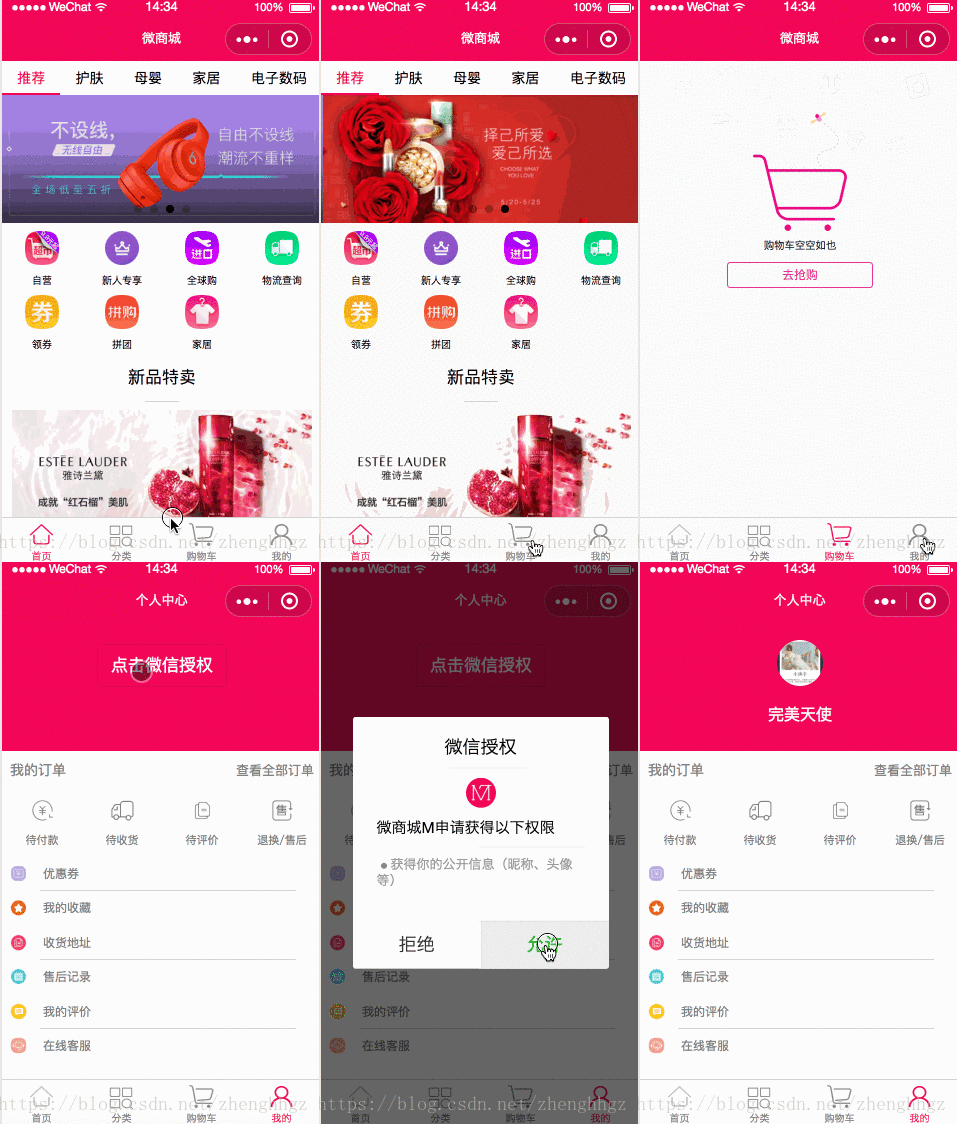
开发计划
1、实现微信授权并获取用户信息2、个人中心页面布局一、实现微信授权并获取用户信息
mine.js
onLoad: function () { if (app.globalData.userInfo) { this.setData({ userInfo: app.globalData.userInfo, hasUserInfo: true }) } else if (this.data.canIUse) { // 由于 getUserInfo 是网络请求,可能会在 Page.onLoad 之后才返回 // 所以此处加入 callback 以防止这种情况 app.userInfoReadyCallback = res => { this.setData({ userInfo: res.userInfo, hasUserInfo: true }) } } else { // 在没有 open-type=getUserInfo 版本的兼容处理 wx.getUserInfo({ success: res => { app.globalData.userInfo = res.userInfo this.setData({ userInfo: res.userInfo, hasUserInfo: true }) } }) } }, getUserInfo: function (e) { console.log(e) app.globalData.userInfo = e.detail.userInfo this.setData({ userInfo: e.detail.userInfo, hasUserInfo: true }) }二、实现微信授权并获取用户信息
mine.wxml
<view class="userinfo"> <button wx:if="{{!hasUserInfo && canIUse}}" open-type="getUserInfo" bindgetuserinfo="getUserInfo" class="userinfo-btn"> 点击微信授权 </button> <block wx:else> <image bindtap="bindViewTap" class="userinfo-avatar" src="{{userInfo.avatarUrl}}" background-size="cover"></image> <text class="userinfo-nickname">{{userInfo.nickName}}</text> </block></view><view class="separate"></view><view class="order" catchtap="toOrder"> <text class="myorder-text">我的订单</text> <text class="myorderlook-text">查看全部订单</text></view><view class="line"></view><view class="navs"> <block wx:for-items="{{orderItems}}" wx:key="name"> <view class="nav-item" catchtap="toOrder" data-type="{{item.name}}" data-typeid="{{item.typeId}}"> <image src="{{item.imageurl}}" class="nav-image" /> <text>{{item.name}}</text> </view> </block></view><view class="separate"></view><view class="person-list"> <view class="list-item"> <image class="item-image" src="../../images/person/personal_card.png"></image> <text class="item-text">优惠券</text> </view> <view class="person-line"></view> <view class="list-item"> <image class="item-image" src="../../images/person/personal_favorite.png"></image> <text class="item-text">我的收藏</text> </view> <view class="person-line"></view> <view class="list-item"> <image class="item-image" src="../../images/person/personal_site.png"></image> <text class="item-text">收货地址</text> </view> <view class="person-line"></view> <view class="list-item"> <image class="item-image" src="../../images/person/personal_sale_record.png"></image> <text class="item-text">售后记录</text> </view> <view class="person-line"></view> <view class="list-item"> <image class="item-image" src="../../images/person/personal_evaluated.png"></image> <text class="item-text">我的评价</text> </view> <view class="person-line"></view> <view class="list-item"> <image class="item-image" src="../../images/person/personal_customer.png"></image> <text class="item-text">在线客服</text> </view></view><view class="separate"></view>mine.wxss
.userinfo { display: flex; flex-direction: column; align-items: center; background: #f0145a; width: 100%; height: 300rpx;}.userinfo-btn{ margin-top: 50rpx; background: none !important; color: #fff !important; font-size: 40rpx;}.account-bg { width: 100%; height: 150rpx;}.userinfo-avatar { width: 108rpx; height: 108rpx; margin: 40rpx; border-radius: 50%;}.userinfo-nickname { color: #fff;}/* 订单 */.order { display: flex; flex-direction: row; align-items: center; width: 100%; height: 90rpx;}.myorder-text { font-size: 34rpx; color: gray; margin: 20rpx; width: 40%;}.myorderlook-text { font-size: 32rpx; color: gray; position: relative; right: 20rpx; width: 60%; text-align: right;}.next-image { width: 20rpx; height: 25rpx; position: relative; right: 10rpx;}.navs { display: flex;}.nav-item { width: 25%; display: flex; align-items: center; flex-direction: column; padding: 20rpx;}.nav-item .nav-image { width: 55rpx; height: 55rpx; margin: 5rpx;}.nav-item text { margin-top: 20rpx; font-size: 28rpx; color: gray;}/* 列表 */.person-list { display: flex; flex-direction: column; align-items: left;}.list-item { display: flex; flex-direction: row; align-items: center; height: 80rpx;}.item-image { width: 40rpx; height: 40rpx; margin: 20rpx;}.item-text { color: gray; font-size: 30rpx; margin-left: 20rpx;}.person-line { width: 80%; height: 2rpx; background: lightgray; margin-left: 90rpx;}mine.js
var app = getApp()Page({ data: { userInfo: {}, hasUserInfo: false, canIUse: wx.canIUse('button.open-type.getUserInfo'), orderItems: [ { typeId: 0, name: '待付款', url: 'bill', imageurl: '../../images/person/personal_pay.png', }, { typeId: 1, name: '待收货', url: 'bill', imageurl: '../../images/person/personal_receipt.png', }, { typeId: 2, name: '待评价', url: 'bill', imageurl: '../../images/person/personal_comment.png' }, { typeId: 3, name: '退换/售后', url: 'bill', imageurl: '../../images/person/personal_service.png' } ], }, //事件处理函数 toOrder: function () { wx.navigateTo({ url: '../order/order' }) }}mine.json
{ "navigationBarTitleText": "个人中心"}备注
微信小程序微商城系列 都是通过https 动态获取数据并展示的,建议从第一篇开始阅读。大家多多支持本系列文章会继续更新下去,谢谢各位!大家在使用过程中有哪些建议可以提出来,我们一起学习哈~~~
微信小程序微商城系列
微信小程序微商城:开发者key获取
微信小程序微商城(一):https框架搭建并实现导航功能
微信小程序微商城(二):电商首页轮播、分类导航和新品特卖实现
微信小程序微商城(三):电商首页福利专场无限下拉刷新动态API数据实现
微信小程序微商城(四):动态API实现商品详情页(上)
微信小程序微商城(五):动态API实现商品详情页(下)
微信小程序微商城(六):动态API实现新品特卖商品流式布局
微信小程序微商城(七):动态API实现商品分类
微信小程序微商城(八):缓存实现商品购物车功能
关注我们
如果需要源码和素材可以关注“IT实战联盟”公*众*号并留言(微商城源码,5个字会收到源码下载地址,一定要看源码里面的操作手册会少走很多弯路),也可以加入交流群和作者互撩哦~~~
微信小程序












