废话不多说,先上图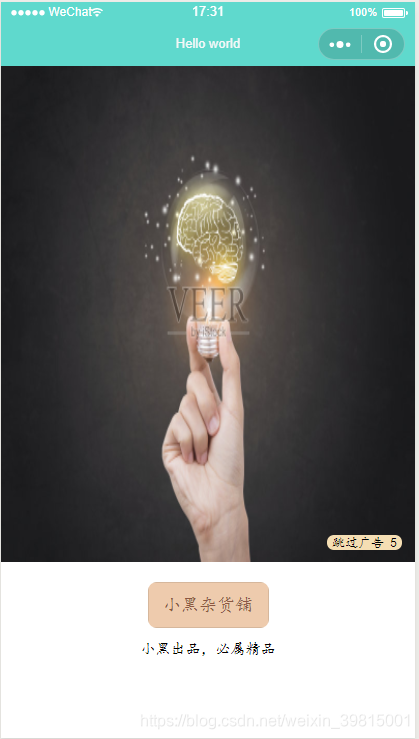
PS:附上最近写的一个小程序商城demo地址:小黑杂货铺:https://github.com/Yxiaogg/vioShop:(支持请点star哟)
欢迎讨论!
实现思路:
1.写一个定时器,绑定一个数据,这里使用的是miao,初始值为6。
2.在进入页面时开始执行定时器,每秒执行一次miao-1操作。
this.time = setInterval(function () { that.setData({ miao: that.data.miao-1 })3.当miao==0时,清除定时器clearInterval(this.time)(一定要清除定时器),然后自动跳转到首页。
if (that.data.miao == 0){ clearInterval(this.time); wx.switchTab({ //保留当前页面,跳转到应用内的某个页面 url: "/pages/index/index" }) }4.也可以点击跳过广告,当用户点击跳过广告时,清除定时器(一定要清除定时器),然后页面跳转
cliadv: function(){ clearInterval(this.time) wx.switchTab({ //保留当前页面,跳转到应用内的某个页面(最多打开5个页面,之后按钮就没有响应的) url: "/pages/index/index" }) }WXML部分
<!--pages/advertising/advertising.wxml--><view class='main'><view class='adv1'> <image src='/img/adv.jpg' class='adv-img'></image> <text class='tiaoguo' bindtap='cliadv'>跳过广告 {{miao}}</text></view><view> <button>小黑杂货铺</button> <text class='text2'>小黑出品,必属精品</text></view></view>WXSS部分
/* pages/advertising/advertising.wxss */.adv1{ width: 100%; height: 900rpx; background: url('/img/ba3.png') no-repaeat 0 0; background-size: contain;}.adv-img{ width: 100%; height: 900rpx; position: absolute;}.tiaoguo{ font-size: 25rpx; background-color: wheat; border-radius: 80rpx; display: inline-block; margin-left: 10rpx; position: absolute; z-index: 999; right: 25rpx; top: 850rpx; padding-left: 10rpx; padding-right: 10rpx;}button{ border-radius: 18rpx; width: 220rpx; background-color: #EECBAD; color: #8B5742; margin-top: 38rpx; font-size: 33rpx;}.text2{ width: 100%; height: 100%; display: flex; justify-content: center; margin-top: 23rpx; font-size: 28rpx;}JS代码部分
// pages/advertising/advertising.js Page({ /** * 页面的初始数据 */ data: { miao: 6, time:'' }, /** * 生命周期函数--监听页面加载 */ onLoad: function (options) { var that = this; this.time = setInterval(function () { that.setData({ miao: that.data.miao-1 }) if (that.data.miao == 0){ clearInterval(this.time); wx.switchTab({ //保留当前页面,跳转到应用内的某个页面(最多打开5个页面,之后按钮就没有响应的) url: "/pages/index/index" }) } }, 1000) }, cliadv: function(){ clearInterval(this.time) wx.switchTab({ //保留当前页面,跳转到应用内的某个页面(最多打开5个页面,之后按钮就没有响应的) url: "/pages/index/index" }) }})学习交流群,有问题可以加一下,不收费 不收费 不收费