微信小程序获取微信公众号文章
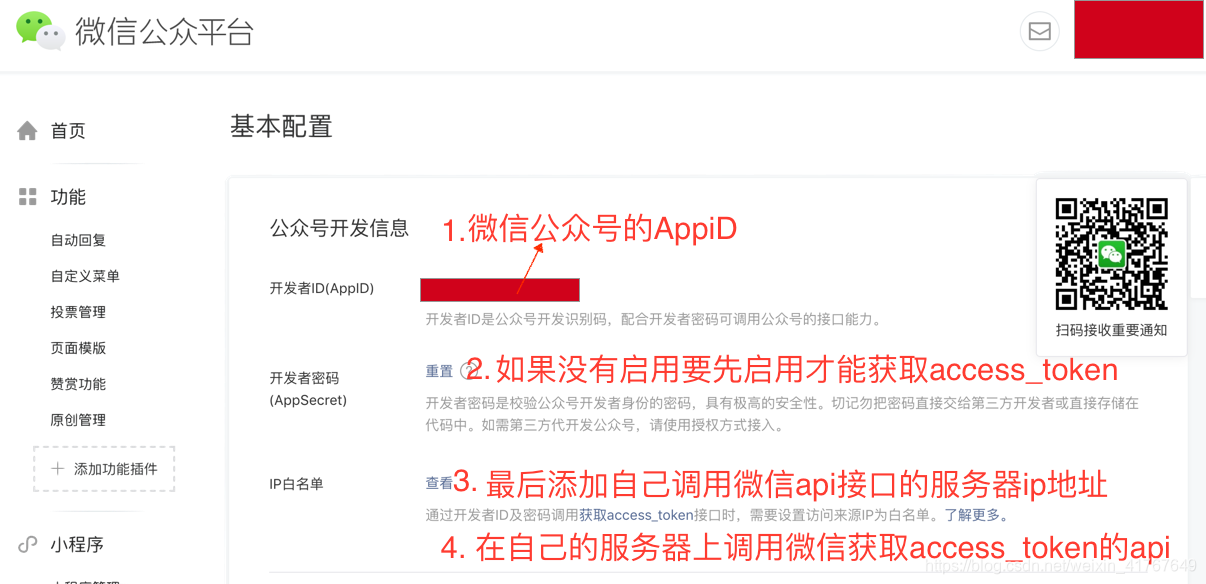
1. 获取access_token
微信公共号的APPSECRET 这个密钥要启用才可以看到。
在开启APPSECRET密钥之后,会出现一个添加ip白名单。如果不添加,会报错:
{ errcode: 40164,errmsg: 'invalid ip 117.100.47.169 ipv6 ::ffff:117.100.47.169, not in whitelist hint: [39lrcA01394100]' }获取微信的access_token。最好在自己服务器后台写,因为要输入AppID和AppSecret;
接口调用请求说明: https请求方式: GEThttps://api.weixin.qq.com/cgi-bin/token?grant_type=client_credential&appid=APPID&secret=APPSECRET
2. 拿到access_token后,在小程序中获取微信公众号的素材列表:
getArtLists(accessToken){ wx.showLoading({ title: '加载中', }) wx.request({ url: 'https://api.weixin.qq.com/cgi-bin/material/batchget_material?access_token=' + accessToken data: { "type": 'news', "offset": 0, "count": 20 }, method:'POST', header: { 'content-type': 'application/json' }, success(res) { console.log('微信素材列表',res) }, fail(res){ wx.showToast({ title: res.data.msg, icon: 'none' }) }, complete(){ wx.hideLoading() } }) }调用接口地址:
https://api.weixin.qq.com/cgi-bin/material/batchget_material?access_token= '添加自己的access_token'官方文档链接