


近期开发小程序遇到个需求,需要在Input框中加一个清除按钮清除input框中的内容以及实时搜索
页面效果(未输入内容):
有内容时样式: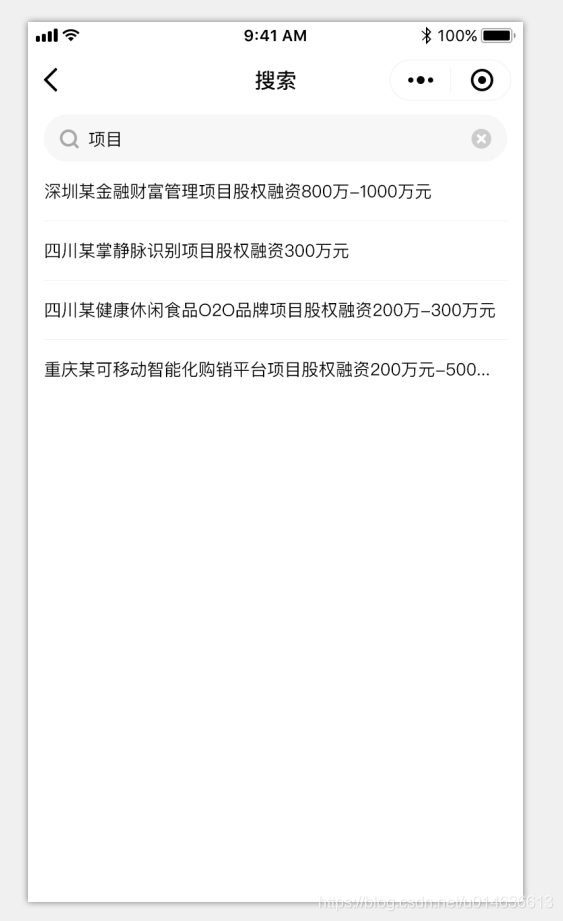
wxml代码:
<view class='container'> <view class='search_input'> <icon type="search" size="15" class='search_icon' /> <input placeholder='请输入关键字' placeholder-class="search_placeholder" value="{{inputValue}}" bindinput="blur"></input> <image src='../public_imgs/del.png' class='cancle_btn' wx:if="{{inputValue}}" bindtap='clean'></image> </view> <view class='flex space_between align_center search_title'> <view> 搜索历史 </view> <image src='../public_imgs/delete.png' wx:if="{{list.length!=0}}" catchtap='remove'></image> </view> <view class='list'> <view class="key" wx:if="{{list.length==0}}">暂无搜索记录</view> <view class="key" wx:for="{{list}}" wx:key="" bindtap='searchName' data-value='{{item}}'>{{item}}</view> </view> <view class='search_result' wx:if="{{inputValue}}"> <view wx:for="{{resultList}}" wx:key="" bindtap='detail' data-id='{{item.projectCode}}'> {{item.projectName}} </view> <view class='no_more' wx:if="{{resultList.length==0}}">暂无相关内容</view> </view></view>wxss代码:
.key{ width:auto; height:48rpx; line-height: 48rpx; background:rgba(246,246,246,1); border-radius:30rpx; padding: 5rpx 30rpx; font-weight:300; color: #4A4A4A; float:left; margin-right: 10rpx; margin-bottom: 30rpx; margin-left: 10rpx;}.list{ padding-left: 10rpx;}.search_title{ margin: 40rpx 20rpx 40rpx 30rpx;}.search_title image{ width: 48rpx; height: 48rpx;}.search_result{ position:fixed; left:0; right:0; top:80rpx; bottom:0; background:#ffffff; font-size: 26rpx; overflow: scroll; padding-bottom: 30rpx;}.search_result>view{ width: 690rpx; border-bottom:1rpx solid rgba(239,239,239,1); margin: auto; padding:30rpx 0; color: #070707; font-weight:400; overflow: hidden; white-space: nowrap; text-overflow: ellipsis;}.search_result>view:nth-last-child(1){ border-bottom: none;}.cancle_btn{ position: absolute; right: 40rpx; top:15rpx; width: 48rpx; height: 48rpx; z-index: 999;}.search_input { width: 620rpx; height: 72rpx; background: rgba(247, 247, 247, 1); border-radius: 36rpx; padding-left: 80rpx; margin: auto; font-size: 24rpx;}.search_input input{ line-height:72rpx; height:72rpx; width:500rpx;}.search_icon { position: absolute; left: 60rpx; top: 23rpx;}.search_placeholder { color: #cacaca;}.cancle_btn{ position: absolute; right: 40rpx; top:15rpx; width: 48rpx; height: 48rpx; z-index: 999;}.container { padding: 0 0 100rpx; font-size: 29rpx; overflow: scroll;}.no_more { text-align: center; font-weight: 400; color: rgba(107, 107, 107, 1); margin-bottom: 30rpx;}.flex { display: flex;}.space_between { justify-content: space-between;}.space_around { justify-content: space-around;}.align_center { align-items: center;}js代码:
var network = require("../../utils/network.js");Page({ /** * 页面的初始数据 */ data: { list: [], inputValue: null, resultList:[] }, /** * 生命周期函数--监听页面加载 */ onLoad: function (options) { var _this = this; wx.getStorage({ key: 'historySearch', success(res) { _this.setData({ list: res.data }) } }) }, blur: function (e) { this.setData({ inputValue: e.detail.value }) this.search(); }, search:function(){ var _this = this network.requestLoading('projectAppList', { projectName: this.data.inputValue }, '', function (res) { if (res.respState == 'S') { _this.setData({ resultList: res.dtos }) } }, function () { wx.showToast({ title: '搜索失败', icon: 'none' }) }) }, save: function () { var list = this.data.list; if (list.indexOf(this.data.inputValue) == -1 & this.data.inputValue != '') { list.push(this.data.inputValue); } this.setData({ list: list }) wx.setStorage({ key: 'historySearch', data: list }) }, searchName: function (e) { this.setData({ inputValue: e.currentTarget.dataset.value }) this.search(); }, remove: function () { var _this = this; wx.showModal({ title: '提示', content: '确认清空所有记录?', success(res) { if (res.confirm) { wx.removeStorage({ key: 'historySearch', success() { _this.setData({ list: [] }) } }) } else if (res.cancel) { console.log('用户点击取消') } } }) }, clean:function(){ var _this=this setTimeout(function () { _this.setData({ inputValue: '', }) },100) }, detail: function (e) { this.save(); wx.navigateTo({ url: '../projectDetail/projectDetail?id=' + e.currentTarget.dataset.id, }) }network.js:
var cryptData = require("cryptData.js");var app = getApp();const HOST = app.globalData.HOST;function request(url, params, success, fail) { this.requestLoading(url, params, "", success, fail)}// 展示进度条的网络请求// url:网络请求的url// params:请求参数// message:进度条的提示信息// success:成功的回调函数// fail:失败的回调function requestLoading(url, params, message, success, fail) { var ocryptData = cryptData.cryptData(params, url) wx.showNavigationBarLoading() if (message != "") { wx.showLoading({ title: message, }) } wx.request({ url: HOST + '/gateWay', data: JSON.stringify(ocryptData), header: { //'Content-Type': 'application/json' 'content-type': 'application/x-www-form-urlencoded' }, method: 'post', success: function(res) { //console.log(res.data) wx.hideNavigationBarLoading() if (message != "") { wx.hideLoading() } if (res.statusCode == 200) { success(res.data.params) if (res.data.params.respState == 'F' && res.data.params.respShow=='Y'){ wx.showToast({ title: res.data.params.respMsg, icon:'none', duration:2000 }) } if (res.data.params.respCode =='TK-INVALID'){ wx.reLaunch({ url: '../authorize/authorize', }) } } else { fail() } }, fail: function(res) { wx.hideNavigationBarLoading() if (message != "") { wx.hideLoading() } fail() }, complete: function(res) { wx.stopPullDownRefresh() }, })}module.exports = { request: request, requestLoading: requestLoading}遇到问题:未收起键盘情况下,安卓清除input框内容失败,收起键盘再点清除则没问题
解决方案延迟清除:
clean:function(){ var _this=this setTimeout(function () { _this.setData({ inputValue: '', }) },100) },









