


最近开始做小程序,通读一遍文档再上手并不算难,但不得不说小程序里还是有一些坑。这里说一下如何实现页面锚点跳转,一个城市列表的效果示意图如下:
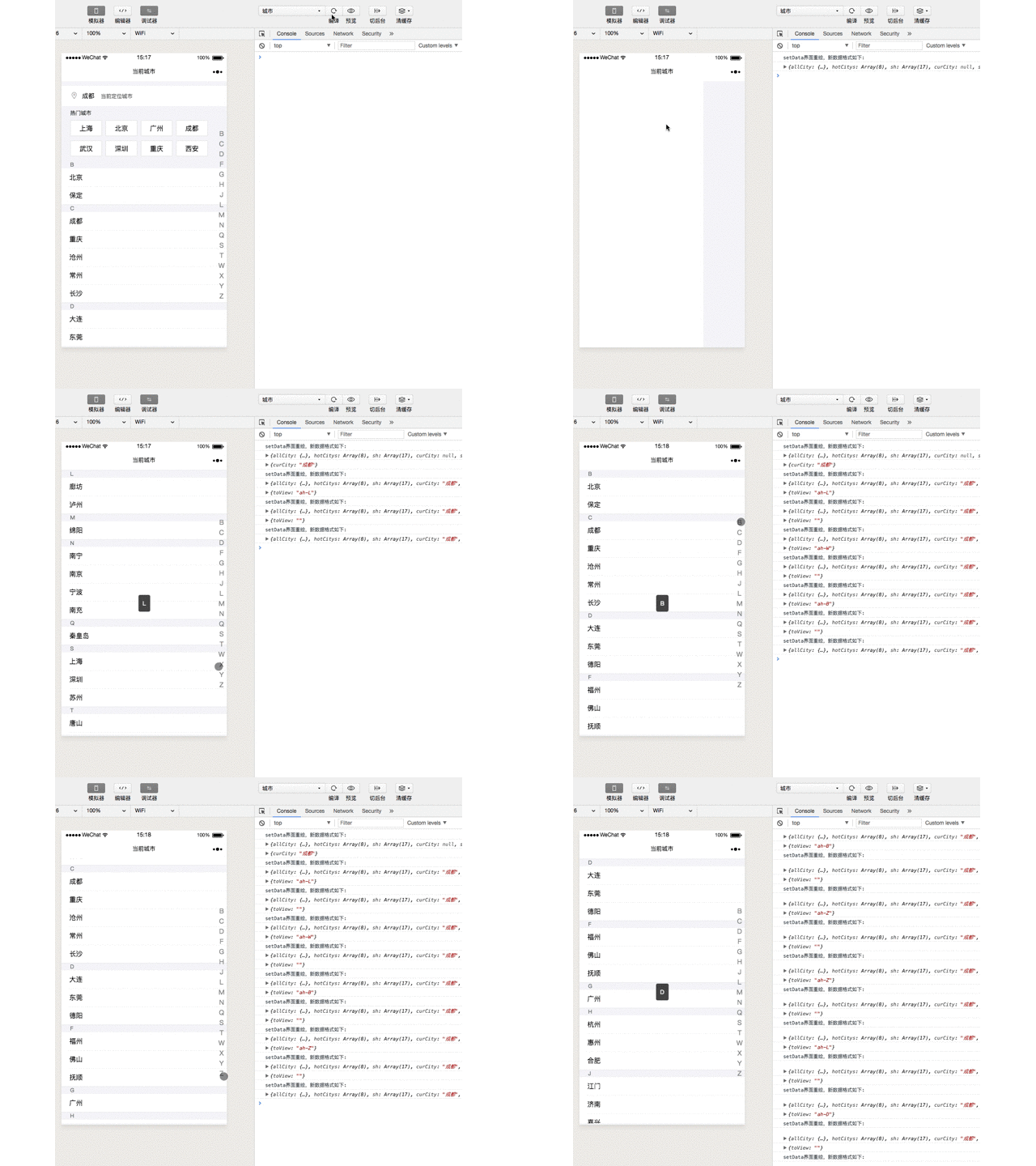
因为在微信小程序的环境中不能想在浏览器里设置标签,或者操作dom滚动,传统做法就行不通了,一切都得按小程序的文档来。
一开始我们的做法是使用boundingClientRect()方法获取每个锚点的坐标,然后再用wx.pageScrollTo()方法滑动过去。结果发现效果不是很好,因为boundingClientRect方法返回的每个点的坐标会随着屏幕滑动而变化,可能还会引起页面抖动,最后还是选择scroll-view(可滚动视图区域)组件来实现锚点效果。
具体实现
具体API就不赘述了,可以去看官方文档,这里讲几个需要注意的地方,下面是一个示意的scroll-view组件代码,上面的几个属性是必须的:
复制代码代码如下:<scroll-view scroll-y style="height: {{height}}px;" bindscroll="scroll" scroll-into-view="{{toView}}" >
scroll-into-view:这个绑定了一个属性,它的值应该是页面元素的id,设置它的值就可以跳转到ID对应的元素那里了。
scroll-y:添加这个属性标明是竖向滑动的,对应的scroll-x则表示横向滑动,竖向滑动时scroll-view必须设置一个固定的height
bindscroll:监听滑动,传给他一个事件,滑动时执行该事件
文档上给的属性特别多,暂时只需要上述几个就可实现我们想要的效果。实现原理也很简单,内容部分,每个英文简写的view设置一个id,然后在导航list那里点击时,就把scroll-into-view的值设置成点击的那个id即可实现跳转。
再说一下scroll-view的高度问题,这个一定要做适配的固定高度,不然在不同屏幕大小的手机上的显示效果有差异。
获取屏幕大小的代码:height是个变量,获取到的高度付给他,并反馈到页面
onLoad: function (options) { var that = this // 获取系统信息 wx.getSystemInfo({ success: function (res) { // 计算主体部分高度,单位为px that.setData({ height: res.windowHeight }) } }) },
几点优化
到这里功能基本都实现了,但后面还发现一些问题:如果要隐藏scroll-view的滚动条,需要设置css样式:::-webkit-scrollbar
::-webkit-scrollbar { width: 0; height: 0; color: transparent;}还有就是点了一个锚点实现了跳转,这个时候你滚动页面再点之前点的锚点,页面就不会再跳转了,这个时候就需要监听滚动事件,滚动时将scroll-into-view属性的值清空。或者在每次锚点跳转后,再由一个异步操作将scroll-into-view属性的值清空。
scroll-view默认是无滑动动画的,需要滚动的动画效果需要在组件上设置:
scroll-with-animation='true'
关于固定高度height的设置问题,一开始我以为这个高度和滚动元素的数目/高度有关,这个时候处理动态变化的列表就很麻烦。后面在网上看到的一个方法就是使用wx.getSystemInfo方法得到windowHeight,把这个设置为scroll-view的高度(单位为px)即可。
自己的测试代码
wxml代码:
<scroll-view scroll-y style="height: {{height}}px" bindscroll="scroll" scroll-into-view="{{toView}}" scroll-with-animation='true'><view wx:for="{{carModel}}"> <view wx:for = "{{item}}"> <view wx:if="{{item.id == 0}}" id="{{item.name}}"> <view class='zimu'> <view class='weizhi'> {{item.name}} </view> </view> </view> <view wx:else> <view class='carFrame'> <image src='{{item.url}}' class='tupian'></image> <view class='carText'>{{item.name}} </view> </view> </view> </view></view> <view id='cdwz'> <view wx:for="{{letter}}" class='caidan' bindtap='jump' id="{{index}}"> {{item}} </view> </view></scroll-view>
wxss代码:
/* 汽车图片 */.tupian{ width: 100rpx; height: 100rpx; display:inline-block; vertical-align:middle; margin-left: 10rpx;}/* 汽车外框 */.carFrame,.biaotou{ font-size: 30rpx; width: 100%; height: 100rpx; line-height: 50rpx; border-bottom: 1rpx solid #F4F4F8; display:inline-block;}/* 文本文字 */.carText{ font-size: 28rpx; margin-left: 50rpx; display:inline-block; vertical-align:middle;}/* 字母属性 */.zimu{ height: 50rpx; border-bottom: 1rpx solid #F4F4F8; font-size: 29rpx; color: #777777;}/* 字母位置 */.weizhi{ margin:10rpx 0 0 18rpx;}/* 菜单位置 */#cdwz{ position: fixed; right: 30rpx; top: 80rpx; text-align: center;}/* 字母菜单样式 */.caidan{ font-size: 25rpx; margin-top: 10rpx; color: #007ADF;}::-webkit-scrollbar { width: 0; height: 0; color: transparent;}js代码:
//获取屏幕高度 var screenHeight = wx.getSystemInfo({ success: function (res) { screenHeight = res.windowHeight } })Page({ /** * 页面的初始数据 */ data: { toView:'', height:"", carModel: [ [ { id: "0", name: "A" }, ], [ { id: "0", name: "B" }, ], [ { id: "0", name: "C" }, ], [ { id: "0", name: "D" }, ], [ { id: "0", name: "E" }, ], [ { id: "0", name: "F" }, ], [ { id: "0", name: "G" }, ], [ { id: "0", name: "H" }, ], [ { id: "0", name: "I" }, ], [ { id: "0", name: "J" }, ], [ { id: "0", name: "K" }, ], [ { id: "0", name: "L" }, ], [ { id: "0", name: "M" }, ], [ { id: "0", name: "N" }, ], [ { id: "0", name: "O" }, ], [ { id: "0", name: "P" }, ], [ { id: "0", name: "Q" }, ], [ { id: "0", name: "R" }, ], [ { id: "0", name: "S" }, ], [ { id: "0", name: "T" }, ], [ { id: "0", name: "U" }, ], [ { id: "0", name: "V" }, ], [ { id: "0", name: "W" }, ], [ { id: "0", name: "X" }, ], [ { id: "0", name: "Y" }, ], [ { id: "0", name: "Z" }, ], ], letter: ['A', 'B', 'C', 'D', 'E', 'F', 'G', 'H', 'I', 'J', 'K', 'L', 'M', 'N', 'O', 'P', 'Q', 'R', 'S', 'T', 'U', 'V', 'W', 'X', 'Y', 'Z'], }, jump: function (num){ var text = this.data.letter[num.target.id]; this.setData({ toView: text, }) console.log(text); }, onLoad: function (options) { var that = this // 获取系统信息 wx.getSystemInfo({ success: function (res) { // 计算主体部分高度,单位为px that.setData({ height: res.windowHeight }) } }) },})













