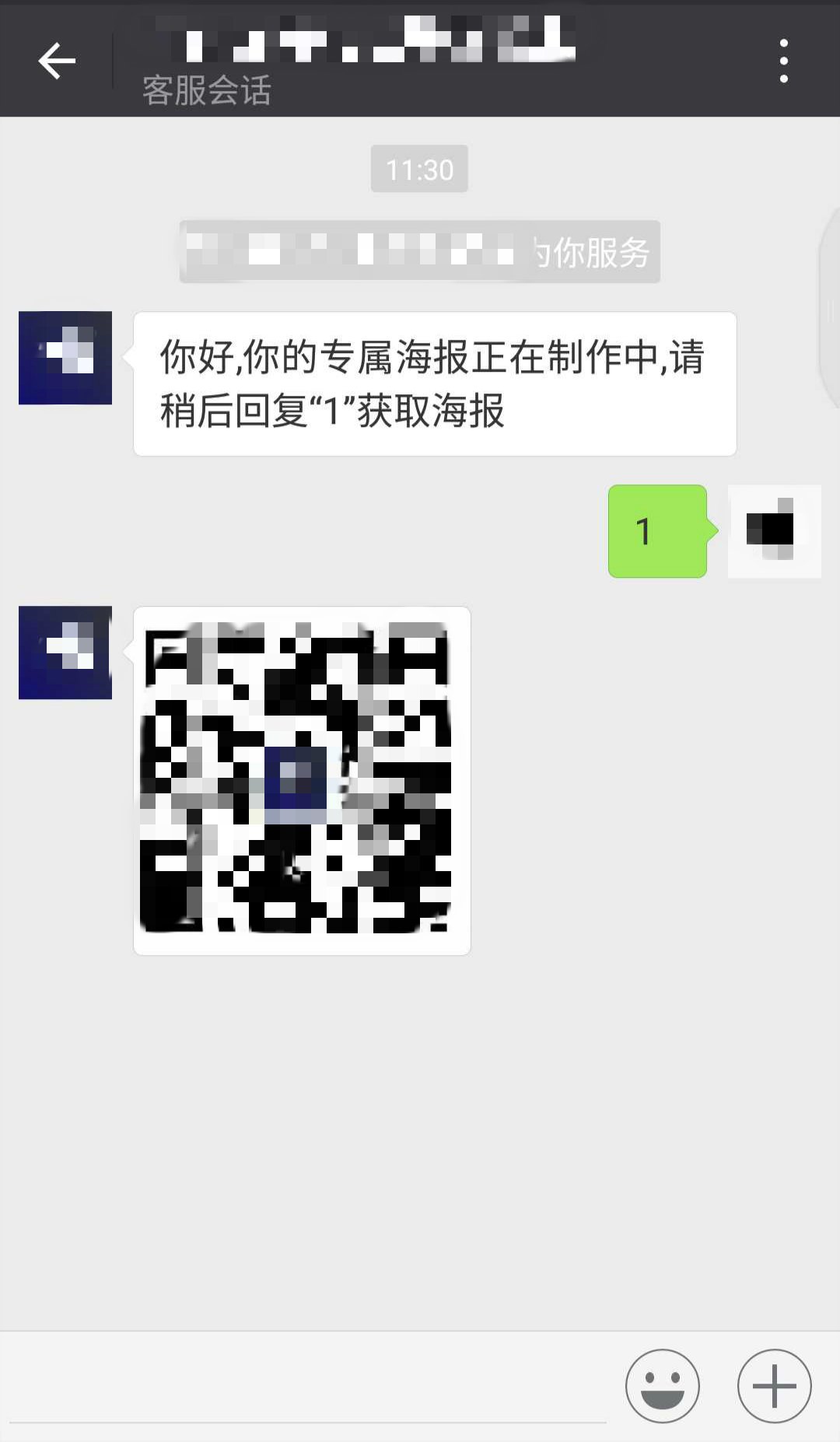
最近在开发微信小程序,前后端均是我一个人负责,也着实受了不少苦
网上客服消息开发挺多的,但是大多数说的都不详尽对新人来说有很多坑,最后还是根据官方说明文档一步一步走下来,写一份新人版的供大家参考,望大佬指正
注:如果要参考官方文档的话,这里有一个我推荐的阅读顺序
https://developers.weixin.qq.com/miniprogram/dev/component/contact-button.html?t=20161221
contact-button 按钮介绍,这是入口
https://developers.weixin.qq.com/miniprogram/dev/api/custommsg/receive.html#%E8%BF%9B%E5%85%A5%E4%BC%9A%E8%AF%9D%E4%BA%8B%E4%BB%B6
然后了解用户在客服会话中发送文本消息时产生的数据包结构
https://developers.weixin.qq.com/miniprogram/dev/api/custommsg/conversation.html
最后再看咱们往客户发送客服消息 的数据包结构
https://developers.weixin.qq.com/miniprogram/dev/api/custommsg/material.html?t=2018518
如果有图片消息,再看获取素材media_id(注意:微信公众号的media_id和小程序的media_id的获取接口是不同的,我当初就没仔细看坑了我好久)
官方的客服消息分两种
第一种是在小程序内添加contact-button标签,点击后会进入到“小程序客服消息”
第二种是网页版 的“客服消息”,在小程序平台里,选择“客服消息”,添加客服人员即可这里就不讲了
网上资料都让大家配“消息推送”,其实“消息推送”就是实现第一种“客服消息”的功能,当你设置好“消息推送”后,你再进入客服消息时,微信后台会自动发送数据包到你设置的url中,咱们获取传过来的数据再做相应处理即可
首先我们要配置“消息推送”,进入小程序平台,选择“设置”->“开发设置”->“消息推送”->点击“启用”
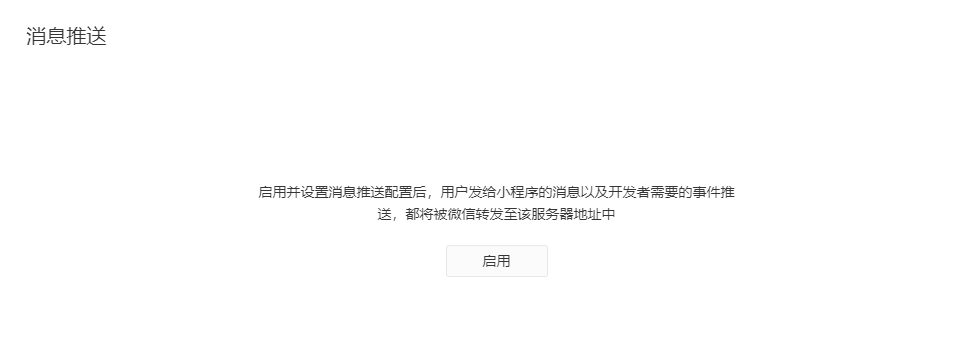
启用后需要填写url(即你要处理消息回复消息,写逻辑功能的地方,我习惯用php做后台所以服务器地址是http://XXX.php),Token随便写只要和你url对应的php里的token相同即可,最后数据格式就是你希望微信后台向你发送什么格式的数据包,个人比较喜欢json,本文也用json做例子
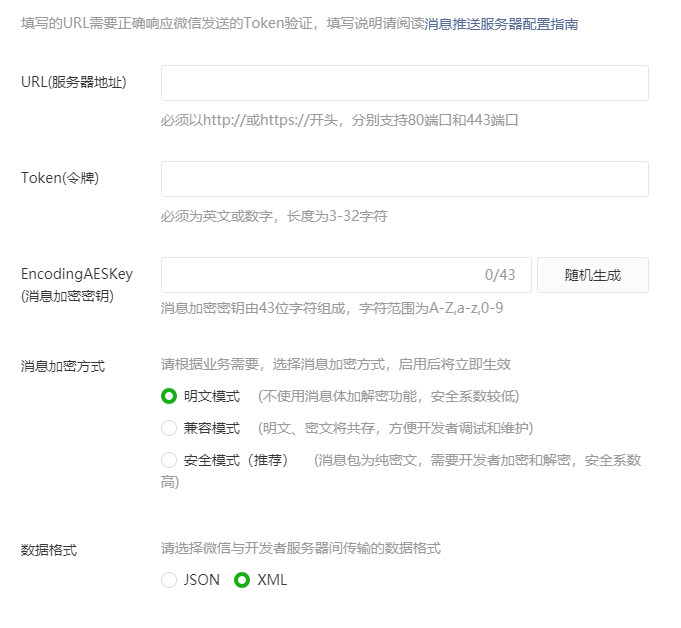
配置好后点击提交,token验证成功即可提交成功,下方即为验证Token部分
$signature = $_GET["signature"];$timestamp = $_GET["timestamp"];$nonce = $_GET["nonce"]; $token = TOKEN; //TOKEN 写自己在微信平台填入的token$tmpArr = array($token, $timestamp, $nonce);sort($tmpArr, SORT_STRING);$tmpStr = implode( $tmpArr );$tmpStr = sha1( $tmpStr ); if( $tmpStr == $signature ){ return true;}else{ return false;}提交成功后,恭喜你离成功已经很近了,接下来打开url对应文件
define("TOKEN", ""); //填写自己的tokenif (isset($_GET['echostr'])) {//校验服务器地址URLvalid();}else{responseMsg();} function valid() { $echoStr = $_GET["echostr"]; if(checkSignature()){ header('content-type:text'); echo $echoStr; exit; }else{ echo $echoStr.'+++'.TOKEN; exit; } } function checkSignature() { $signature = $_GET["signature"]; $timestamp = $_GET["timestamp"]; $nonce = $_GET["nonce"]; $token = TOKEN; $tmpArr = array($token, $timestamp, $nonce); sort($tmpArr, SORT_STRING); $tmpStr = implode( $tmpArr ); $tmpStr = sha1( $tmpStr ); if( $tmpStr == $signature ){ return true; }else{ return false; } } function responseMsg() { $postStr = file_get_contents('php://input'); //此处推荐使用file_get_contents('php://input')获取后台post过来的数据 if (!empty($postStr) && is_string($postStr)){$postArr = json_decode($postStr,true); if(!empty($postArr['MsgType']) && $postArr['MsgType'] == 'text'){ //用户发送文本消息 $fromUsername = $postArr['FromUserName']; //发送者openid $media_id = ''; //输入想要回复的图片消息的media_id $data=array( "touser"=>$fromUsername, "msgtype"=>"image", "image"=>array("media_id"=>$media_id) ); $json = json_encode($data,JSON_UNESCAPED_UNICODE); //php5.4+ requestAPI($json); }elseif(!empty($postArr['MsgType']) && $postArr['MsgType'] == 'image'){ //用户发送图文消息 $fromUsername = $postArr['FromUserName']; //发送者openid$media_id = ''; //输入想要回复的图片消息的media_id $data=array( "touser"=>$fromUsername, "msgtype"=>"image", "image"=>array("media_id"=>$media_id) ); $json = json_encode($data,JSON_UNESCAPED_UNICODE); //php5.4以上版本才可使用 requestAPI($json); }elseif($postArr['MsgType'] == 'event' && $postArr['Event']=='user_enter_tempsession'){ //用户进入客服 $fromUsername = $postArr['FromUserName']; //此处为文字回复,不同的回复方式可参考文章顶部第三个链接“回复客户消息”里查看 $content = '你好,你的专属海报正在制作中,请稍后回复“1”获取海报'; $data=array( "touser"=>$fromUsername, "msgtype"=>"text", "text"=>array("content"=>$content) ); $json = json_encode($data,JSON_UNESCAPED_UNICODE); //php5.4+ requestAPI($json); }else{ exit('error'); } }else{ echo "empty"; exit; } }function requestAPI($json){$access_token = get_accessToken();/* * POST发送https请求客服接口api */$url = "https://api.weixin.qq.com/cgi-bin/message/custom/send?access_token=".$access_token;//以'json'格式发送post的https请求$curl = curl_init();curl_setopt($curl, CURLOPT_URL, $url);curl_setopt($curl, CURLOPT_POST, 1); // 发送一个常规的Post请求curl_setopt($curl, CURLOPT_SSL_VERIFYPEER, FALSE);curl_setopt($curl, CURLOPT_SSL_VERIFYHOST, FALSE);if (!empty($json)){curl_setopt($curl, CURLOPT_POSTFIELDS,$json);}curl_setopt($curl, CURLOPT_RETURNTRANSFER, 1);//curl_setopt($curl, CURLOPT_HTTPHEADER, $headers );$output = curl_exec($curl);if (curl_errno($curl)) {echo 'Errno'.curl_error($curl);//捕抓异常}curl_close($curl);if($output == 0){echo 'success';exit;}} /* 调用微信api,获取access_token,有效期7200s*/ function get_accessToken(){$url = 'https://api.weixin.qq.com/cgi-bin/token?grant_type=client_credential&appid=wx****&secret='***'; //替换成自己的小程序id和secret@$weixin = file_get_contents($url);@$jsondecode = json_decode($weixin);@$array = get_object_vars($jsondecode);$token = $array['access_token'];return $token; }最后进入自己的微信小程序,在需要的地方添加contact-button标签即可<contact-button type="default-light" size="27" session-from="weapp"></contact-button><!-- size值18~27 session-from携带参数 -->这里强调一下,在更改后台代码后一定要记得先清除微信的缓存,确保完全退出小程序后再次进入进行测试,确保咱们的改动可以实时更新
最后上一下效果图,有问题的小伙伴大家可以讨论一下~( ̄▽ ̄~)~