


小程序如何获取code
<button open-type="getUserInfo" hover-class='none' bindgetuserinfo="getUserInfoFun">.</button> wx.login({ success: function (res) { var code = res.code; if (code) { console.log('获取用户登录凭证:' + code); // --------- 发送凭证 ------------------ wx.request({ url: 'https://www.my-domain.com/wx/onlogin', data: { code: code } }) // ------------------------------------ } else { console.log('获取用户登录态失败:' + res.errMsg); } } });登录的时候需要拿到token值,需要跟后端配合才能拿到
小程序调用wx.login() 获取 临时登录凭证code ,并回传到开发者服务器
开发者服务器以code换取 用户唯一标识openid 和 会话密钥session_key
// 登录wx.login({ success: res => { // 发送 res.code 到后台换取 openId, sessionKey, unionId // console.log(res) if (res.code) { //发起网络请求 wx.request({ url: 'url', method: 'POST', data: { // x: '', // y: '' code: res.code //将code发给后台拿token }, header: { 'content-type': 'application/json' // 默认值 }, success: function(res) { // 存token console.log('token=' + res.data.data.token) that.globalData.token = res.data.data.token; //拿到后将token存入全局变量 以便其他页面使用 } }) } else { console.log('获取用户登录态失败!' + res.errMsg) } }})// 检验、登录wx.checkSession({ success: function() { //session_key 未过期,并且在本生命周期一直有效 }, fail: function() { //session_key 已经失效,需要重新执行登录流程 wx.login({ success: (res) => { if (res.code) { //发起网络请求 wx.request({ //开发者服务器通过code换取用户唯一标识openid 和 会话密钥session_key。 url: 'https://test.com/onLogin', data: { // 临时登录凭证code,并回传到开发者服务器 code: res.code }, success: function(result) { //返回业务数据,前后端交互身份识别 } }) } else { console.log('登录失败!' + res.errMsg) } } }); }})授权获取用户信息
// 可以通过 wx.getSetting 先查询一下用户是否授权了 "scope.record" 这个 scopewx.getSetting({ success(res) { if (!res.authSetting['scope.record']) { wx.authorize({ scope: 'scope.record', success() { // 用户已经同意小程序使用录音功能,后续调用 wx.startRecord 接口不会弹窗询问 wx.startRecord() } }) } }})wx.authorize({scope: "scope.userInfo"}),无法弹出授权窗口,请使用 <button open-type="getUserInfo"></button>wx.getSetting({ success: (res)=>{ if (res.authSetting['scope.userInfo']) { // 已经授权,可以直接调用 getUserInfo 获取头像昵称 wx.getUserInfo({ withCredentials: true, success: (res) => { console.log(res); } }) } }});
授权和登录的意义
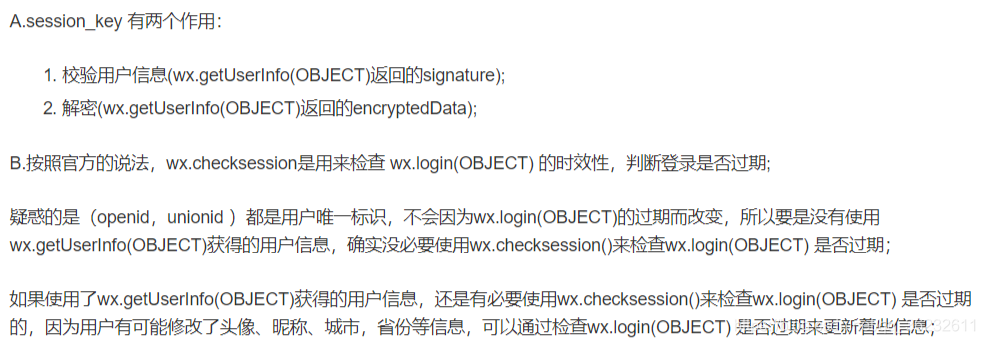
session_key 的作用
unionId 的作用,有哪些获取途径
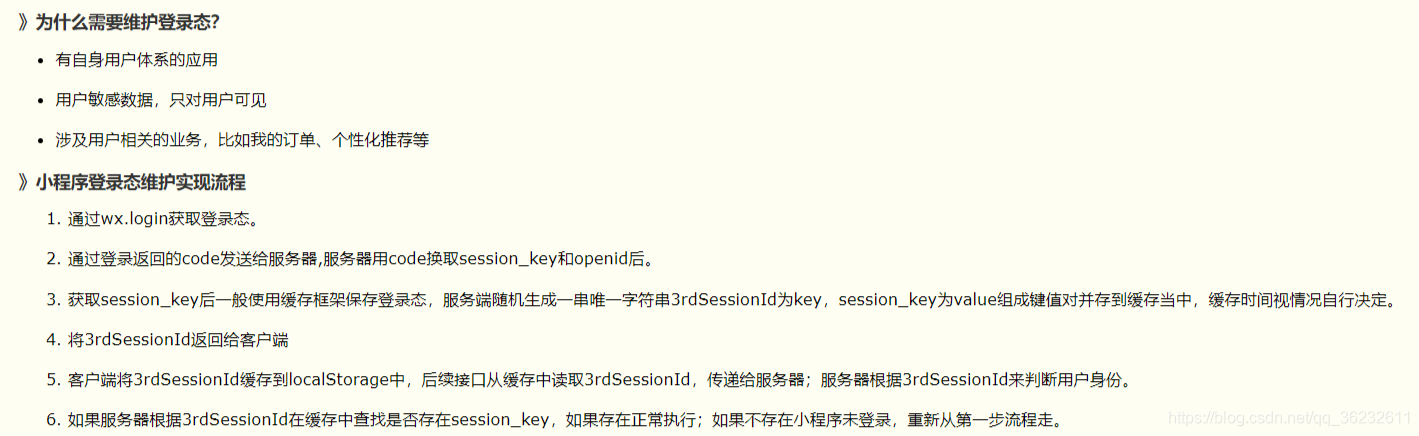
在应用中如何保存用户登录态
新版api已废弃wx.authorize()
wx.getUserInfo(Object object)
调用前需要 用户授权 scope.userInfo。
注意:wx.authorize({scope: “scope.userInfo”}),无法弹出授权窗口,请使用
<button open-type="getUserInfo"/>一个用户相对于不同的微信应用会存在不同的openId
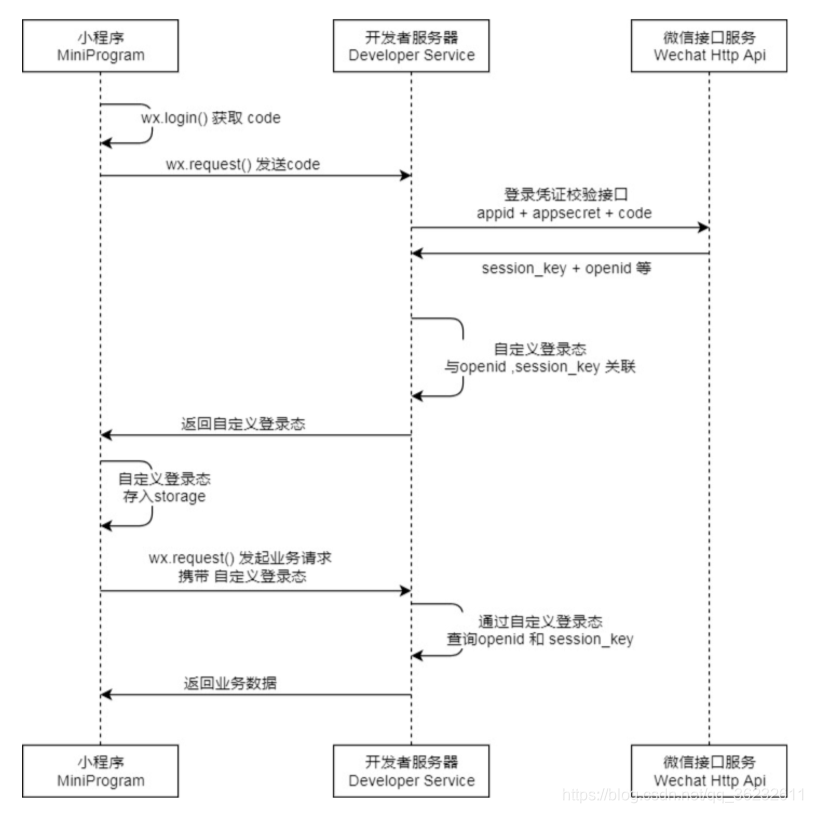
保存用户登录态
两种解决方案:前端保存和后端保存
App({ data:{ titleList: [], //数据 wxa_session: '', // 密钥 openid: '', scene: '' }, onLaunch: function () { try { // 同步清理本地数据缓存 console.log('clear'); wx.clearStorageSync() } catch (e) { // Do something when catch error } },// 定义登录函数userLogin:function(cb){ var that = this wx.login({ success: function (res) { if (res.code) { //发起网络请求 wx.request({ url: 'https://mp.weixin.qq.com/wxaintp/common?action=login&codetype=invoicediscern', data: { // 通过传递code获取openID 和 密钥 code: res.code }, success: function (res) { // console.log(res); if (res.data.base_resp.ret == 0){ // 用户唯一标识openid 和 会话密钥session_key that.data.wxa_session = res.data.session_key; that.data.openid = res.data.openid; console.log(that.data.wxa_session); cb(); // 后续操作 } else { // 参数有误 wx.showToast({ image: '/static/images/icon_fail@3x.png', title: res.data.base_resp.err_msg, }) } } }) } else { console.log('获取用户登录态失败!' + res.errMsg) } } }); globalData:{ userInfo:null }, onShow: function(options) { console.log('app onShow'); console.log(options); var that = this; if(options){ that.data.scene = options.scene; //场景 } } })App({ // 获取token getToken: function() { var that = this; if (wx.getStorageSync("token") == null || wx.getStorageSync("token") == "") { console.log("请用户授权获取token"); wx.redirectTo({ url: '/pages/welcome/welcome', }) } else { wx.switchTab({ url: '/pages/index/index', }) } }, // 当小程序初始化完成时,会触发 onLaunch(全局只触发一次) onLaunch: function() { // 获取小程序更新机制兼容 if (wx.canIUse('getUpdateManager')) { const updateManager = wx.getUpdateManager() updateManager.onCheckForUpdate(function(res) { // 请求完新版本信息的回调 if (res.hasUpdate) { updateManager.onUpdateReady(function() { wx.showModal({ title: '更新提示', content: '新版本已经准备好,是否重启应用?', success: function(res) { if (res.confirm) { // 新的版本已经下载好,调用 applyUpdate 应用新版本并重启 updateManager.applyUpdate() } } }) }) updateManager.onUpdateFailed(function() { // 新的版本下载失败 wx.showModal({ title: '已经有新版本了哟~', content: '新版本已经上线啦~,请您删除当前小程序,重新搜索打开哟~', }) }) } }) } else { // 如果希望用户在最新版本的客户端上体验您的小程序,可以这样子提示 wx.showModal({ title: '提示', content: '当前微信版本过低,无法使用该功能,请升级到最新微信版本后重试。' }) } var that = this; that.getToken(); }, // 当小程序启动,或从后台进入前台显示,会触发 onShow onShow: function(options) { }, // 当小程序从前台进入后台,会触发 onHide onHide: function() { }, // 当小程序发生脚本错误,或者 api 调用失败时,会触发 onError 并带上错误信息 onError: function(msg) { }, globalData: { "avatarUrl": null, "nickName": null, // userId: 用户编号 "userId": null, // organId: 所属单位 "organId": null, // idType:身份类型 "idType": null, "uncheckedNUM": null, "attendNum": null, "beLateNum": null, "leaveNum": null, "token": null, "studentNo": null, }})// 获取全局变量const app = getApp();Page({ // 页面的初始数据 data: { progress_txt: '点击账号绑定...', }, // 按钮 drawProgressbg: function() { // 使用 wx.createContext 获取绘图上下文 context var ctx = wx.createCanvasContext('canvasProgressbg') ctx.setLineWidth(4); // 设置圆环的宽度 ctx.setStrokeStyle('#20183b'); // 设置圆环的颜色 ctx.setLineCap('round') // 设置圆环端点的形状 ctx.beginPath(); //开始一个新的路径 ctx.arc(110, 110, 100, 0, 2 * Math.PI, false); //设置一个原点(100,100),半径为90的圆的路径到当前路径 ctx.stroke(); //对当前路径进行描边 ctx.draw(); }, // 授权登录 doAuthorization: function(e) { var that = this; console.log("调用了 doAuthorization 授权"); // 授权 只为获取token wx.login({ success: function(res) { console.log("login: code", res.code); // 发送至服务器 wx.request({ url: '', method: 'POST', header: { Authorization: "", 'Content-Type': 'application/x-www-form-urlencoded', }, data: { mobile: 'wxecd372cca9b110e3@' + res.code, grant_type: 'mobile', }, success: function(res) { // 进行判断 console.log("button 成功", res.data); console.log("button token 成功", res.data.access_token); if (res.data.access_token == null || res.data.access_token == "") { wx.showModal({ title: '提示', content: '请到公众号平台进行绑定账号', showCancel: false, success: function(res) { console.log("请绑定账号"); } }) } else { wx.setStorageSync("token", res.data.access_token); wx.showToast({ title: '成功', icon: 'succes', duration: 1000, mask: true }) setTimeout(function() { // 授权跳转 index wx.switchTab({ url: '/pages/index/index', }) wx.hideToast() }, 2000) } }, // 失败 fail: function(err) { console.log("token 失败", err); wx.showModal({ title: '提示', content: '请到公众号平台进行绑定账号', showCancel: false, success: function(res) { if (res.confirm) { wx.navigateBack({ delta: 0 }) } } }) } }) } }) }, // 生命周期函数--监听页面加载 onLoad: function(options) { }, // 生命周期函数--监听页面初次渲染完成 onReady: function() { this.drawProgressbg(); }, // 生命周期函数--监听页面显示 onShow: function() { }, // 生命周期函数--监听页面隐藏 onHide: function() { }, // 生命周期函数--监听页面卸载 onUnload: function() { }})











