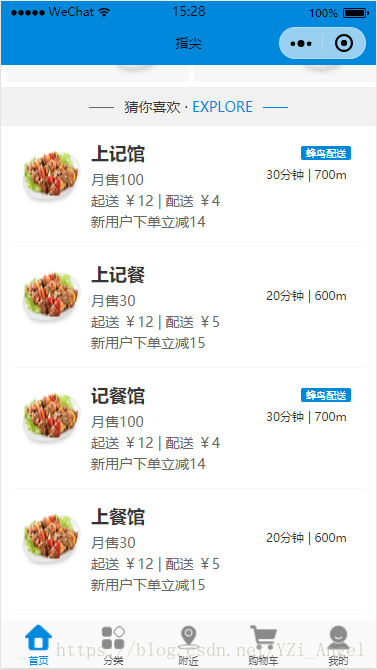
项目中总有项目列表或者经常出现布局样式相同的模块,一般人总喜欢复制一下,就能实现想要的效果,但是,总是复制粘贴代码很难避免让项目变得臃肿,而且还不容易迭代更新,有一个地方需要改进,通常都要一改全改,浪费时间和精力。所以使用模板是大势所趋。
我们再JQuery项目中,可以使用artTemplate插件来实现模板替换功能,不清楚的同学可以点下边的连接了解一下
artTemplate使用方法
在vue等MVVM框架中,可以将列表中的一项,或者经常出现的模块直接独立出一个组件,需要用的地方将组件嵌入即可。
那么小程序里我们该怎么解决呢,接下来,我将详细的记录下其使用方法。
开始之前,我们先做一下准备工作~
- 在根目录创建资源目录resource来存放所有资源文件
- resource文件夹下创建一个存放、管理模板的template文件夹
- 在template下创建 template.wxml 文件和 template.wxss 文件
定义模板
在 template.wxml 中我们可以定义模板了,这里我们可以写 n(很多很多)个模板,用 name 区分,使用的时候他会自动找到对应 name 的模板。
先上 .wxml 模板代码:
<template name="good"> <navigator open-type='navigate' url='{{url}}' class="good"> <image class='image' src='{{item.imgUrl}}'></image> <view class='content'> <text class='title'>{{item.title}}</text> <text class='number'>月售{{item.number}}</text> <text class='price'>起送 ¥{{item.priceMin}} | 配送 ¥{{item.priceSend}}</text> <text wx:if="{{item.activity}}">{{item.activity}}</text> </view> <view class='right'> <text wx:if="{{item.activity}}" class='is-send'>{{item.isSend}}</text> <text class='distance'>{{item.time}}分钟 | {{item.distance}}m</text> </view> </navigator></template>对应的 .wxss 样式
.good{ position: relative; min-height: 200rpx; border-bottom: 2rpx solid #f7f7f7; padding: 10rpx; margin: 20rpx;}.good .image{ position: absolute; top: 20rpx; left: 20rpx; width: 120rpx; height: 120rpx; border-radius: 4rpx;}.good .content{ margin-left: 150rpx;}.good .content > text{ display: block; color: #666; margin-bottom: 5rpx;}.good .content .title{ display: block; margin-bottom: 10rpx; font-size: 36rpx; font-weight: bold; color: #333;}.good .right{ position: absolute; top: 20rpx; right: 20rpx; font-size: 24rpx;}.good .right .is-send{ position: absolute; top: 0; right: 10rpx; display: block; width: 100rpx; text-align: center; border-radius: 5rpx; background: #0089dc; color: #fff; font-size: 20rpx;}.good .right .distance{ position: absolute; top: 40rpx; right: -20rpx; width: 200rpx;}使用模板
在需要使用模板的 .wxml 文件中,先引入模板文件
<import src="../../resource/template/template.wxml"/>使用模板:
<block wx:for="{{goodsList}}" wx:key="{{item}}"> <template is="good" data="{{item}}"></template></block>使用模板我们还有另外一种方式:
<block wx:for="{{goodsList}}" wx:key="{{item}}"> <template is="good" data="{{...item}}"></template></block>使用这种方法,我们的 template.wxml 文件中,所有的 item.xxx 就可以直接替换成 xxx ,这两种的显示效果是一样的
使用模板样式
在使用模板的对应 .wxss 文件中引入样式:
@import "../../resource/template/template.wxss";当然我们也可以在 app.xwss 中引入样式文件,这样我们就可以只引用一次就行。
模板数据
对应的 .js 文件中给 goodsList 定义好对应的数据,这样模板效果也就出来了
goodsList: [ { "url": "", "imgUrl": "../../resource/imgs/goods/1.png", "title": "上记馆", "priceMin": "12", "priceSend": 4, "time": "30", "distance": "700", "grade": 4.2, "number": 100, "activity": "新用户下单立减14", "isSend": "蜂鸟配送" }, { "url": "", "imgUrl": "../../resource/imgs/goods/1.png", "title": "上记餐", "priceMin": "12", "priceSend": 5, "time": "20", "distance": "600", "grade": 3.7, "number": 30, "activity": "新用户下单立减15", "isSend": "" }, { "url": "", "imgUrl": "../../resource/imgs/goods/1.png", "title": "记餐馆", "priceMin": "12", "priceSend": 4, "time": "30", "distance": "700", "grade": 4.2, "number": 100, "activity": "新用户下单立减14", "isSend": "蜂鸟配送" }, { "url": "", "imgUrl": "../../resource/imgs/goods/1.png", "title": "上餐馆", "priceMin": "12", "priceSend": 5, "time": "20", "distance": "600", "grade": 3.7, "number": 30, "activity": "新用户下单立减15", "isSend": "" } ]