


1. 编写目的
简单介绍微信小程序登录的实现。
2. 重要说明
由于之前做微信网页授权登录,容易被之前的思路误导。
微信小程序登录流程如官网图片: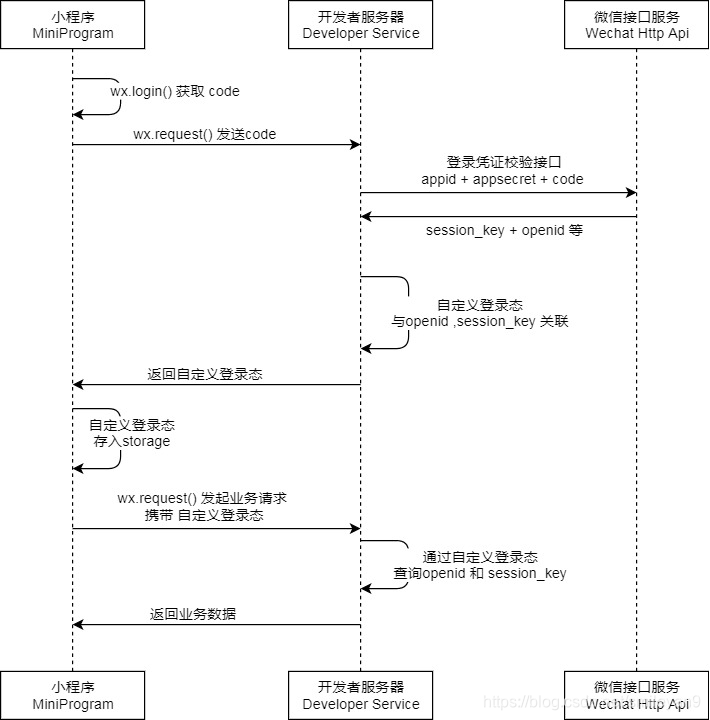
需要说明的就是,获得用户信息并不是后端再次提交数据给微信端,获得用户信息,而是登录后在小程序内授权获得用户信息。
3. 具体代码
首先需要添加maven依赖包 httpclient 与 fastjson
<!-- https://mvnrepository.com/artifact/org.apache.httpcomponents/httpclient --><dependency><groupId>org.apache.httpcomponents</groupId><artifactId>httpclient</artifactId><version>4.5.7</version></dependency><!-- https://mvnrepository.com/artifact/com.alibaba/fastjson --><dependency><groupId>com.alibaba</groupId><artifactId>fastjson</artifactId><version>1.2.56</version></dependency>package cn.ailanglang.diary.login.controller;import com.alibaba.fastjson.JSONObject;import org.apache.http.client.methods.CloseableHttpResponse;import org.apache.http.client.methods.HttpGet;import org.apache.http.client.utils.URIBuilder;import org.apache.http.impl.client.CloseableHttpClient;import org.apache.http.impl.client.HttpClients;import org.apache.http.util.EntityUtils;import org.springframework.beans.factory.annotation.Value;import org.springframework.web.bind.annotation.GetMapping;import org.springframework.web.bind.annotation.RequestMapping;import org.springframework.web.bind.annotation.RestController;import java.net.URI;/** * @author smileyan */@RestController@RequestMapping("/wechat")public class WeChatLoginController { @Value("${wechat.appid}") private String appid; @Value("${wechat.appsecret}") private String appsecret; private String openid; private String session_key; @GetMapping("/index") private String login(String code) { // 创建Httpclient对象 CloseableHttpClient httpclient = HttpClients.createDefault(); String resultString = ""; CloseableHttpResponse response = null; String url="https://api.weixin.qq.com/sns/jscode2session?appid="+appid+"&secret="+appsecret+"&js_code="+code+"&grant_type=authorization_code"; try { // 创建uri URIBuilder builder = new URIBuilder(url); URI uri = builder.build(); // 创建http GET请求 HttpGet httpGet = new HttpGet(uri); // 执行请求 response = httpclient.execute(httpGet); // 判断返回状态是否为200 if (response.getStatusLine().getStatusCode() == 200) { resultString = EntityUtils.toString(response.getEntity(), "UTF-8"); } } catch (Exception e) { e.printStackTrace(); } // 解析json JSONObject jsonObject = (JSONObject) JSONObject.parse(resultString); session_key = jsonObject.get("session_key")+""; openid = jsonObject.get("openid")+""; System.out.println("session_key=="+session_key); System.out.println("openid=="+openid); return resultString; }}4. 测试方法
可以在微信开发者工具中调用js的wx.login然后获得code,用console.log(code);方法输出到控制台上,然后用浏览器访问自己后端的这个路径,就可以看到json格式的返回值。
微信小程序登录完成。
微信小程序Smileyan 2019年2月27日










