


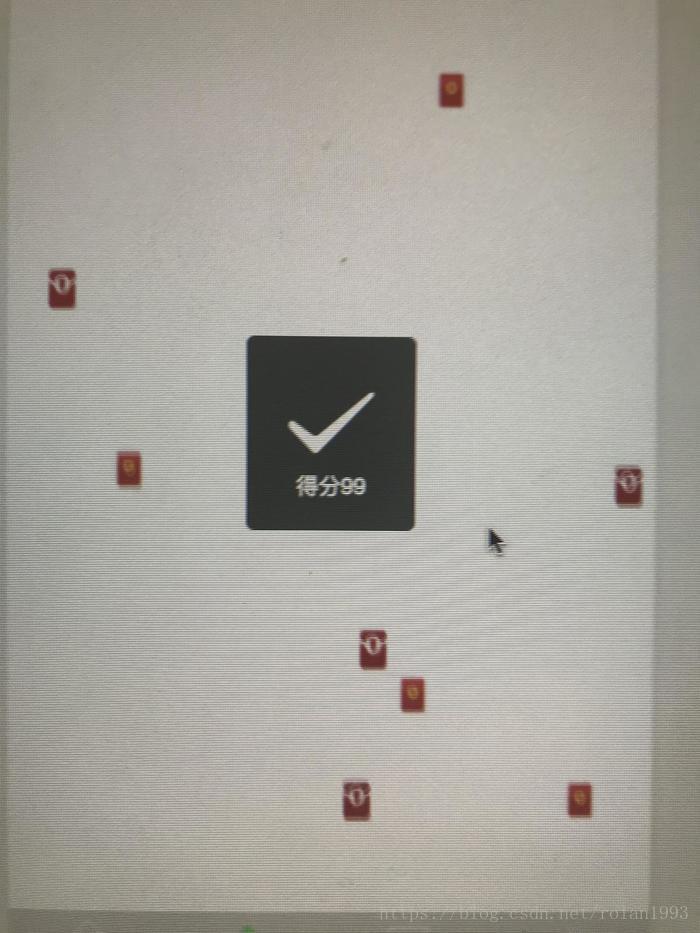
效果图
//建立临时红包列表 var packetList = []; //建立临时红包图片数组 var srcList = ["../images/hogbao.png", "../images/hogbao2.png"]; //生成初始化红包 for (var i = 0; i < that.data.packetNum; i++) { // 生成随机位置(水平位置) var left = Math.random() * that.data.windowWidth - 20; // 优化位置,防止红包越界现象,保证每个红包都在屏幕之内 if (left < 0) { left += 20; } else if (left > that.data.windowWidth) { left -= 20; } // 建立临时单个红包 var packet = { src: srcList[Math.ceil(Math.random() * 2) - 1], top: -30, left: left, speed: Math.random() * 2500 + 3000 //生成随机掉落时间,保证每个掉落时间保持在3秒到5.5秒之间 } // 将单个红包装入临时红包列表 packetList.push(packet); // 将生成的临时红包列表更新至页面数据,页面内进行渲染 that.setData({ packetList: packetList }) } // 初始化动画执行当前索引 var tempIndex = 0; // 开始定时器,每隔1秒掉落一次红包 that.data.showInter = setInterval(function () { // 生成当前掉落红包的个数,1-3个 var showNum = Math.ceil(Math.random() * 3); // 防止数组越界 if (tempIndex * showNum >= that.data.packetNum) { // 如果所有预生成的红包已经掉落完,清除定时器 clearInterval(that.data.showInter); } else { switch (showNum) { case 1: //设置临时红包列表当前索引下的top值,此处top值为动画运动的最终top值 packetList[tempIndex].top = that.data.windowHeigh; // 当前次掉落几个红包,索引值就加几 tempIndex += 1; break; case 2: packetList[tempIndex].top = that.data.windowHeigh; packetList[tempIndex + 1].top = that.data.windowHeigh; tempIndex += 2; break; case 3: packetList[tempIndex].top = that.data.windowHeigh; packetList[tempIndex + 1].top = that.data.windowHeigh; packetList[tempIndex + 2].top = that.data.windowHeigh; tempIndex += 3; break; default: console.log(); } // 更新红包列表数据 that.setData({ packetList: packetList }) } }, 1000) console.log("数据" + that.data.showInter) },
CSS代码:
<view wx:for="{{packetList}}" wx:for-index="index" wx:for-item="items"> <image class="red-packet" src="{{items.src}}" style="position:fixed;top:{{items.top}}px;left:{{items.left}}px;-webkit-transition:{{items.speed}}ms linear 0ms;transition:{{items.speed}}ms linear 0ms" bindtap='tapImages' > </image></view>
WXML代码:
.red-packet{ width: 20px; height: 25px; z-index: 100; transition-property:transform,top; transform-origin:50% 50% 0; -webkit-transition-property:transform,top; -webkit-transform-origin:50% 50% 0;}
JS代码
Page({ /** * 页面的初始数据 */ data: { windowWidth: "",//窗口宽度 windowHeigh: "",//窗口高度 packetList: [{}],//红包队列 packetNum: 200,//总共红包的数量 showInter: ''// 循环动画定时器 }, /** * 生命周期函数--监听页面加载 */ onLoad: function (options) { var that = this; // 获取手机屏幕宽高 wx.getSystemInfo({ success: function (res) { that.setData({ windowWidth: res.windowWidth, windowHeigh: res.windowHeight, top: res.windowHeight - 100 //设置红包初始位置 }) } }) //建立临时红包列表 var packetList = []; //建立临时红包图片数组 var srcList = ["../images/hogbao.png", "../images/hogbao2.png"]; //生成初始化红包 for (var i = 0; i < that.data.packetNum; i++) { // 生成随机位置(水平位置) var left = Math.random() * that.data.windowWidth - 20; // 优化位置,防止红包越界现象,保证每个红包都在屏幕之内 if (left < 0) { left += 20; } else if (left > that.data.windowWidth) { left -= 20; } // 建立临时单个红包 var packet = { src: srcList[Math.ceil(Math.random() * 2) - 1], top: -30, left: left, speed: Math.random() * 2500 + 3000 //生成随机掉落时间,保证每个掉落时间保持在3秒到5.5秒之间 } // 将单个红包装入临时红包列表 packetList.push(packet); // 将生成的临时红包列表更新至页面数据,页面内进行渲染 that.setData({ packetList: packetList }) } // 初始化动画执行当前索引 var tempIndex = 0; // 开始定时器,每隔1秒掉落一次红包 that.data.showInter = setInterval(function () { // 生成当前掉落红包的个数,1-3个 var showNum = Math.ceil(Math.random() * 3); // 防止数组越界 if (tempIndex * showNum >= that.data.packetNum) { // 如果所有预生成的红包已经掉落完,清除定时器 clearInterval(that.data.showInter); } else { switch (showNum) { case 1: //设置临时红包列表当前索引下的top值,此处top值为动画运动的最终top值 packetList[tempIndex].top = that.data.windowHeigh; // 当前次掉落几个红包,索引值就加几 tempIndex += 1; break; case 2: packetList[tempIndex].top = that.data.windowHeigh; packetList[tempIndex + 1].top = that.data.windowHeigh; tempIndex += 2; break; case 3: packetList[tempIndex].top = that.data.windowHeigh; packetList[tempIndex + 1].top = that.data.windowHeigh; packetList[tempIndex + 2].top = that.data.windowHeigh; tempIndex += 3; break; default: console.log(); } // 更新红包列表数据 that.setData({ packetList: packetList }) } }, 1000) console.log("数据" + that.data.showInter) }, //点击图片 tapImages: function (event){ var score = Math.ceil(Math.random() * 100); wx.showToast({ title: "得分"+score, icon: 'succes', duration: 1000, mask: true }) }})
直接配置!
专栏作家
honey缘木鱼。小程序社区博主。分享开发实战,坚持原创。
本文原创发布于小程序社区。著作权归作者所有,未经许可,禁止转载。
原文地址:小程序红包雨-小程序社区/博主专区-微信小程序开发社区-微信小程序联盟
相关文章
微信小程序Demo:语音口令红包
抢红包——微信小程序Demo












