


其实呢这篇文章应该在几个月前就写完了,可惜懒癌一直发作,外加上公司996了几个月,实在无力更新,本着公司人事的规定,上班时间不得看视频学习,作为菜鸟的我只能总结总结之前项目中的一些坑,这不就写写小程序与H5的交互吧。当然,第一你得有思路,究竟是谁与谁的交互,我这个菜鸟当时写的时候是一脸蒙圈,废话有点多,开始撸代码。
第一步:小程序跳转到H5页面,那么这个代码是要写在小程序里面的,小程序自带web-view标签,实现了跳转
1.点击按钮触发页面的跳转(uni-app编写,无论是weex或者taro原理相通)
<view @click="handleAction(item.title)">跳转H5</view>2.点击事件的代码
handleAction(item){ let url = item.poster_link if (url === null) { return } else { let typeform = 'wechat' url = encodeURIComponent(`${url}?typeform=${typeform}`) } //以下代码实现跳转,切记记得自己webview的位置在那里,我之前因为这种低级错误找了半天 uni.navigateTo({url: `/pages/webview/index?url=${encodeURI(encodeURI(item.poster_link))}`}); }3.编写webView页面(本次项目使用的是uni-app)
<template><web-view :src="url"></web-view></template><script>export default { name: "index", data(){ return{ url:'' } }, onLoad(val){ //动态获取的url this.url=decodeURIComponent(val.url) }}</script><style scoped></style>附上文件目录结构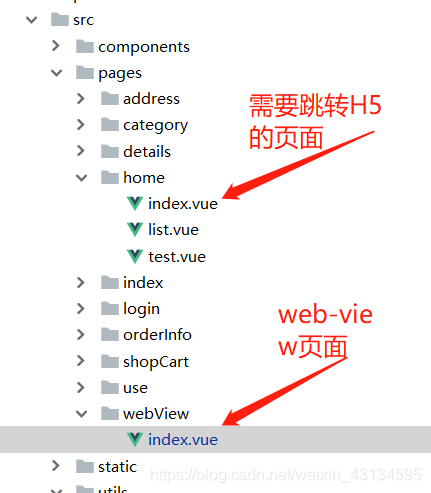
第二步:H5页面跳转小程序(H5页面用的是React)
当你进入到H5页面后,可以点击某个商品再次回到小程序中的商品详情页
1.点击事件,触发,其实都是一个套路
<div key={item.goods_id} className={styles.lineChild} onClick={() => this.handleOpenGoods(item.goods_id)}/>注意:可能会出现点击H5页面,事件没有生效,我这边的做法是在样式中加入cursor:pointer
2.好吧,事件处理,这大概是最恶心的一段,切记,你是在H5页面里做环境的判断,然后写对应的代码(因为我的H5页面既需与App交互又需要与小程序交互,所以~~你懂的)
export function openGoods(goodsId) { const u = navigator.userAgent const isAndroid = u.indexOf('Android') > -1 || u.indexOf('Adr') > -1; //android终端 const isIos = u.match(/(i[^;]+;( U;)? CPU.+Mac OS X/); //ios终端 const isWechat = u.toLowerCase().indexOf('micromessenger') !== -1if (isIos && isWechat===false) {//ios if (window.webkit) { window.webkit.messageHandlers.openGoods.postMessage({ goods_id: goodsId}) } else { } } else if (isAndroid && isWechat===false) {//安卓 if (window.android != null && typeof window.android != 'undefined') { window.android.openGoods(goodsId) return } else { } } else if (isWechat) {//微信 //跳转到小程序 wx.miniProgram.getEnv(function(res){ if(res.miniprogram){ wx.miniProgram.navigateTo({ url: `../details/index?id=${goodsId}`,success:function () { },fail:function (result) { alert(result) }}) } })}
}
以上,无论小程序或者app中点击触发H5页面的事件都能完成跳转
但是,我在这次项目中唯一的一个埂是token的传递,在H5页面的渲染中出现了较多的问题,和请同事帮忙一起调试才得以解决
前后端分离,React中的service层发送请求,封装成公用方法
export function request(url, params, method) {return new Promise(function(resolve,reject){ getAppToken(url, params, method,data=>{ resolve(data) }) })}获取app的token,Android一次可以获取,但是IOS需要三次才能获取到,所以封装了一下
export function getAppToken(url, params, method,callback) { let num = 0 let u = navigator.userAgent const isWechat = u.toLowerCase().indexOf('micromessenger') != -1 let isAndroid = u.indexOf('Android') > -1 || u.indexOf('Adr') > -1 //android终端 let isiOS = !!u.match(/(i[^;]+;( U;)? CPU.+Mac OS X/) //ios终端 let token, device_id, version, platform,res = ''; if (isAndroid && isWechat===false) { //需要一个android的开发环境 if (window.android) { if (window.android != null && typeof (window.android) !== undefined) { let tokenStr = window.android.callUserInfo() //安卓自带方法获取用户信息 let tokenObj = JSON.parse(tokenStr) //将字符串转为json对象 token = tokenObj.token //本地的 device_id = tokenObj.device_id version = tokenObj.version platform = tokenObj.platform if(token!==undefined){ postman(url, params, method,token,data=>{ let result = data typeof callback === 'function' && callback.call(window,result); return result; }) } } } } else if (isiOS && isWechat === false) { if (window.webkit) { window.webkit.messageHandlers.callUserInfo.postMessage({}) window['callUserInfo'] = function (res) { let tokenStr = res; let tokenObj = JSON.parse(tokenStr); token = tokenObj.token; device_id = tokenObj.device_id; version = tokenObj.version; platform = tokenObj.platform if(token!==undefined){ if(num<1){ postman(url, params, method,token,data=>{ let result = data typeof callback === 'function' && callback.call(window,result); return result; }) } num++ } } } } else if(isWechat){ //小程序中跳转的时候,token通过地址栏传递过来的 if(localStorage.getItem('storage_token')){ token = localStorage.getItem('storage_token') } else if(GetQueryString('token')){ token = GetQueryString('token') } postman(url, params, method,token,data=>{ let result = data typeof callback === 'function' && callback.call(window,result); return result; }) } }地址栏中获取地址
function GetQueryString(name) { const reg = new RegExp("(^|&)" + name + "=([^&]*)(&|$)"); const r = window.location.search.substr(1).match(reg); if (r != null) return unescape(r[2]); return null;}封装的ajax请求
export function postman(url, params, method,accessToken,callback){ if (method === 'get') { return axios({ url, method, params: {...params}, headers: { 'Content-Type': 'application/json;charset=utf-8', 'access-token': accessToken !== undefined ? accessToken : '' } }).then(res => { let result = res typeof callback === 'function' && callback.call(window,result); return result; }) } else { return axios({ url, method, data: { ...params}, headers: { 'access-token': accessToken !== undefined ? accessToken : ''}, }).then(res => { let result = res typeof callback === 'function' && callback.call(window,result); return result; }) } }









