


小程序自定义组件的使用
一直以来忙项目都没有什么时间来写博客,今天晚上刷了会儿csdn,知乎等平台,发现有很多人再问小程序自定义组件怎么写,如何编写一个自己的自定义组件?当然也有一些同行们对于这些问题都有解答。
今天就自己的项目经验给大家从构建自定义组件,调用自定义组件,传值给组件,组件传值出来,给大家讲解一下如何构造一个自定义视频组件
大家可能都刷过火山小视频,本次讲解的就是做的一款类似于火山小视频的视频播放效果的一款小程序软件,效果如下图所示
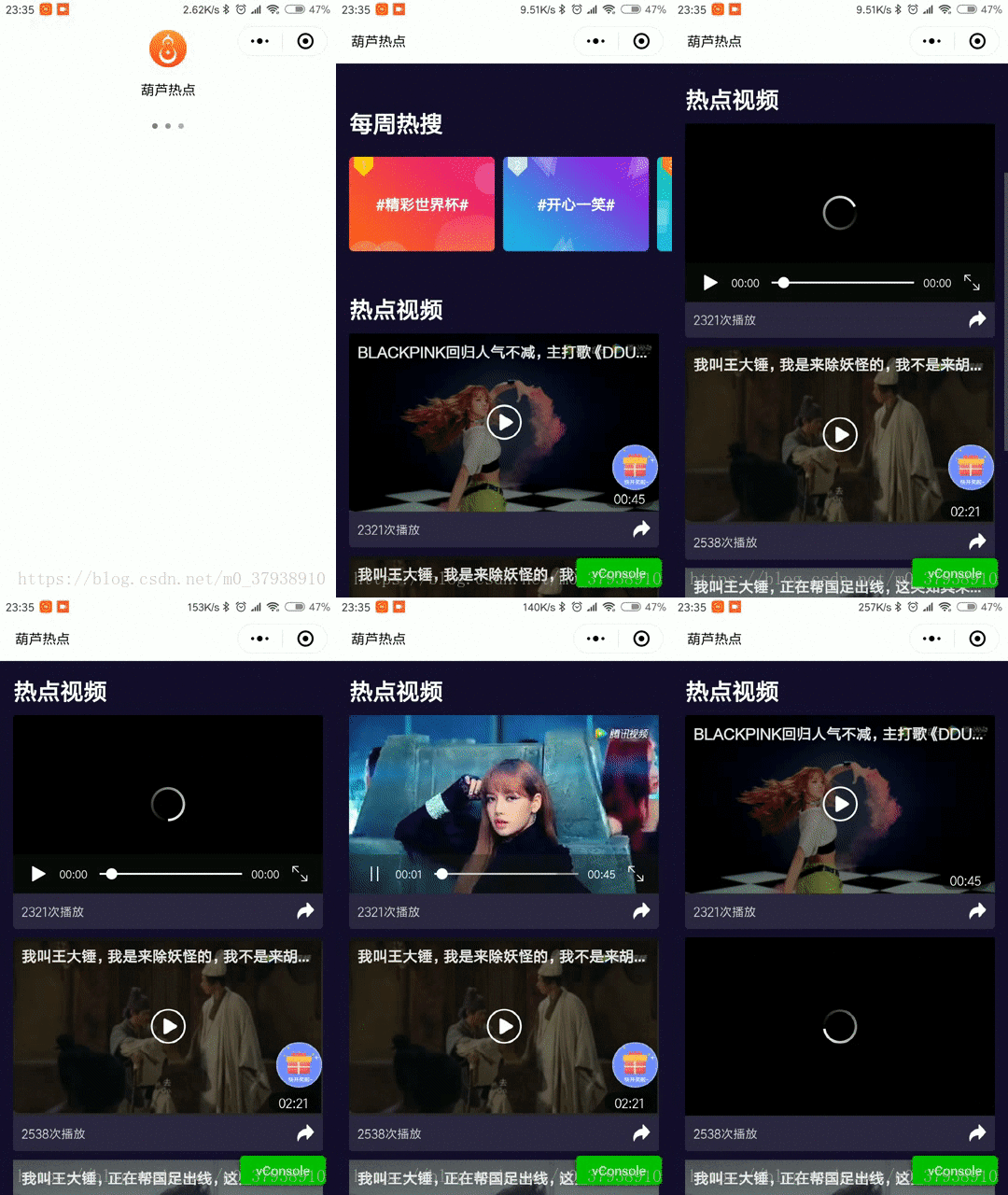
这个项目因为要用到视频播放这个功能,于是就用了小程序的video媒体播放。废话不多说,直接进入正题吧,首先微信小程序自定义组件出来这么长时间了,于是我在写这个项目的时候就行运用一下自定义组件,看了一下官方文档,官方文档有一些介绍但是都不怎么全,于是我就实验了一把,在这个项目中自定义了一个视频播放组件
- 要自定义一个组件,首先要新建一个文件夹,如图所示,我建了一个名为Component的文件夹
在文件夹里点击右键新建了一个Component名为‘AuglyVideo’的自定义组件,组件的组成跟正常的页面文件接口一样。
- 这是AuglyVideo.wxml文件
<view class='videoItem' wx:for="{{videoList}}"> <video objectFit='fill' show-center-play-btn='{{showPlay}}' id='myVideo{{item.id}}' data-index="{{index}}" src='{{item.videoUrl}}' wx:if="{{playIndex == index}}"> </video> <view class='myposter' bindtap="videoPlay" id="{{item.id}}" data-index="{{index}}" style="display: {{playIndex==index ? 'none' : 'block'}};" data-id='{{item.id}}' data-title='{{item.title}}' data-cover='{{item.cover}}' data-duration='{{item.duration}}' data-allnum="{{item.palyCnt+item.playInitCnt}}"> <image src='{{item.cover}}'> </image> <form bindsubmit="submitInfo" report-submit='true'> <button class='videoTitle' hover-class='none' form-type='submit'> {{item.title}} </button> </form> <form bindsubmit="submitInfo" report-submit='true'> <button class='iconfont icon-bofang' hover-class='none' id="{{item.id}}" data-index="{{index}}" form-type='submit'></button> </form> <view class='time'>{{item.duration}}</view> </view> <view class='videoRes'> <view class='playnum'>{{item.palyCnt+item.playInitCnt}}次播放</view> <button class='iconfont icon-zhuanfa' hover-class='none' open-type='share' data-id='{{item.id}}' data-title='{{item.title}}' data-cover='{{item.cover}}' data-duration='{{item.duration}}' data-allnum="{{item.palyCnt+item.playInitCnt}}"></button> </view></view><form bindsubmit="submitInfo" report-submit='true' wx:if="{{aps.isShow=='t'}}"> <navigator class='tominApp' hover-class='none' form-type='submit' style="background-image:url('{{aps.image}}');" open-type="navigate" target="miniProgram" app-id='{{aps.val}}'> </navigator></form>这是wxss文件
/* Component/AuglyVideo.wxss */@font-face { font-family: 'iconfont'; /* project id 724078 */ src: url('//at.alicdn.com/t/font_724078_43qt7yvrrsk.eot'); src: url('//at.alicdn.com/t/font_724078_43qt7yvrrsk.eot?#iefix') format('embedded-opentype'), url('//at.alicdn.com/t/font_724078_43qt7yvrrsk.woff') format('woff'), url('//at.alicdn.com/t/font_724078_43qt7yvrrsk.ttf') format('truetype'), url('//at.alicdn.com/t/font_724078_43qt7yvrrsk.svg#iconfont') format('svg');}.iconfont { font-family: "iconfont" !important; font-size: 16px; font-style: normal; -webkit-font-smoothing: antialiased; -moz-osx-font-smoothing: grayscale;}.icon-bofang:before { content: "e606";}.icon-zhuanfa:before { content: "e627";}.videoItem { width: 100%; height: auto; border-radius: 0rpx 0rpx 10rpx 10rpx; overflow: hidden; margin-top: 20rpx;}.videoItem video { width: 100%; height: 398rpx; border-radius: 10rpx 10rpx 0rpx 0rpx; display: flex; align-items: center; justify-content: center; overflow: hidden;}.videoItem .myposter { width: 100%; height: 398rpx; /* border-radius: 10rpx 10rpx 0rpx 0rpx; */ position: relative; box-sizing: border-box; background-color: rgba(0, 0, 0, 0.5); background-size: 100% 100%;}.videoItem image { width: 100%; height: 100%; position: absolute; top: 0; z-index: -1; /* border: 10rpx 10rpx 0rpx 0rpx; */}.videoTitle { position: absolute; left: 0rpx; width: 100%; height: 100rpx; font-size: 34rpx; font-weight: bold; top: 0rpx; overflow: hidden; white-space: nowrap; text-overflow: ellipsis; padding: 0rpx 20rpx; background: linear-gradient(rgba(0, 0, 0, 0.2), rgba(0, 0, 0, 0)); color: RGBA(254, 254, 254, 0.9);}.icon-bofang { color: rgba(255, 255, 255, 1); font-size: 80rpx; line-height: 80rpx; z-index: 5; position: absolute; display: block; left: 50%; margin-left: -40rpx; top: 50%; margin-top: -40rpx;}.tominApp { position: fixed; width: 103rpx; height: 103rpx; background-color: rgba(255, 255, 255, 1); border-radius: 50%; display: flex; box-sizing: border-box; padding: 18rpx; align-items: center; flex-wrap: wrap; justify-content: center; right: 33rpx; bottom: 240rpx; white-space: wrap; color: rgba(0, 0, 0, 1); font-size: 30rpx; line-height: 35rpx; background-size: 100% 100%;}.time { position: absolute; width: 112rpx; height: 45rpx; background-color: rgba(0, 0, 0, 0.5); right: 11rpx; bottom: 10rpx; font-size: 28rpx; color: rgba(255, 255, 255, 1); display: flex; align-items: center; justify-content: center; border-radius: 22rpx;}.videoItem .videoRes { width: 100%; height: 81rpx; background-color: RGBA(46, 39, 67, 1); box-sizing: border-box; padding: 0rpx 20rpx; display: flex; align-items: center; justify-content: space-between;}.playnum { font-size: 28rpx; color: RGBA(215, 215, 215, 1);}.icon-zhuanfa { color: rgba(255, 255, 255, 1); font-size: 40rpx;}这是js文件
// Component/AuglyVideo.jsconst config = require('../utils/config.js')let app = getApp();Component({ /** * 组件的属性列表 */ properties: { videoList: { type: Array, value: [] }, aps: { type: Object, value: { isShow: null } }, playIndex: { type: null, value: null }, page: { type: String, value: 'index' } }, /** * 组件的初始数据 */ data: { playIndex:
版权声明
即速应用倡导尊重与保护知识产权。如发现本站文章存在版权问题,烦请提供版权疑问、身份证明、版权证明、联系方式等发邮件至197452366@qq.com ,我们将及时处理。本站文章仅作分享交流用途,作者观点不等同于即速应用观点。用户与作者的任何交易与本站无关,请知悉。










