


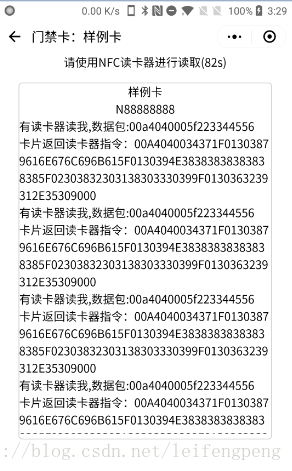
需要实现带模拟一张智能卡(门禁卡或者其他业务卡),使用带NFC设备根据指定协议进行读取模拟卡数据(效果图如下): 

1. 模拟卡设计
这里使用设备自带NFC模拟卡(HCE)模式,模拟出一张虚拟卡,类似华为钱包,applepay钱包等。选择添加的卡,提供读取。
1.1 数据包交互协议
类TLV数据包格式,及Tag Length Value(和银联IC卡返回数据协议类似)。
1.2 AID规定
固定AID=F223344556 (注意不要超过10为长度)
1.3 Apdu协议
1.3.1 select apdu header
00A404001.3.2 update apdu header
00B40400交互Apdu格式:[apdu header]+[dataLength]+[data]+[status]1.4 界面设计
HCE界面分为2个,以上图为例,第二幅图为提供选择需要被读卡,第三幅图为卡界面,开启HCE开始交互。
1.5 小程序端HCE代码片段
HCE封装核心模块 nfc_hce_core.js:
var comm = require('comm_util.js')function Action(){ Action_GETHCESTATUS=0;Action_STARTHCE=1;Action_SENDMESSAGE=2 Action_RECEIVEMESSAGE=3;Action_STOPHCE=4}var Status=[ {code:'0',msg:'OK'}, { code: '13000', msg: '当前设备不支持 NFC' }, { code: '13001', msg: '当前设备支持 NFC,但系统NFC开关未开启' }, { code: '13002', msg: '当前设备支持 NFC,但不支持HCE' }, { code: '13003', msg: 'AID 列表参数格式错误' }, { code: '13004', msg: '未设置微信为默认NFC支付应用' }, { code: '13005', msg: '返回的指令不合法' }, { code: '13006', msg: '注册 AID 失败' }]class NfcHCECore{ constructor(mContext,_aids,mMsgCallBack,onNfcMessageLinsener){ this.context=mContext this.aids = _aids this.mCallBack = mMsgCallBack this.nfcMessageCallBack = onNfcMessageLinsener } //获取当前状态 getNfcStatus(){ var that=this wx.getHCEState({ success:function(res){ console.log('NfcHCECore-->getNfcStatus::success:',res) that._runCallBack(res.errCode, res.errMsg) }, fail:function(err){ console.error('NfcHCECore-->getNfcStatus::fail:', err) that.callError(err) } }) } //开启HCE环境 startNfcHCE(){ var that = this wx.startHCE({ aid_list: this.aids, success:function(res){ console.log('NfcHCECore-->startNfcHCE::success:', res) that._runCallBack(res.errCode, res.errMsg) }, fail:function(err){ console.error('NfcHCECore-->startNfcHCE::fail:', err) that.callError(err) } }) } //发消息 sendNfcHCEMessage(hexApdu){ console.log('开始发送发回') var that = this var byteArrays = comm.hex2Bytes(hexApdu) console.log(byteArrays.length) var retbuffer = new ArrayBuffer(byteArrays.length) var dataView = new DataView(retbuffer) for (var i = 0; i < dataView.byteLength; i++) { dataView.setInt8(i, byteArrays[i]) } wx.sendHCEMessage({ data: retbuffer, success:function(res){ console.log('NfcHCECore-->sendNfcHCEMessage::success:', res) that._runCallBack(res.errCode, res.errMsg) }, fail:function(err){ console.error('NfcHCECore-->sendNfcHCEMessage::fail:', err) that.callError(err) } }) } /** * 收到读卡器发来的消息 */ onNfcHCEMessageHadnler(){ var that = this wx.onHCEMessage(function(res){ console.log('NfcHCECore-->onHCEMessage:', res) that.nfcMessageCallBack(res.messageType, res.reason, comm.ab2hex(res.data)) }) } /** * 停止HCE环境 */ stopNfcHCE(){ var that = this wx.stopHCE({ success:function(res){ console.log('NfcHCECore-->stopNfcHCE::success:', res) that._runCallBack(res.errCode,res.errMsg) }, fail:function(err){ console.error('NfcHCECore-->stopNfcHCE::fail:', err) that.callError(err) } }) } simple(){ var that = this wx.getHCEState({ success:function(res){ console.log('NfcHCECore-->simple::getHCEState:', res) console.log(that.aids) that._runCallBack(res.errCode, res.errMsg) wx.startHCE({ aid_list: that.aids, success:function(res){ console.log('NfcHCECore-->simple::startHCE:', res) that._runCallBack(res.errCode, res.errMsg) wx.onHCEMessage(function(res){ console.log('NfcHCECore-->simple::onHCEMessage:', res) that.nfcMessageCallBack(res.messageType, res.reason, comm.ab2hex(res.data)) }) }, fail:function(err){ that.callError(err) } }) }, fail:function(err){ that.callError(err) } }) } callError(err){ var that=this Status.forEach(function (value, index, list) { if (value.code === err.errCode) { that._runCallBack(value, value.msg) } }) } _runCallBack(status,data){ this.mCallBack(status,data) }}module.exports = NfcHCECore工具模块 用来做数据处理等 comm_util.js:
/** * 生成指定长度随机数 */function genRandom(n) { let a = [0, 1, 2, 3, 4, 5, 6, 7, 8, 9]; //生成的随机数的集合 let res = []; for (let i = 0; i < n; i++) { let index = parseInt(Math.random() * (a.length)); //生成一个的随机索引,索引值的范围随数组a的长度而变化 res.push(a[index]); a.splice(index, 1) //已选用的数,从数组a中移除, 实现去重复 } return res.join('');} function isFunctinMethod(name) { if (name != undefined && typeof name === 'function') { return true } return false}const formatNumber = n => { n = n.toString() return n[1] ? n : '0' + n}// ArrayBuffer转16进度字符串function ab2hex(buffer) { var hexArr = Array.prototype.map.call( new Uint8Array(buffer), function (bit) { return ('00' + bit.toString(16)).slice(-2) } ) return hexArr.join('');}//十六进制字符串转字节数组 function hex2Bytes(str) { var pos = 0; var len = str.length; if (len % 2 != 0) { return null; } len /= 2; var hexA = new Array(); for (var i = 0; i < len; i++) { var s = str.substr(pos, 2); var v = parseInt(s, 16); hexA.push(v); pos += 2; } return hexA;}function hex2ArrayBuffer(hex){ var pos = 0; var len = hex.length; if (len % 2 != 0) { return null; } len /= 2; var buffer = new ArrayBuffer(len) var dataview=new DataView(buffer) for (var i = 0; i < len; i++) { var s = hex.substr(pos, 2); var v = parseInt(s, 16); dataview.setInt16(i,v) pos += 2; } return buffer}//string转16进制function stringToHex(str) { var val = ""; for (var i = 0; i < str.length; i++) { if (val == "") val = str.charCodeAt(i).toString(16); else val += str.charCodeAt(i).toString(16); } return val;}//16进制转stringfunction hexCharCodeToStr(hexCharCodeStr) { var trimedStr = hexCharCodeStr.trim(); var rawStr = trimedStr.substr(0, 2).toLowerCase() === "0x" ? trimedStr.substr(2) : trimedStr; var len = rawStr.length; if (len % 2 !== 0) { alert("Illegal Format ASCII Code!"); return ""; } var curCharCode; var resultStr = []; for (var i = 0; i < len; i = i + 2) { curCharCode = parseInt(rawStr.substr(i, 2), 16); // ASCII Code Value resultStr.push(String.fromCharCode(curCharCode)); } return resultStr.join("");}function pad(num, n) { var len = num.toString().length; while (len < n) { num = "0" + num; len++; } return num;}function strToHexCharCode(str) { if (str === "") return ""; var hexCharCode = []; hexCharCode.push("0x"); for (var i = 0; i < str.length; i++) { hexCharCode.push((str.charCodeAt(i)).toString(16)); } return hexCharCode.join("");}//string转byte数组function stringToByteArray(str) { var bytes = new Array(); var len, c; len = str.length; for (var i = 0; i < len; i++) { c = str.charCodeAt(i); if (c >= 0x010000 && c <= 0x10FFFF) { bytes.push(((c >> 18) & 0x07) | 0xF0); bytes.push(((c >> 12) & 0x3F) | 0x80); bytes.push(((c >> 6) & 0x3F) | 0x80); bytes.push((c & 0x3F) | 0x80); } else if (c >= 0x000800 && c <= 0x00FFFF) { bytes.push(((c >> 12) & 0x0F) | 0xE0); bytes.push(((c >> 6) & 0x3F) | 0x80); bytes.push((c & 0x3F) | 0x80); } else if (c >= 0x000080 && c <= 0x0007FF) { bytes.push(((c >> 6) & 0x1F) | 0xC0); bytes.push((c & 0x3F) | 0x80); } else { bytes.push(c & 0xFF); } } return bytes;}// byte数组转stringfunction byteToString(bytearr) { if (typeof arr === 'string') { return arr; } var str = '', _arr = arr; for (var i = 0; i < _arr.length; i++) { var one = _arr[i].toString(2), v = one.match(/^1+?(?=0)/); if (v && one.length == 8) { var bytesLength = v[0].length; var store = _arr[i].toString(2).slice(7 - bytesLength); for (var st = 1; st < bytesLength; st++) { store += _arr[st + i].toString(2).slice(2); } str += String.fromCharCode(parseInt(store, 2)); i += bytesLength - 1; } else { str += String.fromCharCode(_arr[i]); } } return str;}//二进制转10function bariny2Ten(byte){ return parseInt(byte, 2)}function bariny2Hex(a){ return parseInt(a, 16)}//10/16进制转2进制function ten2Bariny(ten){ return ten.toString(2)}function str2Hex(str){ return parseInt(str, 10).toString(16)}//16进制转2进制function hex2bariny(hex){ return parseInt(hex, 16).toString(2)}module.exports = {formatTime: formatTime,isFunctinMethod: isFunctinMethod,ab2hex: ab2hex,hex2Bytes: hex2Bytes,stringToByteArray: stringToByteArray,byteToString: byteToString,hex2ArrayBuffer:hex2ArrayBuffer,bariny2Ten:bariny2Ten,bariny2Hex: bariny2Hex,ten2Bariny: ten2Bariny,str2Hex: str2Hex,hex2bariny: hex2bariny,genRandom: genRandom,stringToHex: stringToHex,hexToString: hexCharCodeToStr,pad: pad}卡交互页面逻辑 hcecard.js:
该js模块对应卡页面交互功能,读卡器使用nfc读卡模式会进入onHCEMessage()回调中,
返回二进制数据,此时使用console是无法打印出data,需要转成16进制才行。
流程:
获取NFC状态–>开启HCE模式–>接受读卡器消息–>发送消息给读卡器
具体API详见:
https://developers.weixin.qq.com/miniprogram/dev/api/nfc.html#wx.sendhcemessageobject
var comm = require('../../utils/comm_util.js')var NfcHCECore = require('../../utils/nfc_hce_core.js')var app=getApp()var msg=''var countdown = 120;var timer=null//倒计时 120s退出 关闭hcevar settime = function (that) { if (countdown == 0) { wx.navigateBack({}) return; } else { that.setData({ last_time: countdown }) countdown--; } timer=setTimeout(function () { settime(that) }, 1000)}Page({ //页面的初始数据 data: { currentCard:null, content:'', last_time: '', }, onLoad: function (options) { var cardKey = options.cardkey var cardbean=wx.getStorageSync(cardKey) console.log('cardbean=' ,cardbean) this.setData({ currentCard: cardbean }) wx.setNavigationBarTitle({ title: "门禁卡:"+cardbean.cardName, }) this.nfcHCECore = new NfcHCECore(this, [cardbean.AID], this.onOptMessageCallBack.bind(this), this.onHCEMessageCallBack.bind(this)) console.log("-->initNFCHCE") this.nfcHCECore.simple() }, //hce操作相关回调 onOptMessageCallBack(code, _msg) { console.log('onOptMessageCallBack') if (code === 0) { console.log("执行成功!", _msg) } else { msg = msg + '执行失败code=' + code + ",msg=" + _msg + '' } this.setData({ content: msg }) this.resetTime() }, resetTime(){ clearTimeout(timer) countdown=120 this.setData({ last_time:'120' }) settime(this) }, //收到读卡器发送指令 onHCEMessageCallBack(messageType, reason, hexData) { var that = this console.log('onHCEMessageCallBack') console.log("有读卡器读我,messageType=", messageType) if (messageType == 1) { msg = msg + "有读卡器读我,数据包:" + hexData + '' that.setData({ content: msg }) this.sendDataPackage() } this.resetTime() }, //发送数据及包 sendDataPackage() { var cardbean = this.data.currentCard console.log(comm.pad(2, 2)) //组装TLV数据包 var header = '00A40400' var hexCardName = comm.stringToHex('yanglika') hexCardName = plusZero(hexCardName) console.log('cardName=>', cardbean.cardName,';hexCardName=>' + hexCardName) var nameTag = '1F01' var len = comm.stringToHex(comm.pad((hexCardName.length / 2), 2)) var cmdname = nameTag + len + hexCardName console.log('cmdname.TVL=>' + cmdname) var hexCardNo = comm.stringToHex(cardbean.cardNo) hexCardNo = plusZero(hexCardNo) console.log('cardNo=>', cardbean.cardNo,';hexCardNo=>' + hexCardNo) var noTag = '5F01' len = comm.stringToHex(comm.pad((hexCardNo.length / 2), 2)) var cmdNo = noTag + len + hexCardNo console.log('cmdNo.TVL=>' + cmdNo) var hexCreateDate = comm.stringToHex(cardbean.createDate) hexCreateDate = plusZero(hexCreateDate) console.log('hexCreateDate=>' + hexCreateDate) var createDateTag = '5F02' len = comm.stringToHex(comm.pad((hexCreateDate.length / 2), 2)) var cmdDate = createDateTag + len + hexCreateDate console.log('cmdDate.TVL=>' + cmdDate) var hexCardExp = comm.stringToHex(cardbean.cardExp) hexCardExp = plusZero(hexCardExp) console.log('hexCardExp=>' + hexCardExp) var hexCardExpTag = '9F01' len = comm.stringToHex(comm.pad((hexCardExp.length / 2), 2)) var cmdExp = hexCardExpTag + len + hexCardExp console.log('cmdExp.TVL=>' + cmdExp) len = comm.stringToHex(((cmdname.length + cmdNo.length + cmdDate.length + cmdExp.length)/2).toString(); console.log(










