


效果图:
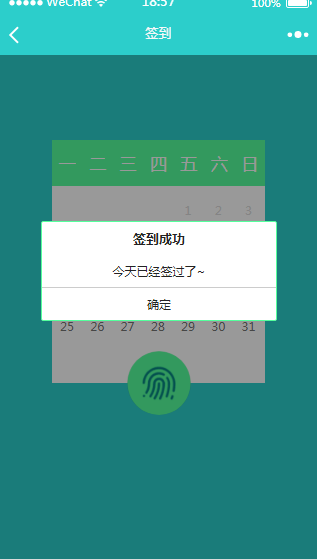
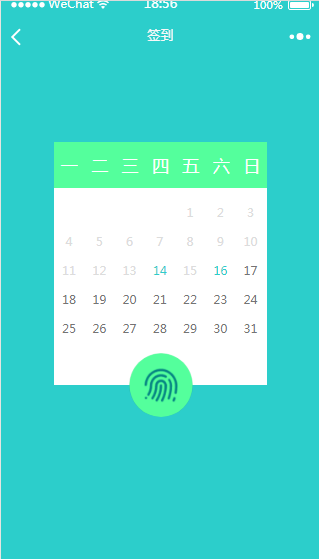
今天是16号,所以显示已签到,渲染页面时请求后台传的参数为这月签到的日期
如:["16", "14"]
点击签到执行
calendarSignsign.wxml
<!--index.wxml--><view class="calendar"> <view class='bcfff'> <view class="weekName"> <view class="monday">一</view> <view class="tuesday">二</view> <view class="wednesday">三</view> <view class="thursday">四</view> <view class="friday">五</view> <view class="saturday">六</view> <view class="sunday">日</view> </view> <view class="week"> <!--填补空格--> <view wx:for="{{nbsp}}"></view> <!--循环日期--> <!-- 当天以前 --> <view wx:for="{{date-1}}" style="color:gainsboro;"> <text wx:if="{{item+1==calendarSignData[item+1]}}" style="color: #2ccecb;">{{item+1}}</text> <text wx:else="">{{item+1}}</text> </view> <!-- 当天 --> <view style=""> <text wx:if="{{is_qd}}" style="color: #2ccecb;">{{date}}</text> <text wx:else="" style="">{{date}}</text> </view> <!-- 以后 --> <view wx:for="{{monthDaySize-date}}">{{item+date+1}}</view> </view> </view> <view class="calendarSign"> <image bindtap="calendarSign" class='btnimg' src='https://jpadmin.99dudesign.com/public/img/source/btn_icon_wodekaoqin1.png'></image> <!-- wx:if="{{date!=calendarSignData[date]}}" --> </view></view><!-- 签到成功 --><view class='zhegai hide {{qdView?"block":""}}' bindtap='quxiaoQd'></view><view class='successqd hide {{qdView?"block":""}}'> <view class='qdtitle'>签到成功</view> <view class='qdcontent' wx:if="{{is_qd}}">今天已经签过了~</view> <view class='qdcontent' wx:else>签到成功,获得{{integral}}积分,您已连续签到{{rule}}天!</view> <view class='queding' bindtap='quxiaoQd'>确定</view></view>var app = getApp();var calendarSignData;var date;var calendarSignDay;var is_qd;Page({ /** * 页面的初始数据 */ data: { qdView: false, calendarSignData: "", calendarSignDay: "", is_qd: false, }, quxiaoQd: function (e) { var that = this; that.setData({ qdView: false, is_qd: true }) }, //事件处理函数 calendarSign: function (e) { var that = this; that.setData({ qdView: true }) calendarSignData[date] = date; console.log(calendarSignData); calendarSignDay = calendarSignDay + 1; var today = new Date().getDate() wx.request({ url: getApp().data.host + '后台的接口', method: "POST", data: { "user_id": wx.getStorageSync('user_id'), "sign_num": today }, header: { 'content-type': 'application/x-www-form-urlencoded' //通过post传值,所以要加header }, success: function (res) { that.setData({ rule: res.data.rule, integral: res.data.integral, }) } }) wx.setStorageSync("calendarSignData", calendarSignData); wx.setStorageSync("calendarSignDay", calendarSignDay); this.setData({ calendarSignData: calendarSignData, calendarSignDay: calendarSignDay }) }, /** * 生命周期函数--监听页面加载 */ onLoad: function () { var that = this; var mydate = new Date(); var year = mydate.getFullYear(); var month = mydate.getMonth() + 1; date = mydate.getDate(); console.log("date" + date) var day = mydate.getDay(); console.log(day) var nbsp = 7 - ((date - day) % 7); console.log("nbsp" + nbsp); var monthDaySize; if (month == 1 || month == 3 || month == 5 || month == 7 || month == 8 || month == 10 || month == 12) { monthDaySize = 31; } else if (month == 4 || month == 6 || month == 9 || month == 11) { monthDaySize = 30; } else if (month == 2) { // 计算是否是闰年,如果是二月份则是29天 if ((year - 2000) % 4 == 0) { monthDaySize = 29; } else { monthDaySize = 28; } }; // 传ajax wx.request({ url: getApp().data.host + 'index.php?g=api&m=output&a=sign_list', method: "POST", data: { "user_id": wx.getStorageSync('user_id') }, header: { 'content-type': 'application/x-www-form-urlencoded' }, success: function (res) { // 判断是否签到过 if (res.data == null) { calendarSignData = new Array(monthDaySize) wx.setStorageSync("calendarSignData", calendarSignData); } else { var is_qd; for (var i in res.data) { parseInt(res.data[i]) calendarSignData = new Array(monthDaySize) calendarSignData[parseInt(res.data[i])] = parseInt(res.data[i]) wx.setStorageSync("calendarSignData", calendarSignData); console.log(date) console.log(parseInt(res.data[i])) if (parseInt(res.data[i]) == date) { console.log(1) wx.setStorageSync("calendarSignDay", 1); is_qd = true } else { wx.setStorageSync("calendarSignDay", 0); } } } console.log(is_qd) calendarSignData = wx.getStorageSync("calendarSignData") calendarSignDay = wx.getStorageSync("calendarSignDay") console.log(calendarSignData); console.log(calendarSignDay) that.setData({ is_qd: is_qd, year: year, month: month, nbsp: nbsp, monthDaySize: monthDaySize, date: date, calendarSignData: calendarSignData, calendarSignDay: calendarSignDay }) } }) }, /** * 生命周期函数--监听页面初次渲染完成 */ onReady: function () { }, /** * 生命周期函数--监听页面显示 */ onShow: function () { }, /** * 生命周期函数--监听页面隐藏 */ onHide: function () { }, /** * 生命周期函数--监听页面卸载 */ onUnload: function () { wx.removeStorageSync("calendarSignData") wx.removeStorageSync("calendarSignDay") }, /** * 页面相关事件处理函数--监听用户下拉动作 */ onPullDownRefresh: function () { }, /** * 页面上拉触底事件的处理函数 */ onReachBottom: function () { }, /** * 用户点击右上角分享 */ onShareAppMessage: function () { }})sign.wxss
page { background-color: #2ccecb;}.t_red { color: red;}.t_blue { color: royalblue;}.calendar { width: 500rpx; margin: 200rpx 125rpx; /* height: 600rpx; *//* background-color: #ffffff; */ border-radius: 4rpx;}.time { padding: 16rpx 20rpx; background-color: wheat; display: flex;}.time view { flex: 1; font-size: 30rpx;}.time view text { font-size: 38rpx;}.weekName { background-color: #54ff9c; width: 100%; display: flex; padding: 30rpx 0; font-size: 40rpx; color: #fff;}.weekName view { flex: 1; text-align: center;}.week { width: 100%;}.week view { width: 14.2%; height: 50rpx; line-height: 50rpx; display: inline-block; margin: 10rpx 0; text-align: center; font-size: 30rpx; color: #747474;}.week view text { width: 100%; height: 100%; display: inline-block;}.calendarSign { margin-top: -75rpx; text-align: center;}.btnimg { width: 150rpx; height: 150rpx; border-radius: 50%;}.bcfff { background-color: white; padding-bottom: 100rpx;}.zhegai { position: fixed; top: 0; left: 0; bottom: 0; width: 100%; height: 100%; background-color: black; opacity: 0.4;}.successqd { position: fixed; top: 50%; left: 50%; width: 550rpx; margin-left: -275rpx; margin-top: -200rpx; background-color:white; border-radius: 6rpx; border: 2rpx solid #54ff9c; text-align: center;}.qdtitle{ font-size: 32rpx;font-weight: bold;color: #232323;padding: 20rpx;}.qdcontent{font-size: 30rpx;color: #232323;padding: 20rpx 10rpx;}.queding{font-size: 30rpx;color: #232323;border-top: 1rpx solid #cccccc;padding: 20rpx;}









