


大家都知道,小程序有着大量的api,文件(图片)的上传也是其中之一.
给大家分享一下个人的用法.我所做的是一个类似空间日志的图文发布以及混排.
首先是图片的选择,使用wx.chooseImage,将选中的图片存放在一个数组里面,便于上传.
chooseImage: function () { var that = this; wx.chooseImage({ success: function (res) { console.log(res); for (var i = 0; i < res.tempFilePaths.length; i++){ var newList = that.data.imagesList.concat(res.tempFilePaths[i]); } that.setData({ imagesList: newList, }) }, }) },然后就是上传图片了,使用的是wx.uploadFile
将图片数组里面的图片取出以此上传,
//上传图片 up_img: function (img,date,index) { var _this = this; wx.uploadFile({ url: 'https://这里是服务器域名/diary/setImage.php', //接口 filePath: img,//图片路径 name: 'file', formData: {//存放图片的相关信息 blog_id: date, img_index: index, }, success: function (res) { if (res.data == '200') { wx.showToast({ title: '上传成功', }) } else if (res.data == '404') { wx.showToast({ title: '上传失败', }) } }, fail: function (error) { console.log(error); } })在后端再进行接收与保存.
require 'connect.php'; date_default_timezone_set("Asia/Shanghai"); //设置时区$code = $_FILES['file'];//获取小程序传来的图片if(is_uploaded_file($_FILES['file']['tmp_name'])) { //把文件转存到你希望的目录 $uploaded_file=$_FILES['file']['tmp_name']; $username = "image"; //动态的创建一个文件夹 $user_path=$_SERVER['DOCUMENT_ROOT']."/diary/".$username; //判断是否已经有这个文件夹 if(!file_exists($user_path)) { mkdir($user_path); } $file_true_name=$_FILES['file']['name'];//得到图片的文件名 $name = time().rand(1,1000)."-".date("Y-m-d");//取当前时间戳+一个4位随机数然后再加上当前日期作为图片的新的文件名 $type = substr($file_true_name,strrpos($file_true_name,"."));//截取图片的类型后缀(.jpg,.png等等) //strrops($file_true,".")查找“.”在字符串中最后一次出现的位置 $image = $name.$type;//组成新名称 $move_to_file=$user_path."/".$name.$type;// if(move_uploaded_file($uploaded_file,iconv("utf-8","gb2312",$move_to_file))) { //图片保存成功的同时,将改名之后的图片名称存放至数据库,方便前端下载 $sql="insert into image values('".$_POST['blog_id']."','".$image."','".$_POST['img_index']."')"; $result=$mysqli->query($sql); if($result) { echo '200'; }else{ //不存在信息就返回false echo '404'; } echo $_FILES['file']['name']."--上传成功".date("Y-m-d H:i:sa"); } else { echo "上传失败".date("Y-m-d H:i:sa"); } } else { echo "上传失败".date("Y-m-d H:i:sa"); }在后端保存完之后,前端使用wx.request进行不同请求访问即可获取图片信息.
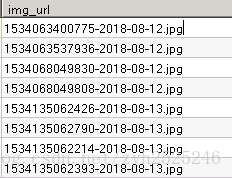
这是数据库里面存的信息.
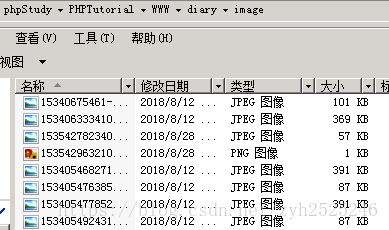
这是文件夹里面存的信息
返回路径的时候记得做以下这个操作
$path = 'https://这里是服务器域名/diary/image/';while ($row = $result->fetch_assoc()){$row['img_url'] = $path.$row['img_url'];$results[]=$row;}只有完整的路径才能访问到图片.如果有某些地方存在问题,希望各位大牛指点…













