


1. 文件格式
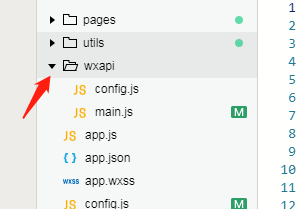
2. main.js 文件(统一配置接口导出,各个页面按需导入引用)
// 小程序开发api接口统一配置// 如果你的域名是: https://www.baidu.com/cn 那么这里只要填写 cnlet subDomain = '/cn' // 子域名,没有就等于''const API_BASE_URL = 'https://www.baidu.com' // 主域名const request = (url, method, data) => { let _url = API_BASE_URL + subDomain + url return new Promise((resolve, reject) => { wx.request({ url: _url, method: method, data: data, header: { 'Content-Type': 'application/json' }, success(request) { resolve(request.data) }, fail(error) { reject(error) }, complete(aaa) { // 加载完成 } }) })}/** * 小程序的promise没有finally方法,自己扩展下 */Promise.prototype.finally = function (callback) { var Promise = this.constructor; return this.then( function (value) { Promise.resolve(callback()).then( function () { return value; } ); }, function (reason) { Promise.resolve(callback()).then( function () { throw reason; } ); } );}module.exports = { request, // 首页列表接口 getList: data => request('/goods/list','get', data), // 详情接口 getDetail: (data) => request('/goods/detail','get', data),}3. 导入使用
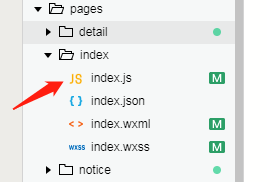
index.js 导入使用
const WXAPI = require('../../wxapi/main')const app = getApp()Page({ data: { list: [], inputValue:'', pageNumber: 1, pageSize: 10, }, // 加载页面 onLoad: function () { let that = this; wx.showLoading({ "mask": true, "title": "加载中..." }); WXAPI.getList({ // 接口调用获取列表 keyword: that.data.inputValue, pageNumber: that.data.pageNumber, pageSize: that.data.pageSize }).then(function (res) { wx.hideLoading() if (res.code == 200) { that.setData({ list: res.data.list, }); } }).catch(function (e) { console.log(e) wx.showToast({ title: e.msg, icon: 'none' }) }) }, // 分享 onShareAppMessage: function () { }})










