


无奈现在小程序没有开放分享到朋友圈的功能,只能通过canvas生成海报,保存到手机中分享朋友圈。 说说我遇到的两个坑吧。
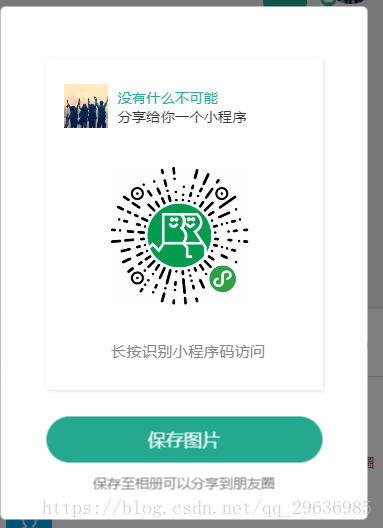
放下代码吧,rem函数是我创建的转换px函数。
var data = this.data; var that = this; //canvas绘制文字和图片 const ctx = wx.createCanvasContext('share'); var imgPath = app.addUrlImg(info.iconUrl); // 背景色 ctx.setFillStyle('white'); ctx.fillRect(0, 0, app.rem(500), app.rem(600)); //头像 wx.downloadFile({ url:"https://wx.qlogo.cn/mmopen/vi_32/Q0j4TwGTfTKerhicfTMvNOiaibwIWLKzdXEHlVYBHvGiandyGcuCWwnvDeSgaYz8pl3vJCoh8UQa2ZZiaHhQPKRiblzA/132", success: res => { imgPath = res.tempFilePath; ctx.save(); ctx.beginPath(); ctx.arc(app.rem(70), app.rem(85), app.rem(40), 0, 2 * Math.PI); ctx.clip(); ctx.drawImage(imgPath, app.rem(30), app.rem(45), app.rem(80), app.rem(80)); ctx.restore(); ctx.draw(true); } }) //昵称 ctx.setFontSize(app.rem(26)); ctx.setFillStyle('#2dab94'); ctx.fillText(info.nickName, app.rem(128), app.rem(80)); //文字 ctx.setFontSize(app.rem(26)); ctx.setFillStyle('#363636'); ctx.fillText('分享给你一个小程序', app.rem(128), app.rem(115)); ctx.setFontSize(app.rem(28)); ctx.setFillStyle('#878787'); ctx.fillText('长按识别小程序码访问', app.rem(116), app.rem(540)) // 二维码 app.request({ url: app.api._getGRcodeBYb, method:"get", data: { page:"public/chat/chat/index", scene:"id=1234", width: "340" }, userId:false, success: res => { var img = app._root + res.data.qr_code_url; // 缓存图片 wx.getImageInfo({ src: img, success: res => { ctx.drawImage(res.path, app.rem(110), app.rem(190), app.rem(260), app.rem(260)); ctx.draw(true); } }); } }) ctx.draw(true);wx.showLoading({ title: '保存中..', }) // 生成图片 wx.canvasToTempFilePath({ canvasId: 'share', fileType:"jpg", quality:1, success: function (res) { var saveImg = res.tempFilePath // 保存图片 wx.saveImageToPhotosAlbum({ filePath: saveImg, success(res) { wx.hideLoading(); wx.showToast({ title: '成功保存到相册', }) } }) }, fail: function (res) { wx.showToast({ title: '生成图片失败', icon:"none" }) } })










