实现中英文对接翻译小程序—最终版
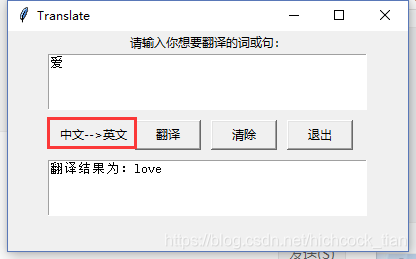
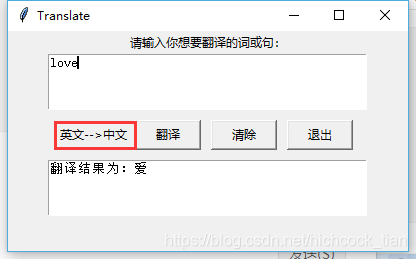
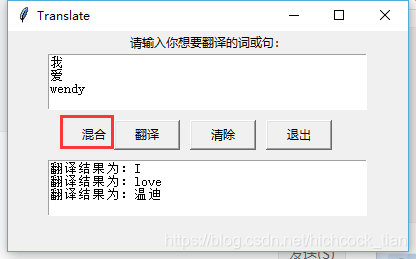
在原有界面上增加了新的标签和按钮
#encoding=utf-8import jsonimport requestsimport sysfrom tkinter import *import tkinter.messageboxroot = Tk()root.title("Translate")root.geometry("400x220+200+200")def my_translate(word): #翻译函数,word是要翻译的内容 url='http://fanyi.youdao.com/translate?smartresult=dict&smartresult=rule&smartresult=ugc&sessionfrom=null' #传输的参数,其中i为需要翻译的内容 key = { 'type':"AUTO", 'i':word, 'doctype':"json", 'version':'2.1', 'keyfrom':'fanyi.web', 'ue':'utf-8', 'action':'FY_BY_CLICKBUTTON', 'typoResult':'true' } print(word) #key这个字典为发送给有道词典服务器端的内容 response=requests.post(url,data=key) #判断服务器是否响应成功 if response.status_code==200: #返回响应结果 return response.text else: print("有道词典调用失败") #响应失败返回空 tkinter.messagebox.showwarning('错误',"有道词典调用失败")def get_result(response): #通过json.load把返回的结果加载成json格式 result=json.loads(response) print("输入的词为:%s" % result['translateResult'][0][0]['src']) print("翻译结果为:%s" % result['translateResult'][0][0]['tgt']) translate_result="翻译结果为:%s" % result['translateResult'][0][0]['tgt'] return translate_resultdef translate_func(): output_text.delete(1.0,END) #清除翻译结果 global words words=input_text.get("0.0","end").split() #从输入文本读取要翻译的内容 print(words) if not words: tkinter.messagebox.showwarning('提示',"请输入你想要翻译的词或句") #没有输入内容提示 return None chinesetoE=False #中译英标记 englishtoC=False #英译中标记 for word in words: if 'u4e00'<=word<='u9fa5': #判断文件类型输入的是否是中文 chinesetoE=True vText="中文-->英文" #修改标签内容 elif word.isalpha(): englishtoC=True vText="英文-->中文" list_trans=my_translate(word) #调用方法获得网站返回因袭 translate_result=get_result(list_trans) #解析返回信息,得到翻译结果 output_text.insert(INSERT,translate_result+'') if chinesetoE and englishtoC: vText="混合" label_info.config(label_info,text=vText)def restart(): #清除输入输出和标签 vText='自动检测语言' label_info.config(label_info,text=vText) input_text.delete(1.0,END) output_text.delete(1.0,END)#frame1=Frame(root)label_info=Label(root,text="请输入你想要翻译的词或句:",width="60")label_info.pack(side="top")input_text=Text(root,width=45,height=4)input_text.pack()#frame1.pack(fill = "y")frame1=Frame(root)translate_button=Button(frame1,text="翻译",width=8,command=translate_func)translate_button.grid(row=1,column=5,padx=5,pady=10)close_button=Button(frame1,text="退出",width=8,command=sys.exit)close_button.grid(row=1,column=7,padx=5,pady=10)label_info=Label(frame1,text='自动检测语言')label_info.grid(row=1,column=0)restart_button=Button(frame1,text="清除",width=8,command=restart)restart_button.grid(row=1,column=6,padx=5,pady=10)frame1.pack(side = "top")output_text=Text(root,width=45,height=4)output_text.pack()root.mainloop()更新内容
1.修改translate_func方法
def translate_func(): output_text.delete(1.0,END) #清除翻译结果 global words words=input_text.get("0.0","end").split() #从输入文本读取要翻译的内容 print(words) if not words: tkinter.messagebox.showwarning('提示',"请输入你想要翻译的词或句") #没有输入内容提示 return None chinesetoE=False #中译英标记 englishtoC=False #英译中标记 for word in words: if 'u4e00'<=word<='u9fa5': #判断文件类型输入的是否是中文 chinesetoE=True vText="中文-->英文" #修改标签内容 elif word.isalpha(): englishtoC=True vText="英文-->中文" list_trans=my_translate(word) #调用方法获得网站返回因袭 translate_result=get_result(list_trans) #解析返回信息,得到翻译结果 output_text.insert(INSERT,translate_result+'') if chinesetoE and englishtoC: vText="混合" label_info.config(label_info,text=vText)此次修改可以输入多个内容,并根据输入内容判断是中译英还是英译中
2.增加restart方法
def restart(): #清除输入输出和标签 vText='自动检测语言' label_info.config(label_info,text=vText) input_text.delete(1.0,END) output_text.delete(1.0,END)清除内容
3.增加标签和清除按钮
label_info=Label(frame1,text='自动检测语言')label_info.grid(row=1,column=0)restart_button=Button(frame1,text="清除",width=8,command=restart)restart_button.grid(row=1,column=6,padx=5,pady=10)