


前言:应项目要求,需要使用微信小程序做支付,写完后告知手续费太高方案不予通过(宝宝心里苦,但宝宝不说)。此次开发在因站在巨人的肩膀上顺利完成。
微信支付文档传送门:https://pay.weixin.qq.com/wiki/doc/api/wxa/wxa_api.php?chapter=7_3
1.开发工具:
Eclipse+Tomcat+微信web开发工具
2.开发环境:
java+maven
3.开发前准备:
3.1 所需材料
小程序的appid,APPsecret,支付商户号(mch_id),商户密钥(key),付款用户的openid。
申请接入微信商户地址:https://pay.weixin.qq.com/static/applyment_guide/applyment_detail_miniapp.shtml
3.2 开发模式
本次开发采用的开发模式是:普通模式,适用于有自己开发团队或外包开发商的直连商户收款。开发者申请自己的appid和mch_id,两者需具备绑定关系,以此来使用微信支付提供的开放接口,对用户提供服务。
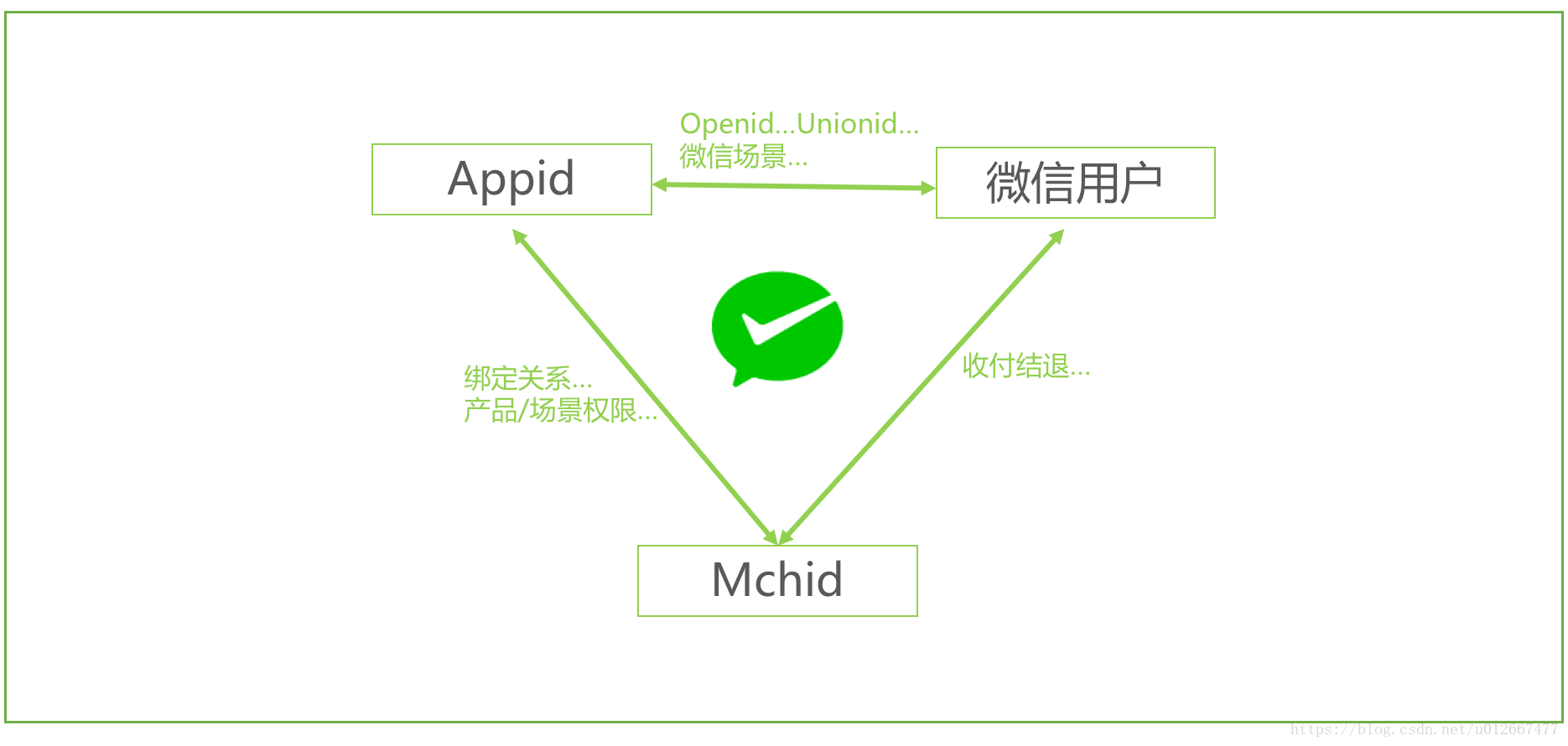
4 开发
4.1 小程序端
wx.request({ url: address + 'wxPay', data: { openId: openId // amount: amount, // openId: openId }, header: { 'content-type': 'application/x-www-form-urlencoded' // 默认值 }, method: "POST", success: function (res) { console.log(res); that.doWxPay(res.data); }, fail: function (err) { wx.showToast({ icon: "none", title: '服务器异常,清稍候再试' }) },});doWxPay(param) {//小程序发起微信支付wx.requestPayment({timeStamp: param.data.timeStamp,//记住,这边的timeStamp一定要是字符串类型的,不然会报错nonceStr: param.data.nonceStr,package: param.data.package,signType: 'MD5',paySign: param.data.paySign,success: function (event) {// successconsole.log(event);wx.showToast({title: '支付成功',icon: 'success',duration: 2000});},fail: function (error) {// failconsole.log("支付失败")console.log(error)},complete: function () {// completeconsole.log("pay complete")}});},4.2 java后台
4.2.1 PayUtil.java
private static Logger logger = Logger.getLogger(PayUtil.class);public static JSONObject wxPay(String openid,HttpServletRequest request){JSONObject json = new JSONObject(); try{ //生成的随机字符串 String nonce_str = Util.getRandomStringByLength(32); //商品名称 String body = new String(WXConst.title.getBytes("ISO-8859-1"),"UTF-8"); //获取本机的ip地址 String spbill_create_ip = Util.getIpAddr(request); String orderNo = WXConst.orderNo; String money = "1";//支付金额,单位:分,这边需要转成字符串类型,否则后面的签名会失败 Map<String, String> packageParams = new HashMap<String, String>(); packageParams.put("appid", WXConst.appId); packageParams.put("mch_id", WXConst.mch_id); packageParams.put("nonce_str", nonce_str); packageParams.put("body", body); packageParams.put("out_trade_no", orderNo);//商户订单号 packageParams.put("total_fee", money); packageParams.put("spbill_create_ip", spbill_create_ip); packageParams.put("notify_url", WXConst.notify_url); packageParams.put("trade_type", WXConst.TRADETYPE); packageParams.put("openid", openid); // 除去数组中的空值和签名参数 packageParams = PayUtil.paraFilter(packageParams); String prestr = PayUtil.createLinkString(packageParams); // 把数组所有元素,按照“参数=参数值”的模式用“&”字符拼接成字符串 //MD5运算生成签名,这里是第一次签名,用于调用统一下单接口 String mysign = PayUtil.sign(prestr, WXConst.key, "utf-8").toUpperCase(); logger.info("=======================第一次签名:" + mysign + "====================="); //拼接统一下单接口使用的xml数据,要将上一步生成的签名一起拼接进去 String xml = "<xml version='1.0' encoding='gbk'>" + "<appid>" + WXConst.appId + "</appid>" + "<body><![CDATA[" + body + "]]></body>" + "<mch_id>" + WXConst.mch_id + "</mch_id>" + "<nonce_str>" + nonce_str + "</nonce_str>" + "<notify_url>" + WXConst.notify_url + "</notify_url>" + "<openid>" + openid + "</openid>" + "<out_trade_no>" + orderNo + "</out_trade_no>" + "<spbill_create_ip>" + spbill_create_ip + "</spbill_create_ip>" + "<total_fee>" + money + "</total_fee>" + "<trade_type>" + WXConst.TRADETYPE + "</trade_type>" + "<sign>" + mysign + "</sign>" + "</xml>"; System.out.println("调试模式_统一下单接口 请求XML数据:" + xml); //调用统一下单接口,并接受返回的结果 String result = PayUtil.httpRequest(WXConst.pay_url, "POST", xml); System.out.println("调试模式_统一下单接口 返回XML数据:" + result); // 将解析结果存储在HashMap中 Map map = PayUtil.doXMLParse(result); String return_code = (String) map.get("return_code");//返回状态码 //返回给移动端需要的参数 Map<String, Object> response = new HashMap<String, Object>(); if(return_code == "SUCCESS" || return_code.equals(return_code)){ // 业务结果 String prepay_id = (String) map.get("prepay_id");//返回的预付单信息 response.put("nonceStr", nonce_str); response.put("package", "prepay_id=" + prepay_id); Long timeStamp = System.currentTimeMillis() / 1000; response.put("timeStamp", timeStamp + "");//这边要将返回的时间戳转化成字符串,不然小程序端调用wx.requestPayment方法会报签名错误 String stringSignTemp = "appId=" + WXConst.appId + "&nonceStr=" + nonce_str + "&package=prepay_id=" + prepay_id+ "&signType=" + WXConst.SIGNTYPE + "&timeStamp=" + timeStamp; //再次签名,这个签名用于小程序端调用wx.requesetPayment方法 String paySign = PayUtil.sign(stringSignTemp, WXConst.key, "utf-8").toUpperCase(); logger.info("=======================第二次签名:" + paySign + "====================="); response.put("paySign", paySign); //更新订单信息 //业务逻辑代码 } response.put("appid", WXConst.appId); json.put("errMsg", "OK"); //json.setSuccess(true); json.put("data", response); //json.setData(response); }catch(Exception e){ e.printStackTrace(); json.put("errMsg", "Failed"); //json.setSuccess(false); //json.setMsg("发起失败"); } return json; }/** * 签名字符串 * @param text需要签名的字符串 * @param key 密钥 * @param input_charset编码格式 * @return 签名结果 */ public static String sign(String text, String key, String input_charset) { text = text + "&key=" + key; return DigestUtils.md5Hex(getContentBytes(text, input_charset)); } /** * 签名字符串 * @param text需要签名的字符串 * @param sign 签名结果 * @param key密钥 * @param input_charset 编码格式 * @return 签名结果 */ public static boolean verify(String text, String sign, String key, String input_charset) { text = text + key; String mysign = DigestUtils.md5Hex(getContentBytes(text, input_charset)); if (mysign.equals(sign)) { return true; } else { return false; } } /** * @param content * @param charset * @return * @throws SignatureException * @throws UnsupportedEncodingException */ public static byte[] getContentBytes(String content, String charset) { if (charset == null || "".equals(charset)) { return content.getBytes(); } try { return content.getBytes(charset); } catch (UnsupportedEncodingException e) { throw new RuntimeException("MD5签名过程中出现错误,指定的编码集不对,您目前指定的编码集是:" + charset); } } /** * 生成6位或10位随机数 param codeLength(多少位) * @return */ public static String createCode(int codeLength) { String code = ""; for (int i = 0; i < codeLength; i++) { code += (int) (Math.random() * 9); } return code; } @SuppressWarnings("unused")private static boolean isValidChar(char ch) { if ((ch >= '0' && ch <= '9') || (ch >= 'A' && ch <= 'Z') || (ch >= 'a' && ch <= 'z')) return true; if ((ch >= 0x4e00 && ch <= 0x7fff) || (ch >= 0x8000 && ch <= 0x952f)) return true;// 简体中文汉字编码 return false; } /** * 除去数组中的空值和签名参数 * @param sArray 签名参数组 * @return 去掉空值与签名参数后的新签名参数组 */ public static Map<String, String> paraFilter(Map<String, String> sArray) { Map<String, String> result = new HashMap<String, String>(); if (sArray == null || sArray.size() <= 0) { return result; } for (String key : sArray.keySet()) { String value = sArray.get(key); if (value == null || value.equals("") || key.equalsIgnoreCase("sign") || key.equalsIgnoreCase("sign_type")) { continue; } result.put(key, value); } return result; } /** * 把数组所有元素排序,并按照“参数=参数值”的模式用“&”字符拼接成字符串 * @param params 需要排序并参与字符拼接的参数组 * @return 拼接后字符串 */ public static String createLinkString(Map<String, String> params) { List<String> keys = new ArrayList<String>(params.keySet()); Collections.sort(keys); String prestr = ""; for (int i = 0; i < keys.size(); i++) { String key = keys.get(i); String value = params.get(key); if (i == keys.size() - 1) {// 拼接时,不包括最后一个&字符 prestr = prestr + key + "=" + value; } else { prestr = prestr + key + "=" + value + "&"; } } return prestr; } /** * * @param requestUrl请求地址 * @param requestMethod请求方法 * @param outputStr参数 */ public static String httpRequest(String requestUrl,String requestMethod,String outputStr){ // 创建SSLContext StringBuffer buffer = null; try{ URL url = new URL(requestUrl); HttpURLConnection conn = (HttpURLConnection) url.openConnection(); conn.setRequestMethod(requestMethod); conn.setDoOutput(true); conn.setDoInput(true); conn.connect(); //往服务器端写内容 if(null !=outputStr){ OutputStream os=conn.getOutputStream(); os.write(outputStr.getBytes("utf-8")); os.close(); } // 读取服务器端返回的内容 InputStream is = conn.getInputStream(); InputStreamReader isr = new InputStreamReader(is, "utf-8"); BufferedReader br = new BufferedReader(isr); buffer = new StringBuffer(); String line = null; while ((line = br.readLine()) != null) { buffer.append(line); } br.close(); }catch(Exception e){ e.printStackTrace(); } return buffer.toString(); } public static String urlEncodeUTF8(String source){ String result=source; try { result=java.net.URLEncoder.encode(source, "UTF-8"); } catch (UnsupportedEncodingException e) { // TODO Auto-generated catch block e.printStackTrace(); } return result; } /*** 解析xml,返回第一级元素键值对。如果第一级元素有子节点,则此节点的值是子节点的xml数据。* @param strxml* @return* @throws JDOMException* @throws IOException*/public static Map doXMLParse(String strxml) throws Exception { if(null == strxml || "".equals(strxml)) { return null; } Map m = new HashMap(); InputStream in = String2Inputstream(strxml); SAXBuilder builder = new SAXBuilder(); Document doc = builder.build(in); Element root = doc.getRootElement(); List list = root.getChildren(); Iterator it = list.iterator(); while(it.hasNext()) { Element e = (Element) it.next(); String k = e.getName(); String v = ""; List children = e.getChildren(); if(children.isEmpty()) { v = e.getTextNormalize(); } else { v = getChildrenText(children); } m.put(k, v);}//关闭流in.close();return m;}/*** 获取子结点的xml* @param children* @return String*/public static String getChildrenText(List children) { StringBuffer sb = new StringBuffer(); if(!children.isEmpty()) { Iterator it = children.iterator(); while(it.hasNext()) { Element e = (Element) it.next(); String name = e.getName(); String value = e.getTextNormalize(); List list = e.getChildren(); sb.append("<" + name + ">"); if(!list.isEmpty()) { sb.append(getChildrenText(list)); } sb.append(value); sb.append("</" + name + ">"); }} return sb.toString();}public static InputStream String2Inputstream(String str) { return new ByteArrayInputStream(str.getBytes());}public static void wxNotify(HttpServletRequest request,HttpServletResponse response) throws Exception{ BufferedReader br = new BufferedReader(new InputStreamReader((ServletInputStream)request.getInputStream())); String line = null; StringBuilder sb = new StringBuilder(); while((line = br.readLine())!=null){ sb.append(line); } br.close(); //sb为微信返回的xml String notityXml = sb.toString(); String resXml = ""; System.out.println("接收到的报文:" + notityXml); Map map = PayUtil.doXMLParse(notityXml); String returnCode = (String) map.get("return_code"); if("SUCCESS".equals(returnCode)){ //验证签名是否正确 if(PayUtil.verify(PayUtil.createLinkString(map), (String)map.get("sign"), WXConst.key, "utf-8")){ /**此处添加自己的业务逻辑代码start**/ /**此处添加自己的业务逻辑代码end**/ //通知微信服务器已经支付成功 resXml = "<xml>" + "<return_code><![CDATA[SUCCESS]]></return_code>" + "<return_msg><![CDATA[OK]]></return_msg>" + "</xml> "; } }else{ resXml = "<xml>" + "<return_code><![CDATA[FAIL]]></return_code>" + "<return_msg><![CDATA[报文为空]]></return_msg>" + "</xml> "; } System.out.println(resXml); System.out.println("微信支付回调数据结束"); BufferedOutputStream out = new BufferedOutputStream( response.getOutputStream()); out.write(resXml.getBytes()); out.flush(); out.close(); }
4.2.2 Util.java
/** * Util工具类方法 * 获取一定长度的随机字符串,范围0-9,a-z * @param length:指定字符串长度 * @return 一定长度的随机字符串 */ public static String getRandomStringByLength(int length) { String base = "abcdefghijklmnopqrstuvwxyz0123456789"; Random random = new Random(); StringBuffer sb = new StringBuffer(); for (int i = 0; i < length; i++) { int number = random.nextInt(base.length()); sb.append(base.charAt(number)); } return sb.toString(); } /** * Util工具类方法 * 获取真实的ip地址 * @param request * @return */ public static String getIpAddr(HttpServletRequest request) { String ip = request.getHeader("X-Forwarded-For"); if(StringUtils.isNotEmpty(ip) && !"unKnown".equalsIgnoreCase(ip)){ //多次反向代理后会有多个ip值,第一个ip才是真实ip int index = ip.indexOf(","); if(index != -1){ return ip.substring(0,index); }else{ return ip; } } ip = request.getHeader("X-Real-IP"); if(StringUtils.isNotEmpty(ip) && !"unKnown".equalsIgnoreCase(ip)){ return ip; } return request.getRemoteAddr(); }
4.2.3 WXConst.java
//微信小程序appidpublic static String appId = "";//微信小程序appsecretpublic static String appSecret = "";//微信支付主体public static String title = "";public static String orderNo = "";//微信商户号public static String mch_id="";//微信支付的商户密钥public static final String key = "";//获取微信Openid的请求地址public static String WxGetOpenIdUrl = "";//支付成功后的服务器回调urlpublic static final String notify_url="https://api.weixin.qq.com/sns/jscode2session";//签名方式public static final String SIGNTYPE = "MD5";//交易类型public static final String TRADETYPE = "JSAPI";//微信统一下单接口地址public static final String pay_url = "https://api.mch.weixin.qq.com/pay/unifiedorder";
5 可能出现的问题
5.1 商户号
会出现一个什么异常我忘了,重置一下微信商户密钥就好了
5.2 中文参数
String body = new String(WXConst.title.getBytes("ISO-8859-1"),"UTF-8");
这行很重要,如果报参数索引-2异常,很可能是出现了中文,对中文进行如上处理即可通过。
5.3 invalid spbill_create_ip
使用微信web开发工具直接测试的,出现了这个问题,调试记得用真机哦。
整个小程序前后端一个人开发,测试成功上线前夕又嫌弃微信支付收取的手续费(0.6%)太高,结算周期(T+7)太长,所以就被无情抛弃了,这个月项目重启(2018-11)和工商银行达成一致,直接转账到对公账户,目前项目进展顺利已上线。改需求请先扫码(小声bb)










