


先给大家上一个实战的效果图
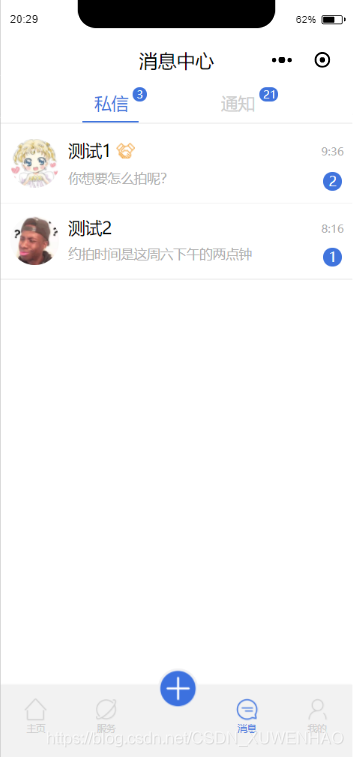
这个是我们小组在开发的一个消息界面,用于实现简单的交流通信功能,只实现了简单的前端框架,下面献上代码供大家参考学习,若有不足,请多多指教。
wxml部分
<!--头部消息中心--><view class='title' style='height:{{navH}}px' catchtouchmove='true'> <view class='title-text'>消息中心</view> <!-- 私信、通知切换栏 --><view class="selectTab" style='margin-top:{{navH}}px' catchtouchmove='true'> <view class="flex-row"> <view class="message {{currentTab==0?'active':''}}" data-current="0" bindtap="clickTab"> 私信 <!--气泡提示--> <view class='bubble'> <view class='num'>3</view> </view> </view> <view class="notify {{currentTab==1?'active':''}}" data-current="1" bindtap="clickTab"> 通知 <!--气泡提示--> <view class='bubble2'> <view class='num'>21</view> </view> </view> </view> <view class='onTabLine' style="margin-left:{{175+currentTab*273}}rpx" catchtouchmove="ture"></view> <view class='line'></view></view></view><!--私信消息列表--><scroll-view scroll-y="true" class="message-list" style="margin-top:{{navH+47}}px;height:1200rpx" wx:if="{{currentTab==0}}" > <!--示例用户1--> <view class='user' bindtap='goTocontactPage'> <image class='header-icon' src='/images/icon1.jpeg'></image> <view class='user-content'> <view class='firstline'> <view class='apart'> <view class='username'> <text>测试1</text> </view> <view class='cooperation'> <image src='./images/6.png'></image> </view> </view> <view class='time'> <view class='time-num'>9:36</view> </view> </view> <view class='secondline'> <view class='dialog'> <text>你想要怎么拍呢?</text> </view> <view class='dialog-nums'> <view class='bubble3'> <view class='num'>2</view> </view> </view> </view> </view> </view><!--分割线--><view class='linecut'></view> <!--示例用户2--> <view class='user' bindtap='goTocontactPage'> <image class='header-icon' src='https://b267.photo.store.qq.com/psb?/V13v0ZyH3zvYu7/9Ne*obpt0tAkfi3fZZij7.1VF4qT363gGq021zfYWQ0!/b/dAsBAAAAAAAA&bo=bgFuAQAAAAAFByQ!&rf=viewer_4'></image> <view class='user-content'> <view class='firstline'> <view class='apart'> <view class='username'> <text>测试2</text> </view> <view class='cooperation'> <!-- <image src='./images/6.png'></image> --> </view> </view> <view class='time'> <view class='time-num'>8:16</view> </view> </view> <view class='secondline'> <view class='dialog'> <text>约拍时间是这周六下午的两点钟</text> </view> <view class='dialog-nums'> <view class='bubble3'> <view class='num'>1</view> </view> </view> </view> </view> </view><!--分割线--><view class='linecut'></view></scroll-view><!--关注消息列表框--><scroll-view scroll-y class="notify-list" style="margin-top:{{navH+47}}px;height:1800rpx;" wx:if="{{currentTab==1}}"> <!--系统通知--> <view class='notify-type' bindtap='goToSystemPage'> <view class='notify-icon'> <image src='./images/tongzhi.png'></image> </view> <view class='notify-name'> 系统通知 <view class='notify-num'> <view class='nums'>11</view> </view> </view> <view class='right'> <!-- <image src=''></image> --> </view> </view> <view class='liner'></view> <!--点赞--> <view class='thumbs-up-type' bindtap='goToDianzanPage'> <view class='notify-icon'> <image src='./images/dianzan.png'></image> </view> <view class='thumbs-up-name'> 点赞 <view class='thumbs-up-num'> <view class='nums'>6</view> </view> </view> <view class='right'> <!-- <image src=''></image> --> </view> </view> <view class='liner'></view> <!--评论--> <view class='dialog-type' bindtap='goToCommentPage'> <view class='dialog-icon'> <image src='./images/dialog.png'></image> </view> <view class='dialog-name'> 评论 <view class='dialog-num'> <view class='nums'>2</view> </view> </view> <view class='right'> <!-- <image src=''></image> --> </view> </view> <view class='liner'></view><!--我关注的--> <view class='follow-type' bindtap='goToConcernPage'> <view class='follow-icon'> <image src='./images/guanzhu.png'></image> </view> <view class='follow-name'> 我关注的 <view class='follow-num'> <view class='nums'>1</view> </view> </view> <view class='right'> <!-- <image src=''></image> --> </view> </view> <view class='liner'></view><!--底部消息提示框--><view class="unread"> <text>您有21条未读通知</text></view></scroll-view> <!--底部导航--><tabbar tabbar="{{tabbar}}"></tabbar> wxss部分
/*头部标题*/.title{ width: 100%; /* overflow: hidden; */ position: fixed; top: 0; left: 0; background: #fff; z-index: 999;}.title-text{ width: 100%; height: 45px; line-height: 45px; text-align: center; position: absolute; bottom: 0; left: 0; font-size: 40rpx; font-weight: 500;}/*私信、通知*/.flex-row{ flex-direction: row; display: flex;}.onTabLine{ width: 120rpx; height: 5rpx; background-color:#4074DD; margin-top:15rpx;}.line{ width: 750rpx; height: 2rpx; background-color: #F2F2F2; margin: 0rpx auto 0 auto;}.message,.notify{ display: flex; flex-direction: row; font-size:36rpx; margin-top: 20rpx; width: 120rpx; color:#CDCDCD;}.message{ margin-left: 200rpx;}.notify{ margin-left: 150rpx;}.active{ color:#4074DD;}.selectTab{ position: fixed; background-color: #fff; z-index: 100;}/*气泡框样式*/.bubble{ background-color: #4074DD; border-radius: 50rpx; width: 30rpx; height: 30rpx; position: relative; left: 10rpx; bottom: 10rpx;}.bubble .num{ font-size: 24rpx; color:#ffffff; margin-left: 8rpx; margin-top: -2rpx;}.bubble2{ background-color: #4074DD; border-radius: 20rpx; width: 40rpx; height: 30rpx; position: relative; left: 10rpx; bottom: 10rpx;}.bubble2 .num{ font-size: 24rpx; color:#ffffff; margin-left: 8rpx; margin-top: -2rpx;}/*私信消息*/.message-list{ /* background-color:#f2f2f2; */ display: flex; flex-direction: column;}.user{ display: flex; flex-direction: row;}.user-content{ display: flex; flex-direction: column;}.header-icon{ width: 104rpx; height: 104rpx; border-radius: 80rpx; margin-left: 20rpx; margin-top: 26rpx;}.firstline{ display: flex; flex-direction: row;}.apart{ margin-left: 20rpx; display: flex; flex-direction: row; width: 400rpx;}.username{ font-size: 36rpx; margin-top: 26rpx; font-weight: 400;}.cooperation{ width: 40rpx;}.cooperation image{ width: 40rpx; height: 34rpx; margin-top: 34rpx; margin-left: 10rpx;}.time{ display: flex; width: 60rpx; font-size: 24rpx; margin-top: 36rpx; color: #aeaeae; margin-left: 140rpx;}.time-num{ /* margin-right: 200rpx; */}/*内容第二行*/.secondline{ display: flex; flex-direction: row;}/*对话框消息内容*/.dialog{ width: 545rpx; font-size: 28rpx; color: #aeaeae; margin-left: 20rpx; margin-top: 15rpx;}/*对话框提示数目*/.dialog-nums{ /* width: 100rpx; */}/*气泡样式*/.bubble3{ background-color: #4074DD; border-radius: 80rpx; width: 40rpx; height: 40rpx; /* margin-left: 200rpx; */ margin-top: 20rpx;}.bubble3 .num{ font-size: 28rpx; color: #ffffff; font-weight: 500; margin-left: 12rpx;}/*分割线*/.linecut{ width: 100%; height: 2rpx; background-color: #F2F2F2; margin-top: 26rpx;}/*通知界面*//*系统通知*/.notify-type{ display: flex; flex-direction: row;}.notify-icon{ margin-left: 20rpx; margin-top: 20rpx;}.notify-icon image{ width: 80rpx; height: 80rpx;}.notify-name{ font-size: 36rpx; font-weight: 500; margin-top: 35rpx; margin-left: 36rpx;}.notify-num{ width: 40rpx; height: 30rpx; background-color: red; border-radius: 40rpx; display: flex; flex-direction: row; position: relative; bottom: 60rpx; left: 150rpx;}.notify-num .nums{ font-size: 24rpx; color: #fff; margin-left: 8rpx; margin-bottom: 6rpx;}/*最帅的分割线*/.liner{ width: 100%; height: 2rpx; background-color: #F2F2F2; margin-top: 20rpx;}/*点赞*/.thumbs-up-type{ display: flex; flex-direction: row;}.thumbs-up-icon{ margin-left: 20rpx; margin-top: 20rpx;}.thumbs-up-icon image{ width: 80rpx; height: 80rpx;}.thumbs-up-name{ font-size: 36rpx; font-weight: 500; margin-top: 35rpx; margin-left: 36rpx;}.thumbs-up-num{ width: 30rpx; height: 30rpx; background-color: #4074DD; border-radius: 40rpx; display: flex; flex-direction: row; position: relative; bottom: 60rpx; left: 80rpx;}.thumbs-up-num .nums{ font-size: 24rpx; color: #fff; margin-left: 8rpx; margin-bottom: 6rpx;}/*评论*/.dialog-type{ display: flex; flex-direction: row;}.dialog-icon{ margin-left: 30rpx; margin-top: 35rpx;}.dialog-icon image{ width: 65rpx; height: 65rpx;}.dialog-name{ font-size: 36rpx; font-weight: 500; margin-top: 35rpx; margin-left: 41rpx;}.dialog-num{ width: 30rpx; height: 30rpx; background-color: #4074DD; border-radius: 40rpx; display: flex; flex-direction: row; position: relative; bottom: 60rpx; left: 80rpx;}.dialog-num .nums{ font-size: 24rpx; color: #fff; margin-left: 8rpx; margin-bottom: 6rpx;}/*我关注的*/.follow-type{ display: flex; flex-direction: row;}.follow-icon{ margin-left: 20rpx; margin-top: 20rpx;}.follow-icon image{ width: 80rpx; height: 80rpx;}.follow-name{ font-size: 36rpx; font-weight: 500; margin-top: 35rpx; margin-left: 36rpx;}.follow-num{ width: 30rpx; height: 30rpx; background-color: #4074DD; border-radius: 40rpx; display: flex; flex-direction: row; position: relative; bottom: 60rpx; left: 150rpx;}.follow-num .nums{ font-size: 24rpx; color: #fff; margin-left: 8rpx; margin-bottom: 6rpx;}/*未读消息框*/.unread{ margin-top: 16rpx; font-size: 26rpx; color: #aeaeae; text-align: center;}其中部分bindtap有跳转函数,较为简单,此处就不一一列出,我们使用的是自定义头部标题,所以在使用前,须将app.js中的"navigationStyle"设置为"custom",










