onLoad:function(options){varthat=this;//获取用户信息wx.getUserInfo({success:function(res){console.log(res);that.data.userInfo=res.userInfo;that.setData({userInfo:that.data.userInfo})}})},wx.getUserInfo需要用户授权scope.userInfo,也就是那个授权弹窗。

但是!!!重点来了,自从微信接口有了新的调整之后这个wx.getUserInfo()便不再出现授权弹窗了,需要使用button做引导~
!--wxml--!--需要使用button来授权登录--buttonwx:if="{{canIUse}}"open-type="getUserInfo"bindgetuserinfo="bindGetUserInfo"授权登录/buttonviewwx:else请升级微信版本/view//jsPage({data:{canIUse:wx.canIUse('button.open-type.getUserInfo')},onLoad:function(){//查看是否授权wx.getSetting({success:function(res){if(res.authSetting['scope.userInfo']){//已经授权,可以直接调用getUserInfo获取头像昵称wx.getUserInfo({success:function(res){console.log(res.userInfo)}})}}})},bindGetUserInfo:function(e){console.log(e.detail.userInfo)}})这就是等于一步变两步了~现在用button的话可以在产品上多加引导,不会显得那么突兀的出来一个弹窗了
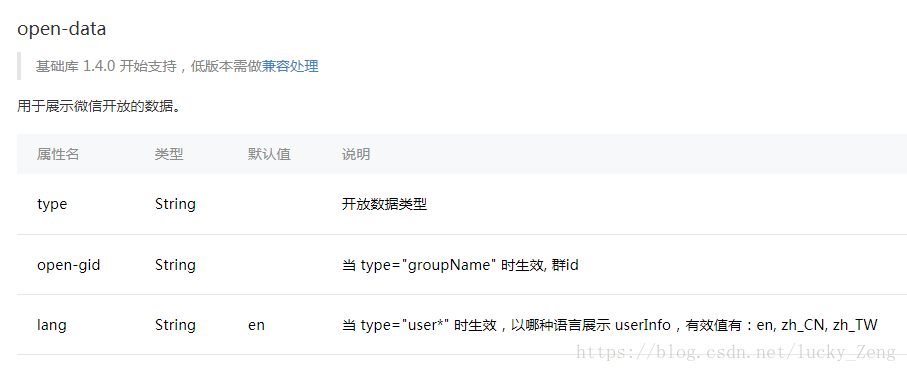
然鹅,如果你仅仅只是想展示用户信息的话,那便使用open-data吧,如下:
!--如果只是展示用户头像昵称,可以使用open-data/组件--open-datatype="userAvatarUrl"/open-dataopen-datatype="userNickName"/open-data只需要这两行wxml的代码,便可展示微信昵称和头像,是不是很惊喜!