


微信小程序分享到朋友圈,微信官方没有提供开放接口,所以我们通过canva画布,生成一张图片,图片自带小程序码,用户通过识别二维码,达到分享小程序到朋友圈目的。
效果图:
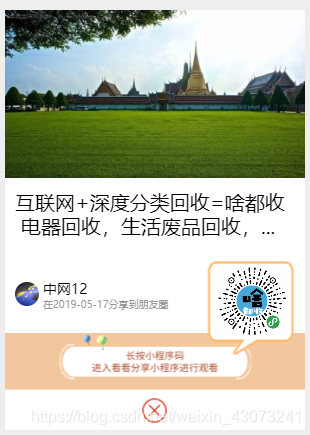
下面我们来实现以上图片:
WXML:
viewclass='share'
canvascanvas-id="shareCanvas"style="width:300px;height:380px"/canvas
viewclass='bottom'
imagesrc="/image/user/close1.png"bindtap='closeShare'/image
/view
/view
WXSS:
/pages/user/ShareCircleOfFriends.wxss/
page{
background:#eee;
}
.share{
width:300px;
height:380px;
position:fixed;
left:0;
right:0;
top:0;
bottom:100rpx;
margin:auto;
}
.btn-box{
padding:1060rpx60rpx060rpx;
}
button{
background:darkturquoise;
}
.bottom{
width:300px;
height:40px;
background-color:white;
}
.bottomimage{
width:70rpx;
height:70rpx;
margin-left:45%;
margin-top:2%;
}
JS:
data:{
sharebg:'https://shadoushoutest.zwyxit.com/Images/ShareImage/share3.png',//分享底部背景图
shareTitle:'互联网+深度分类回收=啥都收电器回收,生活废品回收,工厂废料企业转行酒楼设备企业设备,库存货物等等,有偿服务和无偿服务',//分享标题
shareCoverImg:'https://shadoushoutest.zwyxit.com/Images/ShareImage/share1.png',//分享封面图
shareQrImg:'https://shadoushoutest.zwyxit.com/Images/ShareImage/share2.png',//分享小程序二维码
userInfo:{
headImg:'http://shadoushou.zwyxit.com/Images/User/0515100040529.jpg',//用户头像
nickName:'打豆豆',//昵称
},
seeDate:'2018-12-04',//看视频日期
}
/
生命周期函数--监听页面加载
/
onLoad:function(options){
letthat=this;
varUserName=app.globalData.login_sj[0];
wx.setNavigationBarTitle({
title:'分享到朋友圈',
})
vartime=util.formatTime(newDate());
varUserImage=app.globalData.login_sj[2];
vartimestamp=Date.parse(newDate());
vardate=newDate(timestamp);
//获取年份
varY=date.getFullYear();
//获取月份
varM=(date.getMonth()+110?'0'+(date.getMonth()+1):date.getMonth()+1);
//获取当日日期
varD=date.getDate()10?'0'+date.getDate():date.getDate();
vartime1=Y+"-"+M+"-"+D
that.data.userInfo.nickName=UserName;
that.data.userInfo.headImg=UserImage;
that.setData({
nickName:that.data.userInfo,
headImg:that.data.userInfo,
seeDate:time1
})
console.log(that.data.userInfo.nickName);
//创建画布
constctx=wx.createCanvasContext('shareCanvas')
//白色背景
ctx.setFillStyle('#fff')
ctx.fillRect(0,0,300,380)
ctx.draw()
//下载底部背景图
wx.getImageInfo({
src:that.data.sharebg,
success:(res1)={
ctx.drawImage(res1.path,0,250,300,130)
//下载视频封面图
wx.getImageInfo({
src:that.data.shareCoverImg,
success:(res2)={
ctx.drawImage(res2.path,0,0,300,168)
//分享标题
//ctx.setTextAlign('center')//文字居中
ctx.setFillStyle('#000')//文字颜色:黑色
ctx.setFontSize(20)//文字字号:20px
if(that.data.shareTitle.length=14){
//不用换行
ctx.fillText(that.data.shareTitle,10,200,280)
}elseif(that.data.shareTitle.length=28){
//两行
letfirstLine=that.data.shareTitle.substring(0,14);
letsecondLine=that.data.shareTitle.substring(14,27);
ctx.fillText(firstLine,10,200,280)
ctx.fillText(secondLine,10,224,280)
}else{
//超过两行
letfirstLine=that.data.shareTitle.substring(0,14);
letsecondLine=that.data.shareTitle.substring(14,27)+'...';
ctx.fillText(firstLine,10,200,280)
ctx.fillText(secondLine,10,224,280)
}
//下载二维码
wx.getImageInfo({
src:that.data.shareQrImg,
success:(res3)={
letqrImgSize=70
ctx.drawImage(res3.path,212,256,qrImgSize,qrImgSize)
ctx.stroke()
ctx.draw(true)
//用户昵称
ctx.setFillStyle('#000')//文字颜色:黑色
ctx.setFontSize(14)//文字字号:16px
ctx.fillText(that.data.userInfo.nickName,38,284)
//观看日期
ctx.setFillStyle('#999')//文字颜色:黑色
ctx.setFontSize(10)//文字字号:16px
ctx.fillText('在'+that.data.seeDate+'分享到朋友圈',38,298)
//下载用户头像
wx.getImageInfo({
src:that.data.userInfo.headImg,
success:(res4)={
//先画圆形,制作圆形头像(圆心x,圆心y,半径r)
ctx.arc(22,284,12,0,Math.PI2,false)
ctx.clip()
//绘制头像图片
letheadImgSize=24
ctx.drawImage(res4.path,10,272,headImgSize,headImgSize)
//ctx.stroke()//圆形边框
ctx.draw(true)
//保存到相册
wx.canvasToTempFilePath({
canvasId:'shareCanvas',
success:function(res){
wx.saveImageToPhotosAlbum({
filePath:res.tempFilePath,
success:function(res){
wx.showToast({
title:'分享图片已保存到相册,请到朋友圈选择图片发布'
})
}
})
}
},this)
}
})
}
})
}
})
}
})
}










